Our Short List of 3
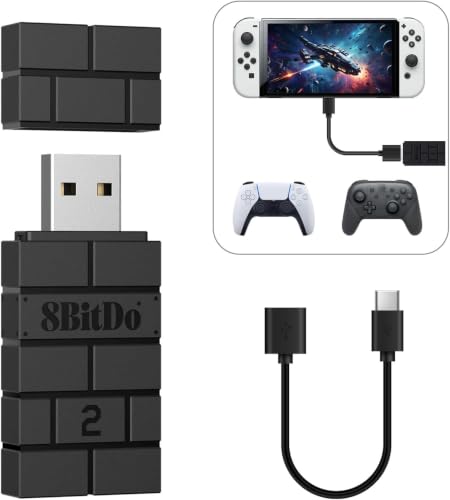
- Role: controller-dedicated receiver, one controller per adapter
- Bluetooth version: not stated
- Host compatibility: Windows, macOS, Switch and Switch 2, Steam Deck, Raspberry Pi
- Controller compatibility: Xbox Series X/S, Xbox One Bluetooth, PS5, PS4, PS3, Switch Pro, Joy-Con, Wii Remote, Wii U Pro, 8BitDo controllers
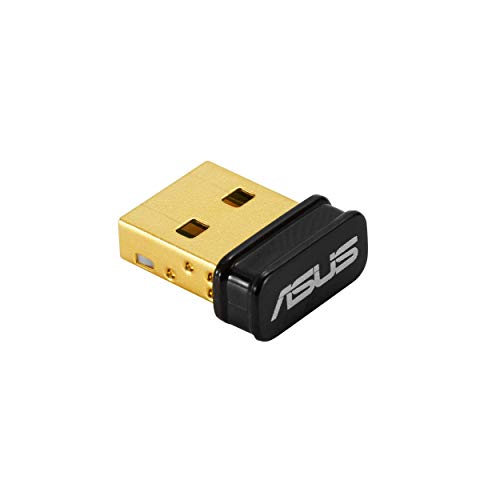
- Bluetooth version: 5.0 with EDR and BLE
- Interface: USB 2.0 Type A
- Data rate: up to 3 Mbps (classic), 2 Mbps (BLE)
- Range: up to 10 meters (classic), up to 40 meters (BLE), open space

- Bluetooth version: 5.3 with BR/EDR and BLE
- Simultaneous devices: up to 5
- Controller support: PS5 and Switch controllers listed by the maker
- Dimensions: 1.2 x 0.63 x 0.27 inches
All 3 Picks at a Glance
| Product | Specs | Action |
|---|---|---|
| 1. 8BitDo Wireless USB Adapter 2 |
| Check price on Amazon |
| 4. ASUS USB-BT500 |
| Check price on Amazon |
| 5. UGREEN Bluetooth 5.3 Adapter |
| Check price on Amazon |
Almost any USB dongle can add Bluetooth to a PC, but a gaming controller is a demanding first device: the link has to stay stable at couch distance, add as little input delay as possible, and survive a metal case between the radio and the player. Adapters that are fine for a mouse can drop a controller mid-match, which is why the picks below are ranked for controller duty first.
The five adapters cover the main routes PC gamers take: a receiver built only for controllers, two TP-Link dongles in nano and long-range antenna forms, a compact ASUS model with broad driver support, and a budget UGREEN stick that names console controllers in its compatibility list. Where a maker limits controller support, simultaneous devices, or operating systems, that limit is stated in the pick.
As an Amazon Associate, we earn from qualifying purchases.
Top 3 picks at a glance
Table of Contents
- Quick Answer
- 1. 8BitDo Wireless USB Adapter 2
- 2. TP-Link UB500 Plus
- 3. TP-Link UB500
- 4. ASUS USB-BT500
- 5. UGREEN Bluetooth 5.3 Adapter
- How to Choose
- Who Should Skip a Bluetooth Adapter
- FAQ
- Conclusion
- Product and ASIN Reference
Quick Answer
For most PC gamers, the TP-Link UB500 Plus is the Bluetooth adapter to buy: Bluetooth 5.3, an adjustable antenna for a steadier controller link, and support for up to seven devices at once. The 8BitDo Wireless USB Adapter 2 is better if one controller is all you need, while the TP-Link UB500 and UGREEN 5.3 adapter cover the budget end.
1. 8BitDo Wireless USB Adapter 2
- Role: controller-dedicated receiver, one controller per adapter
- Bluetooth version: not stated
- Host compatibility: Windows, macOS, Switch and Switch 2, Steam Deck, Raspberry Pi
- Controller compatibility: Xbox Series X/S, Xbox One Bluetooth, PS5, PS4, PS3, Switch Pro, Joy-Con, Wii Remote, Wii U Pro, 8BitDo controllers
The 8BitDo adapter is the only pick here built solely for controllers. Instead of handing Windows a general Bluetooth radio, it pairs one controller itself and presents it to the host in X-input, D-input, Mac, or Switch mode. That translation layer is why controllers Windows handles awkwardly, including the DualShock 3, Wii Remote, and Wii U Pro, work through it on most hosts.
The published compatibility list covers Xbox Series X and S controllers, Bluetooth-equipped Xbox One controllers, the DualSense, DualShock 4 and DualShock 4 Pro, Switch Pro controllers and Joy-Con, plus 8BitDo’s own Bluetooth controllers and arcade sticks. Six-axis motion works in Switch mode and vibration in X-input mode. The limits are real: one adapter serves one controller, the controller’s headphone jack does not pass audio, and motion controls for PlayStation controllers are not supported on Windows. Keep the firmware current, since newer host support, including Switch 2, arrives through receiver updates.
2. TP-Link UB500 Plus
The UB500 Plus is the pick for a tower under a desk or a PC across the room, because its defining feature is a full-size external antenna. The antenna rotates and tilts, so it can clear the back of a case and point toward the couch.
Under the antenna it is a current, general-purpose radio: Bluetooth 5.3 with EDR and BLE, backward compatible with Bluetooth 5.2, 5.0, and 4.0 devices, and able to hold up to seven devices at once, so one adapter can carry a controller, headset, keyboard, and mouse together. TP-Link’s datasheet lists transmit power of 10 dBm and a body measuring 3.19 by 1.65 by 0.66 inches, most of that length being antenna. TP-Link explicitly markets it for game controllers. Support is Windows only: 11, 10, and 8.1 install automatically, while Windows 7 needs a driver download.
Specs
- Bluetooth version: 5.3 with EDR and BLE
- Antenna: one external high-performance antenna, adjustable and multi-directional
- Simultaneous devices: up to 7
- Transmit power: 10 dBm (CE) EIRP
- Dimensions: 3.19 x 1.65 x 0.66 inches
- Compatibility: Windows 11, 10, 8.1, 7 (driver required for Windows 7)
- Price tier: mid-range
3. TP-Link UB500
The UB500 is the default nano dongle: a thumb-sized receiver that disappears into a USB port and adds a modern Bluetooth radio to desktops and older laptops. The current listing ships it as Bluetooth 5.4 with EDR and BLE, although earlier revisions were sold as 5.0 and 5.3, so check the listing title if the exact version matters to you.
It supports up to seven devices at once, with one published caveat: it can only connect to one BLE device at a time, which rarely matters for controllers but can affect low-energy peripherals. The nano body measures 0.74 by 0.58 by 0.27 inches. Setup is plug and play on Windows 11, 10, and 8.1, with a downloadable driver for Windows 7. A useful gaming credential: PlayStation’s support documentation for PS VR2 on PC names the UB500 among the adapters checked for that headset and advises using TP-Link’s own driver. With no external antenna, placement matters; a front-panel port keeps the link cleaner than a rear port.
Specs
- Bluetooth version: 5.4 with EDR and BLE (current listing; earlier revisions 5.0 and 5.3)
- Simultaneous devices: up to 7 (one BLE device at a time)
- Data transfer rate: 2 Mbps
- Dimensions: 0.74 x 0.58 x 0.27 inches
- Compatibility: Windows 11, 10, 8.1 plug and play; Windows 7 with driver
- Price tier: budget
4. ASUS USB-BT500
- Bluetooth version: 5.0 with EDR and BLE
- Interface: USB 2.0 Type A
- Data rate: up to 3 Mbps (classic), 2 Mbps (BLE)
- Range: up to 10 meters (classic), up to 40 meters (BLE), open space
The USB-BT500 is the conservative nano choice from a major motherboard maker. It runs Bluetooth 5.0 with EDR and Bluetooth Smart (BLE) over USB 2.0, rated at up to 3 Mbps for classic connections and 2 Mbps over BLE. ASUS rates range at up to 10 meters for classic Bluetooth and 40 meters for BLE in open space, and the adapter weighs 1.9 grams.
Two things set it apart from the budget field. First, ASUS publishes and maintains its own drivers, and it supports Linux alongside Windows, which most adapters in this class skip. Second, PlayStation’s PS VR2 on PC documentation also lists the USB-BT500 among its checked adapters. The trade-off is the radio generation: Bluetooth 5.0 is a step behind the 5.3 and 5.4 picks above, so buyers who want the newest revision should choose one of those instead.
5. UGREEN Bluetooth 5.3 Adapter
- Bluetooth version: 5.3 with BR/EDR and BLE
- Simultaneous devices: up to 5
- Controller support: PS5 and Switch controllers listed by the maker
- Dimensions: 1.2 x 0.63 x 0.27 inches
UGREEN’s adapter is the budget pick whose listing does the one thing controller buyers want to read: it names game controllers directly. UGREEN lists PS5 and Switch controllers among this model’s compatible devices, alongside keyboards, mice, headphones, and speakers, a stronger signal than the generic peripheral lists most budget dongles publish.
The radio is Bluetooth 5.3 with BR/EDR and BLE modes, a 2 Mbps data transfer rate, and support for up to five devices connected simultaneously, enough for a controller plus a headset and desk peripherals. The body measures 1.2 by 0.63 by 0.27 inches. The constraints are in the operating systems: setup is plug and play on Windows 11, 10, and 8.1 only, with no macOS or Linux support, and UGREEN advises disabling a PC’s built-in Bluetooth first to avoid the two radios conflicting. It is also a PC-only device; UGREEN states it connects controllers to a computer, not to a console.
How to Choose
Start with the job. If the adapter exists for exactly one controller, the 8BitDo receiver is the cleanest route, because it handles pairing and input modes itself and supports controllers Windows alone does not. If the adapter must also run a headset, keyboard, and mouse, buy a general-purpose dongle and let Windows manage the devices.
Bluetooth version matters less than placement. Every pick here is Bluetooth 5.0 or newer, which is plenty for controller input; the 5.3 and 5.4 models add connection robustness, but a nano dongle in a rear port behind a steel case will still underperform an older adapter on an antenna or a front port. For a floor-standing tower, choose the UB500 Plus or move any dongle to the front panel.
Check the device ceiling next: general dongles here hold five to seven devices at once, while the 8BitDo holds one controller, so local multiplayer means one adapter per player. Then confirm the operating system: most are Windows-only, ASUS adds Linux, and 8BitDo adds macOS, Switch, and Steam Deck. If your PC already has Bluetooth, disable the built-in radio first, as several makers instruct, so the two do not fight over paired devices.
Who Should Skip a Bluetooth Adapter
Skip the purchase if your motherboard already includes Bluetooth 5.0 or newer; a second radio adds conflicts, not range. Competitive players chasing the lowest possible input delay should also pass: a wired connection, or the controller maker’s own proprietary 2.4 GHz USB receiver where one exists, will beat any Bluetooth link. Audio-first buyers should look elsewhere too, because general-purpose dongles hand headphone audio to the Windows Bluetooth stack and its basic codec support; a dedicated USB audio transmitter is the right tool for wireless headphones. And an original Xbox One gamepad without Bluetooth cannot pair with any adapter here; it needs a cable or Microsoft’s own wireless adapter.
FAQ
Can one Bluetooth adapter run two controllers at once?
A general-purpose dongle can. The TP-Link and UGREEN picks hold five to seven devices simultaneously, and Windows will accept two controllers through one adapter, though a few games handle dual Bluetooth controllers inconsistently. The 8BitDo adapter is the exception: it pairs exactly one controller, so two players need two adapters.
Will these adapters work with my Xbox controller?
Xbox Series X and S controllers use Bluetooth and pair with every pick here. Bluetooth-equipped Xbox One controllers, identifiable by the plastic around the Xbox button matching the controller face, also work. The original Xbox One controller has no Bluetooth radio and cannot pair with any Bluetooth adapter.
Why does my controller drop out or feel laggy on a nano dongle?
The usual cause is placement, not the controller. A nano dongle in a rear port sits against a metal case that blocks the 2.4 GHz signal, and nearby USB 3.0 ports add interference. Moving the dongle to a front-panel port, a powered hub, or a short extension lead fixes most cases; the antenna-equipped UB500 Plus exists for desks where that is not enough.
Do I need to install drivers before using one?
On Windows 11, 10, and 8.1, most of these adapters install automatically. Windows 7 always needs a driver from the maker’s site, and PlayStation’s PS VR2 guidance recommends TP-Link’s own driver for the UB500 even on newer Windows. The 8BitDo receiver instead takes firmware updates, worth applying before first pairing.
Conclusion
For a single controller and the least setup friction, the 8BitDo Wireless USB Adapter 2 is the specialist pick. For everyone else, the TP-Link UB500 Plus pairs a current Bluetooth 5.3 radio with the antenna a gaming PC needs, the UB500 covers the nano budget slot, the ASUS USB-BT500 suits buyers who value driver support and Linux compatibility, and the UGREEN adapter is the low-cost 5.3 option with controller support stated up front.
Product and ASIN Reference
| Product | ASIN |
|---|---|
| 8BitDo Wireless USB Adapter 2 | B0CB842CL2 |
| TP-Link UB500 Plus | B0DKFXGR21 |
| TP-Link UB500 | B09DMP6T22 |
| ASUS USB-BT500 | B08DFBNG7F |
| UGREEN Bluetooth 5.3 Adapter | B0CZD94YFR |
Related guides
More from Amazon
Programs that pair well with the guide above. Offers and eligibility are set by Amazon and may change.
A free business account with business pricing and bulk-buying tools for work, shop or home office.
Create a business accountFree shipping on eligible items, Prime Video and more. Eligible new members can start with a free trial.
Start a Prime free trialAudiobooks and podcasts to listen to on the go. Eligible new members can start with a free trial.
Try Audible freeAd-free music streaming. Eligible new subscribers can start with a free trial.
Try Music Unlimited freeAs an Amazon Associate we earn from qualifying purchases.


