The best batteries for keyboards are alkaline AA or AAA cells from a reputable brand such as Duracell or Energizer for low-cost wireless keyboards, and rechargeable NiMH cells such as Panasonic Eneloop for heavy daily use. Most wireless keyboards run 6 to 36 months on one set of alkalines, so the right choice depends mainly on how often you type, whether the keyboard has backlighting, and how much you want to spend over time.
As an Amazon Associate we earn from qualifying purchases at no extra cost to you.

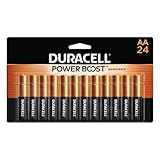


Top 3 picks at a glance
Quick comparison of keyboard battery types
| Battery type | Best for | Key specs | Typical price range |
|---|---|---|---|
| Alkaline AA (Duracell, Energizer) | Best overall for most keyboards | 1.5V, about 2,500-3,000 mAh, low self-discharge | Usually $0.50-$1.00 per cell |
| Lithium AA (Energizer Ultimate Lithium) | Best for long life and cold rooms | 1.5V, about 3,000 mAh, lighter, wider temperature range | Usually $2-$3 per cell |
| NiMH rechargeable AA/AAA (Panasonic Eneloop) | Best for heavy use and long-term savings | 1.2V, about 1,900-2,000 mAh (AA), 500-2,100 recharge cycles | Usually $3-$5 per cell plus charger |
| Alkaline AAA | Best for compact keyboards | 1.5V, about 1,000-1,200 mAh | Usually $0.40-$0.80 per cell |
| CR2032 coin cell | Best for slim keyboards that specify it | 3V, about 220 mAh | Usually $0.50-$1.50 per cell |
Capacity figures are typical values per the manufacturers’ datasheets and vary with load and temperature. Always check which size your keyboard needs: AA, AAA or coin cell.
Best overall: alkaline AA from Duracell or Energizer
Alkaline cells are the default for good reason. They are cheap, available everywhere, and hold their charge for years on a shelf. A typical Bluetooth keyboard without backlighting draws very little current, which is why a pair of AA alkalines often lasts a year or more. The trade-off is that alkalines drain irrecoverably and, if left in a dead keyboard for years, can leak and corrode the contacts.
Best for long life: lithium AA
Lithium primary cells such as Energizer Ultimate Lithium last longer than alkaline under heavy load, weigh less, and perform better in cold conditions. They also have a lower leakage risk. Their trade-off is price, so they make sense for keyboards you want to forget about, such as a media keyboard in a living room, or for high-drain models with backlighting.
Best for daily heavy use: NiMH rechargeable (Eneloop-style)
If you type for hours daily or use a backlit wireless keyboard, rechargeables repay their cost. Low self-discharge NiMH cells like Panasonic Eneloop keep around 70-80% of charge after a year in storage, per the manufacturer’s specification, so they do not go flat in a drawer like older rechargeables. The trade-off is lower voltage (1.2V versus 1.5V) and lower capacity per charge, so you will recharge more often than you would replace alkalines.
Best for compact keyboards: AAA cells
Slim keyboards and some number pads use AAA cells, which have roughly 40% of the capacity of AA cells. Expect proportionally shorter life, and consider rechargeable AAA if the keyboard has no built-in battery.
Worked calculation: how long will your batteries last?
Battery life equals capacity divided by average current draw. Use a typical wireless office keyboard as an example.
- Pair of AA alkalines in series: capacity about 2,500 mAh at the keyboard (series cells share the same capacity).
- Average draw with active typing, Bluetooth idle in between: about 0.3 mA averaged over an 8-hour day, per typical manufacturer claims for low-power keyboards.
Runtime is roughly 2,500 mAh / 0.3 mA = about 8,300 hours. At 8 hours a day, that is around 1,040 days, but manufacturers usually rate 12-36 months because real-world use includes self-discharge, wake events and temperature effects.
| Keyboard type | Average draw (approx.) | Alkaline AA life (2,500 mAh) | Eneloop AA life (1,900 mAh) |
|---|---|---|---|
| Basic 2.4GHz office keyboard | 0.3-0.5 mA | 7-12+ months | 5-9 months per charge |
| Bluetooth keyboard, no backlight | 0.2-0.4 mA | 9-18+ months | 7-14 months per charge |
| Backlit wireless keyboard (low brightness) | 3-6 mA | 17-35 days | 13-26 days |
| Backlit wireless keyboard (full brightness) | 15-30 mA | 3.5-7 days | 2.5-5 days |
These are estimates for illustration; the exact figures depend on the model. The takeaway is that backlighting changes the picture completely: a backlit wireless keyboard on disposable batteries becomes expensive quickly, which is why most are designed with built-in rechargeable cells instead.
Cost over three years
| Option | Upfront cost | Replacement behaviour | Approx. 3-year cost, heavy user |
|---|---|---|---|
| Alkaline AA (2 cells), changed every 3 months | About $1-$2 | 12 changes | About $12-$24 |
| Lithium AA (2 cells), changed every 6 months | About $4-$6 | 6 changes | About $24-$36 |
| NiMH AA (2 cells) plus charger | About $15-$25 | Recharge, replace after several years | About $15-$25 |
Rechargeables win at around the 12-month mark for heavy users, while alkaline remains cheaper for keyboards that run a year or more between changes.
How to choose
- Read the battery compartment. It lists the size (AA, AAA, coin) and orientation. Do not mix sizes or brands.
- Decide on usage. Typing under two hours a day: alkaline. Typing most of the day or backlit: rechargeable or a keyboard with a built-in battery.
- Check low-voltage behaviour. Some keyboards stop working at 1.1V per cell, which NiMH reaches near the end of a charge, so a keyboard may report a low battery sooner on rechargeables.
- Keep a spare set. A fresh pair of alkalines in a drawer avoids losing the keyboard mid-task.
Battery care that prevents damage
- Replace both cells together. Mixing old and new cells causes the weaker cell to drain unevenly and increases leak risk.
- Remove batteries from keyboards you will not use for months. Alkaline leakage is the most common cause of corroded battery contacts.
- Clean mild corrosion. Use a cotton swab with white vinegar or lemon juice, let it dry fully, and then reinstall.
- Use a matching charger for NiMH. A smart charger prevents overcharging and extends the number of cycles.
- Dispose properly. Take dead batteries to a recycling drop-off point instead of general rubbish.
Which batteries to avoid
Skip no-name multipacks with unusually high capacity claims such as 3,000 mAh printed on an AAA cell, because that figure is physically implausible for the size. Avoid mixing alkaline and rechargeable cells in the same keyboard, since their voltages differ and the keyboard may report a low battery incorrectly. Also be wary of heavy-duty zinc-carbon cells sold as budget packs: their capacity under load is a fraction of alkaline, so they run out within weeks in a keyboard that would last a year on alkaline. If a keyboard uses a CR2032 coin cell, buy from a reputable brand and store spares in their sealed packaging, away from metal objects that could short them.
Frequently Asked Questions
Can I use rechargeable batteries in any wireless keyboard?
In most cases yes, since NiMH AA and AAA cells fit the same compartment as alkaline. The 1.2V nominal voltage is lower than 1.5V, but low-power keyboards are designed to tolerate this. If the keyboard shows an early low-battery warning, that is normal behaviour for NiMH cells.
How long do batteries last in a wireless gaming keyboard?
It varies widely. A non-backlit model may last months on a set of alkaline cells, while a backlit gaming keyboard can drain a set within days to weeks. Most wireless gaming keyboards therefore use a built-in rechargeable battery rather than replaceable cells.
Are lithium batteries worth the extra cost for keyboards?
Sometimes. Lithium AA cells last longer under load, weigh less and resist leakage, so they are a fair choice for hard-to-reach or rarely checked devices. For an everyday low-drain keyboard, alkaline gives better value.
Why does my keyboard die so quickly after replacing the batteries?
Common causes are old or low-quality batteries, backlighting left on, a keyboard stuck in a high-power polling mode, or contacts that have corroded. Try a fresh set of name-brand cells, turn off the backlight, and clean the contacts.
What does the battery indicator on my keyboard show?
Many keyboards display a blinking LED or an on-screen warning when voltage drops below a threshold, often around 1.1-1.2V per cell. Because alkaline voltage declines gradually, the warning may appear while a small amount of capacity remains, and replacing the batteries promptly avoids dropped keystrokes.
Related guides
More from Amazon
Programs that pair well with the guide above. Offers and eligibility are set by Amazon and may change.
A free business account with business pricing and bulk-buying tools for work, shop or home office.
Create a business accountFree shipping on eligible items, Prime Video and more. Eligible new members can start with a free trial.
Start a Prime free trialAudiobooks and podcasts to listen to on the go. Eligible new members can start with a free trial.
Try Audible freeAd-free music streaming. Eligible new subscribers can start with a free trial.
Try Music Unlimited freeAs an Amazon Associate we earn from qualifying purchases.


