The best auto changeover thermostat for most homes is the ecobee Smart Thermostat Premium, because it switches between heat and cool on its own, ships with a way to work without a C-wire, and supports remote sensors for hot rooms. If you want a learning schedule and a polished app, the Google Nest Learning Thermostat (4th gen) is the better fit, and the Emerson Sensi Touch 2 is a solid mid-priced option. Auto changeover (also called “auto mode” or “heat/cool mode”) lets the thermostat run the furnace or the AC as needed to keep the room between two temperatures, with no manual mode switching.
As an Amazon Associate we earn from qualifying purchases at no extra cost to you.

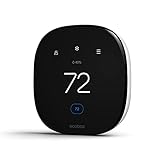


Top 3 picks at a glance
Quick comparison of the best auto changeover thermostats
| Pick | Best for | Key specs | Typical price |
|---|---|---|---|
| ecobee Smart Thermostat Premium | Best overall | Heat/cool auto mode, SmartSensor included, built-in air quality sensor, Wi-Fi, Matter-ready platform support | Usually $200–$250 |
| Google Nest Learning Thermostat (4th gen) | Best for hands-off scheduling | Learning schedule, Heat/Cool range mode, color display, Wi-Fi, optional remote sensors | Usually $250–$280 |
| ecobee Smart Thermostat Enhanced | Best value | Auto changeover, Wi-Fi, SmartSensor included, no built-in air quality sensor | Usually $130–$190 |
| Emerson Sensi Touch 2 | Best mid-range with a touchscreen | Auto changeover, touchscreen, Wi-Fi, geofencing, usually needs a C-wire | Usually $130–$170 |
| Honeywell Home T9 | Best for multi-room sensing | Smart room sensors, auto changeover, geofencing, Wi-Fi | Usually $170–$250 |
| Honeywell Home T6 Pro (Wi-Fi/programmable class) | Best budget, no-frills | Auto changeover, 5-1-1 or 7-day programming depending on version, simple interface | Usually $90–$140 |
Prices are general market ranges and change with sales and bundle contents. Check the manufacturer’s spec sheet and wiring compatibility tool before buying.
What auto changeover actually does (and why it matters)
In plain heat or cool mode, you choose one direction and the system works only that way. In auto changeover, you set two targets: a heat setpoint and a cool setpoint. The thermostat heats if the room falls below the lower number and cools if it rises above the upper number. In between, it does nothing.
That gap is the deadband, and it is the number most buying guides skip. Thermostats enforce a minimum separation between the two setpoints so the furnace and AC don’t fight each other. Per manufacturer documentation, this minimum is typically in the 2–5°F range depending on model and settings. A wider gap saves energy but allows more drift. Some models let you edit the minimum, and others lock it.
Best overall: ecobee Smart Thermostat Premium
The ecobee Premium suits anyone who wants dependable auto changeover and good whole-home control. It includes a SmartSensor in the box, so the thermostat can average or prioritize temperature from a bedroom or office rather than the hallway. Per ecobee, the unit also ships with a power extender kit for systems without a C-wire, though you should confirm that your wiring is supported.
Trade-off: It is among the pricier options, and the built-in air quality sensor is only useful if you’ll use it. If you don’t need it, the Enhanced model gives you the same core heat/cool logic for less.
Best for hands-off scheduling: Google Nest Learning Thermostat (4th gen)
The Nest Learning Thermostat builds a schedule from your manual adjustments and offers a “Heat/Cool” range mode that works as auto changeover. It has the cleanest interface and the best-looking display in this group. It also works well with other Google Home devices.
Trade-off: It is the most expensive pick here, and the learning schedule can take a couple of weeks to settle. If your schedule is irregular, you may spend that time correcting it. Check its compatibility checker for your wiring before ordering.
Best value: ecobee Smart Thermostat Enhanced
This is the pick for most buyers who don’t care about an air quality sensor or the premium finish. You still get a smart auto mode, app scheduling, and a SmartSensor in the box, according to the manufacturer. For a typical house, the day-to-day comfort matches the Premium.
Trade-off: It has fewer premium features, and the voice assistant options are more limited than on the Premium.
Best mid-range touchscreen: Emerson Sensi Touch 2
The Sensi Touch 2 pairs a clear touchscreen with a simple app and a mature feature set, including geofencing. Auto changeover is easy to find in the menu, and setup is quick on standard 24V systems.
Trade-off: It generally expects a C-wire, so older homes with only four wires may need an adapter or a wiring change. Verify in the manufacturer’s compatibility guide.
Best for multi-room sensing: Honeywell Home T9
The T9 uses smart room sensors that can prioritize the rooms you are actually in. Combined with auto changeover, that helps in a house where upstairs and downstairs run several degrees apart.
Trade-off: The sensors cost extra if you want more than the bundled ones, and the app is less polished than ecobee or Nest.
Best budget: Honeywell Home T6 Pro
If you want auto changeover without a Wi-Fi subscription feel or extra features, a basic programmable Honeywell like the T6 Pro covers it. It reliably handles single-stage and many multi-stage systems and heat pumps when wired correctly.
Trade-off: You get few smart features and no remote sensor strategy, so it won’t solve a hot-room problem.
How to choose: a decision matrix
| Your situation | Choose | Reason |
|---|---|---|
| No C-wire, standard furnace + AC | ecobee Premium or Enhanced | Included power extender kit per manufacturer |
| Heat pump with O/B reversing valve | Any pick above, after wiring check | Auto changeover needs the O/B wire configured correctly |
| One hot room (gaming room, office, attic bedroom) | ecobee Premium or Honeywell T9 | Remote sensors let you prioritize that room |
| Irregular schedule, want little setup | Nest Learning (4th gen) | Learning schedule plus geofencing-style presence |
| Tight budget, one thermostat for a whole home | Honeywell T6 Pro or ecobee Enhanced | Lowest price that still has auto changeover |
| Line-voltage baseboard or electric heat only | None of the above | Most low-voltage smart thermostats aren’t compatible. Look for a dedicated line-voltage model |
Worked example: a gaming room that fights your thermostat
A PC drawing 600 W under load, plus a 150 W monitor and peripherals, puts out about 750 W of heat. Converting at 3.412 BTU/hr per watt gives roughly 2,559 BTU/hr. That is about 21% of the capacity of a 1-ton (12,000 BTU/hr) air conditioner, concentrated in one small room.
In a 12×12 room during a spring evening at 50°F outdoors, the rest of your house may call for heat while the gaming room needs cooling. A single hallway thermostat in auto mode may flip to heating and make the gaming room worse. A remote sensor in the gaming room, or a second zone, fixes this. Without either, you widen the deadband so the system does not oscillate.
Setting values to start with
- Heat setpoint: 67–69°F. This is a common comfort and savings range for occupied time.
- Cool setpoint: 74–76°F. Each degree higher generally cuts cooling energy use, though savings vary by climate and home.
- Gap of at least 5–6°F. This leaves a buffer beyond the thermostat’s minimum, so the system doesn’t flip between modes in shoulder seasons.
- Sensor priority: Set the room you occupy at that hour to “priority” if your thermostat supports it, so the system responds to where you actually are.
Wiring checklist before you buy
- Photograph your old thermostat wiring. Note the labels on R, Rc, Rh, W, W2, Y, Y2, G, C, and O/B. This tells you whether you have heat only, cooling, or a heat pump.
- Look for a C-wire. A common wire gives constant 24V power. Without it, you need a power extender, adapter, or a model that includes one.
- Identify the system type. Auto changeover on a heat pump depends on O/B being configured correctly. Getting it backwards can run cooling when you want heat.
- Run the manufacturer’s compatibility checker. Each brand has one, and it prevents the most common returns.
- Cut power at the breaker before touching wires. The thermostat is low-voltage, but the furnace and AC control boards can be damaged by a short.
Frequently Asked Questions
What is an auto changeover thermostat?
It is a thermostat that can switch between heating and cooling automatically, based on two setpoints. You set a low temperature for heat and a high one for cooling. The thermostat works to keep the room between them.
Is auto changeover bad for energy use?
Not if the gap between setpoints is wide enough. Trouble starts when the gap is only 2–3°F, because the system can swing between heating and cooling. A 5–6°F gap usually avoids that.
Do I need a C-wire for auto changeover?
Auto changeover itself does not require one, but most smart thermostats need steady power. Some include a power extender kit, while others expect a C-wire. Check the manufacturer’s compatibility tool for your exact wiring.
Does auto changeover work with heat pumps?
Yes, but the thermostat must be configured for the O/B reversing valve wire. If it’s set backwards, the unit can heat when it should cool. Use the manufacturer’s setup wizard and test both modes after installation.
Can I use one thermostat for a hot gaming room?
You can improve the situation by using a thermostat with remote sensors and giving the gaming room priority during play sessions. If the room still runs hot, the real fix may be a dedicated mini-split, a vent change, or reducing the PC’s heat output. A thermostat only controls the whole system’s behavior.
Related guides
More from Amazon
Programs that pair well with the guide above. Offers and eligibility are set by Amazon and may change.
A free business account with business pricing and bulk-buying tools for work, shop or home office.
Create a business accountFree shipping on eligible items, Prime Video and more. Eligible new members can start with a free trial.
Start a Prime free trialAudiobooks and podcasts to listen to on the go. Eligible new members can start with a free trial.
Try Audible freeAd-free music streaming. Eligible new subscribers can start with a free trial.
Try Music Unlimited freeAs an Amazon Associate we earn from qualifying purchases.


