The best ASUS laptop for most businesses is a 14-inch ExpertBook B5-class model, because it combines vPro-capable configurations, a durable chassis, a full port set and sensible pricing. If weight matters most, the ultralight ExpertBook B9 is the better choice, and the ExpertBook B1 is the value pick for larger fleets. Consumer-line Zenbooks suit freelancers and executives, but they lack some of the management and durability features of ExpertBook.
As an Amazon Associate we earn from qualifying purchases at no extra cost to you.

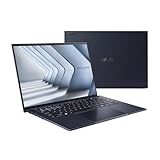
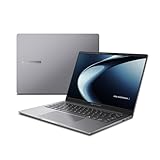

Top 3 picks at a glance
Quick comparison of the best ASUS business laptops
Specs below are typical of each class and vary by configuration and region. Check the manufacturer’s spec sheet for the exact SKU before you order.
| Pick | Best for | Key specs (typical) | Price tier |
|---|---|---|---|
| ExpertBook B5 (14-inch) | Best overall for SMB and mixed fleets | 14-inch 16:10, Intel Core Ultra or AMD Ryzen options, up to 64 GB RAM on some SKUs, about 1.3–1.4 kg, MIL-STD-810H tested | Mid-range to premium |
| ExpertBook B9 | Frequent travelers, executives | 14-inch OLED, magnesium-lithium alloy body, roughly 1 kg, around 66 Wh battery | Premium |
| ExpertBook Ultra / P5 class | Battery life and Copilot+ PC features | Intel Core Ultra 200V (Lunar Lake) with an NPU rated above 40 TOPS, 14-inch, about 1.2–1.4 kg | Premium |
| ExpertBook B1 | Budget fleet deployments | 14- or 15.6-inch, plastic chassis, wide port selection, about 1.4–1.7 kg | Budget |
| ExpertBook B5 Flip class | Sales, field work, pen input | 360-degree hinge, touchscreen with pen support, 14-inch | Mid-range to premium |
| ProArt P16 | CAD, video, 3D and data work | 16-inch OLED, AMD Ryzen AI 9 HX class CPU, dedicated GeForce RTX laptop GPU, about 1.9–2 kg | Premium |
| Zenbook 14 OLED / Zenbook S 14 | Freelancers, executives, solo owners | 14-inch OLED, thin chassis, about 1.2–1.3 kg | Mid-range to premium |
Best overall: ExpertBook B5 (14-inch)
The B5 line is ASUS’s core business laptop. It uses a 16:10 14-inch screen, a keyboard with proper travel, a full-size HDMI port and Thunderbolt or USB4 on current configurations. Select SKUs offer Intel vPro, which matters when IT needs remote management, out-of-band access and hardware-level security. ASUS also lists MIL-STD-810H durability testing for the line. That is a manufacturer claim about a test procedure, not a promise against every drop.
Trade-off: It is heavier than the B9, and not every SKU has vPro or the best display, so verify the exact part number.
Best ultralight: ExpertBook B9
The B9 is the laptop to pick if your staff carry it daily. A magnesium-lithium alloy body brings it to roughly 1 kg, per ASUS. You get a 14-inch OLED panel, a large battery for the weight and business-grade security options.
Trade-off: Premium pricing, and thin designs mean RAM is typically soldered, so buy the memory you will need in three years.
Best for battery life and AI features: ExpertBook Ultra or P5 class
The newer ExpertBook models built on Intel Core Ultra 200V chips target all-day battery life and Copilot+ PC features such as local transcription and live captions. If your team lives in video calls and meeting tools with background effects, an NPU handles that work at lower power than the CPU would.
Trade-off: Lunar Lake laptops fix RAM on the package, so there is no later upgrade. Their multi-core throughput is also lower than that of high-power H-series chips.
Best budget: ExpertBook B1
The B1 is the practical answer when you need many seats at a controlled cost. It usually keeps the ports that cheaper consumer laptops drop, such as HDMI and USB-A, and some SKUs include Ethernet. Choose 14-inch for mobile staff and 15.6-inch for desk-bound roles that benefit from a number pad.
Trade-off: Expect a plastic chassis, a dimmer 1080p panel on many SKUs and a heavier body than the B5 or B9.
Best 2-in-1: ExpertBook B5 Flip class
A convertible makes sense for people who annotate documents, sign contracts on screen or present in tablet mode. The 360-degree hinge and pen support are the point. Avoid buying flips for staff who never touch the screen, since you pay extra for the hinge and carry extra weight.
Best for heavy workloads: ProArt P16
Engineers, architects, video editors and analysts running large datasets need a dedicated GPU and a color-accurate display. The ProArt P16 pairs a 16-inch OLED panel with a high-power AMD Ryzen AI 9 HX-class processor and a GeForce RTX laptop GPU. The wattage the chassis allows matters more than the GPU name, so check the GPU power rating on the spec sheet.
Trade-off: Weight near 2 kg, a bulky power adapter and shorter battery life under load.
Best consumer-line option: Zenbook 14 OLED or Zenbook S 14
Zenbooks give you a premium look and a great screen, and they can be ideal for sole proprietors. They generally lack vPro, the deeper management tooling and the durability certifications of ExpertBook. Warranty terms also differ by region and product line, so confirm business coverage before you buy.
How to choose: a decision matrix
| Your situation | Choose | Why |
|---|---|---|
| IT team manages 20+ devices remotely | ExpertBook B5 with vPro | Remote management and hardware security features |
| Staff fly weekly | ExpertBook B9 | About 1 kg, OLED screen |
| Long days away from a charger | ExpertBook Ultra / P5 class | Efficient chip, NPU for meeting features |
| Front-office, tight budget | ExpertBook B1 | Ports kept, low seat cost |
| Signing, notes, presenting | B5 Flip class | Pen and touch |
| CAD, video, ML work | ProArt P16 | Dedicated GPU, accurate display |
| One-person business | Zenbook 14 OLED / S 14 | Great screen and weight without enterprise extras |
Worked example: how much battery do you need?
Runtime is roughly battery capacity in watt-hours divided by average system power draw in watts. Real office use rarely matches marketing numbers, so use a realistic draw.
- Light office work (documents, email, browser) at a bright-enough screen: about 7–9 W.
- Video calls with camera and effects: about 12–16 W.
- Sustained heavy work: 30 W or more, and far higher on a dedicated-GPU machine.
With a battery around 66 Wh, a 8 W day gives 66 ÷ 8 ≈ 8.25 hours. If half the day is video calls at 14 W and half is light work at 8 W, the average is 11 W, so 66 ÷ 11 = 6 hours. With a 63 Wh pack at the same 11 W you get about 5.7 hours. That is why staff who spend the day in meetings should get an efficient Lunar Lake-class model or carry a USB-C charger. Battery wear also reduces capacity over time, so plan for roughly 80 percent of the original after a few years of daily use.
Check your docking and display bandwidth
Many offices run two external 4K monitors. Raw bandwidth for one 4K display at 60 Hz and 24-bit color is 3840 × 2160 × 60 × 24 ≈ 11.9 Gbps, or about 12.5 Gbps with standard reduced-blanking timing. Two displays need roughly 25 Gbps. A full four-lane DisplayPort 1.4 link carries about 25.9 Gbps of usable data, so dual 4K60 is possible but tight, and it relies on a dock that supports MST or DSC compression. A Thunderbolt 4 or USB4 port with a proper dock is the safer route. Confirm that the laptop’s USB-C port supports DisplayPort and that the dock matches the display count you need.
Other criteria that matter more than the CPU name
- RAM: 16 GB is the realistic minimum for 2026. Choose 32 GB for heavy multitasking, virtual machines or large spreadsheets, especially when memory is soldered.
- Storage: 512 GB suits cloud-first teams. Pick 1 TB if people store local project files.
- Security: Look for TPM 2.0, a fingerprint reader or IR camera for Windows Hello and a webcam privacy shutter.
- Warranty: Compare the length and on-site service options in your country. Business lines often offer extensions that consumer lines do not.
- Screen: For documents, a 16:10 panel with at least 300 nits is more comfortable than a 16:9 one. OLED is excellent, but it carries burn-in risk if static elements stay on screen for years.
Frequently Asked Questions
Is ASUS a good brand for business laptops?
Yes. The ExpertBook line is designed for business, with security options, vPro configurations, durability testing and a ports-first design. Support quality varies by region, so check the local warranty and service terms before you buy a fleet.
ExpertBook or Zenbook: which should I buy for work?
Choose ExpertBook if you need fleet management, vPro, durability testing and business warranty options. Choose a Zenbook if you are an individual who values the screen and thin design and does not need enterprise tooling.
How much RAM does a business laptop need?
16 GB handles typical office, browser and video-call workloads. Move to 32 GB for virtual machines, large datasets or heavy multitasking, and favor models with a socketed slot if you want a later upgrade.
Do I need vPro on an ASUS business laptop?
Only if your IT department manages devices remotely with tools such as Intel’s endpoint management stack. For small teams or a single user, a standard Core Ultra or Ryzen model is usually enough and often costs less.
Which ASUS laptop has the best battery life for business?
Models built on Intel Core Ultra 200V chips, such as the ExpertBook Ultra and P5 class, are designed for long runtime. Real runtime depends on screen brightness, call-heavy usage and battery size, so divide the battery’s watt-hours by your realistic power draw to estimate your day.
Can ASUS business laptops run two 4K monitors?
Most current models with Thunderbolt 4 or USB4 can, usually through a dock. Check that the port supports DisplayPort output and that the dock handles two displays at 60 Hz, since the bandwidth for dual 4K60 sits close to the limit of a single DisplayPort 1.4 link.
Related guides
More from Amazon
Programs that pair well with the guide above. Offers and eligibility are set by Amazon and may change.
A free business account with business pricing and bulk-buying tools for work, shop or home office.
Create a business accountFree shipping on eligible items, Prime Video and more. Eligible new members can start with a free trial.
Start a Prime free trialAudiobooks and podcasts to listen to on the go. Eligible new members can start with a free trial.
Try Audible freeAd-free music streaming. Eligible new subscribers can start with a free trial.
Try Music Unlimited freeAs an Amazon Associate we earn from qualifying purchases.


