
If you’re building a budget gaming PC and keep running into stutter in modern titles, choking on Chrome tabs, or getting bottlenecked while streaming, the fix is often memory capacity rather than raw speed. 16GB was the standard for years, but current games and background apps have pushed well past that ceiling, and 64GB has quietly become the sweet spot for gamers who stream, edit clips, or run heavy modded installs. The catch for budget builders is that not every 64GB kit costs flagship money — several solid options now land between $390 and $620.
The trick is knowing which kits actually deserve your cash. Desktop DIMMs and laptop SODIMMs get lumped together in search results, timings vary from CL16 to CL22, and four-stick kits can be harder on your memory controller than two-stick setups. We’ve sorted through the noise and ranked six kits that cover the real-world choices a budget builder faces in 2026, from sub-$400 value plays to low-latency 2x32GB options with room to overclock.
As an Amazon Associate we earn from qualifying purchases at no extra cost to you.


Our Top Picks



Top 3 picks at a glance
Quick Picks
| Product | Best for | Price |
|---|---|---|
| GIGASTONE Game PRO 64GB (4x16GB) DDR4 3200 | Best value for DDR4 desktop builds | Check on Amazon |
| Crucial 64GB (2x32GB) DDR4 3200 SODIMM | Best for gaming laptops and mini PCs | Check on Amazon |
| G.SKILL Ripjaws V 64GB (4x16GB) DDR4 3200 | Best for proven gaming performance | Check on Amazon |
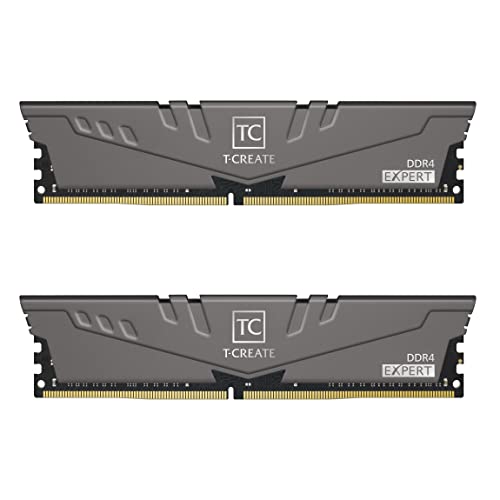
| TEAMGROUP T-Create Expert 64GB (2x32GB) DDR4 3200 | Best for creators who also game | Check on Amazon |
| PNY 64GB (2x32GB) DDR4 3200 SODIMM | Best budget laptop upgrade | Check on Amazon |
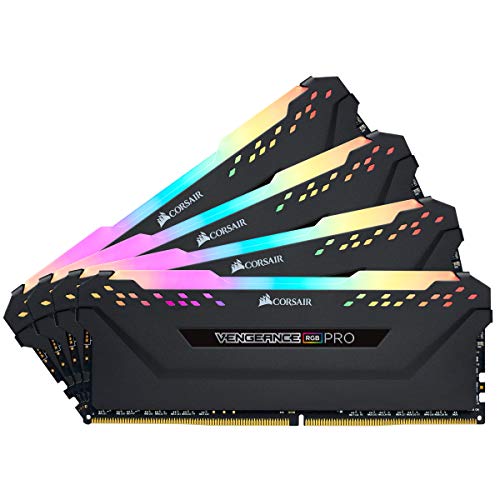
| Corsair Vengeance RGB Pro 64GB (4x16GB) DDR4 3200 | Best for RGB showpiece builds | $495 |
How We Compared
We focused on kits that hit the practical targets for a budget gaming build: 64GB total capacity, DDR4 compatibility, and 3200MHz (PC4-25600) speeds, which pair cleanly with both Intel and AMD desktop platforms. Price mattered heavily — every kit here falls between roughly $395 and $615, because paying workstation-kit money defeats the purpose of a budget build.
Beyond the spec sheet, we prioritized build type, timings, and voltage. Desktop UDIMMs running 1.35V with Intel XMP 2.0 profiles earned points for easy overclocking, while laptop-friendly SODIMM kits were judged on downclocking flexibility and platform compatibility. Stick configuration (2x32GB vs 4x16GB) factored in too, since two-stick kits leave room to expand and are generally easier on the memory controller. We deliberately did not weight RGB lighting or heatspreader aesthetics as performance factors, but we included one RGB option because it’s a genuine purchase driver for many builders.
The 6 Best Picks
1. GIGASTONE Game PRO 64GB Kit (4x16GB) DDR4 3200MHz — Best Value Overall
At around $400, the GIGASTONE Game PRO is the cheapest way to stuff 64GB of DDR4-3200 into a desktop, and it doesn’t cut the corners you’d expect at this price. You get proper gaming-grade timings (CL 16-18-18-40), a 1.35V Intel XMP 2.0 profile that also plays nice with AMD Ryzen, and standard 288-pin unbuffered non-ECC UDIMMs that drop into any modern DDR4 board. This is the kit for builders who want maximum capacity headroom for streaming and multitasking without raiding the GPU fund.
- Cheapest 64GB DDR4-3200 kit in this roundup at around $400
- Gaming-appropriate CL16 timings with XMP 2.0 one-touch setup on both Intel and Ryzen
- Four-stick config means all four slots occupied, leaving no room to expand later
Skip it if you’re building a laptop — this is desktop UDIMM memory only — or if your motherboard’s memory controller struggles with four populated slots at rated speed.
2. Crucial 64GB (2x32GB) DDR4 3200 SODIMM — Best for Gaming Laptops
Laptop gamers are chronically underserved on capacity, and the Crucial CT2K32G4SFD832A fixes that with two 32GB SODIMMs running 3200MHz at CL22. The two-stick layout is ideal because most gaming laptops only have two SO-DIMM slots, so this kit maxes them out cleanly. It’s officially rated for 13th Gen Intel Core and AMD Ryzen 7000 mobile platforms and can downclock to 2933 or 2666MHz if your system doesn’t support the full 3200 — genuinely useful for older machines. At around $440, it’s the most flexible notebook upgrade here.
- 2x32GB config fills both SODIMM slots in nearly any modern gaming laptop
- Downclockable to 2933/2666MHz for broad compatibility with older systems
- CL22 timings are looser than desktop rivals, and SODIMMs don’t support XMP overclocking
Pass on this one if you’re building a desktop — 260-pin SODIMMs physically won’t fit a standard motherboard.
3. G.SKILL Ripjaws V 64GB (4x16GB) DDR4 3200 — Best Proven Performer
The Ripjaws V line has been a builder favorite for the better part of a decade, and this 4x16GB kit (F4-3200C16Q-64GVK) at around $480 is why. You get 3200MT/s with tight CL16-18-18-38 timings at a modest 1.35V, with XMP support for Intel and Ryzen alike. G.SKILL’s long track record on Ryzen platforms means fewer compatibility surprises when you enable the XMP profile. For budget builders who want a name they can trust with real gaming timings rather than value-brand uncertainty, this is the safe pick.
- Tight CL16-18-18-38 timings — slightly quicker tRCD/tRP than the GIGASTONE kit
- Long-established compatibility with both Intel XMP and AMD Ryzen platforms
- Roughly $83 more than the value option for essentially the same spec
Skip it if pure price-per-gigabyte drives your build — the GIGASTONE kit delivers the same capacity and speed for less.
4. TEAMGROUP T-Create Expert 64GB (2x32GB) DDR4 3200 — Best for Creators Who Game
The T-Create Expert is the premium pick at around $610, and it justifies the jump with a 2x32GB configuration running genuine CL16 timings at 3200MHz — a combination that’s rare in this class, where most 2x32GB kits settle for CL22. That tighter latency matters when you’re timelines scrubbing in Premiere or compiling code between gaming sessions. It’s also built as an overclocking-oriented line (the “10L” in its name), so there’s tuning headroom if you want to push beyond spec. This is the kit for hybrid users whose PC earns money and plays games.
- CL16 timings in a 2x32GB layout — best latency-per-stick-density combo here
- Overclocking-focused design leaves tuning headroom beyond the rated 3200MHz
- Highest price in the roundup by a wide margin at around $610
Pass if you’re a pure gamer on a strict budget — you’d be paying a creator premium for latency benefits you may never notice in-game.
5. PNY 64GB (2x32GB) DDR4 3200 SODIMM — Best Budget Laptop Upgrade
PNY’s 64GB notebook kit undercuts the Crucial by about $27 at around $410, making it the most affordable way to hit 64GB in a laptop. You get the same practical formula: two 32GB SODIMMs at 3200MHz with CL22 timings, which is exactly what most mobile platforms support natively anyway. It’s the straightforward, no-frills choice for a laptop that’s buckling under streaming, virtual machines, or heavy multitasking. If your machine supports DDR4 SODIMMs and you just want capacity at the lowest price, this is it.
- Cheapest 64GB laptop option at around $410
- 2x32GB layout maxes out dual-slot laptops in one upgrade
- Fixed CL22 timings with no XMP headroom and fewer listed platform certifications than Crucial
Skip it if you want guaranteed, explicitly listed compatibility with newer Intel or Ryzen mobile chips — the Crucial kit’s validation list is safer for edge-case systems.
6. Corsair Vengeance RGB Pro 64GB (4x16GB) DDR4 3200 — Best RGB Showpiece
At $495, the Vengeance RGB Pro costs about $98 over the value option, and what you’re buying is largely visual: ten-zone addressable RGB lighting across each stick, controllable through Corsair iCUE, wrapped around solid CL16-rated 3200MHz silicon in a 4x16GB layout. Performance is squarely in line with the other desktop kits here — this is not an RGB-tax kit with degraded timings. If your build has a tempered glass panel and you want the memory to be part of the show while still delivering 64GB for streaming, it earns its spot.
- Ten-zone addressable RGB per module with full iCUE software control
- CL16-class timings at 3200MHz, so you’re not sacrificing speed for looks
- Roughly $98 premium over the equivalent-spec non-RGB kit
Skip it if your case has no window or you run a blackout build — you’d be paying for lighting you’ll never see.
Buying Guide
UDIMM vs. SODIMM: Get the Physical Format Right
This is the mistake that forces returns. Desktop motherboards use 288-pin UDIMMs, while laptops and many mini PCs use 260-pin SODIMMs — they are not interchangeable in any direction. Kits 1, 3, 4, and 6 here are desktop-only; kits 2 and 5 are laptop-only. Before buying, open your machine or check the spec sheet: if your slots are long, horizontal, and roughly 5.25 inches wide, you need UDIMMs; if they’re small and offset, you need SODIMMs. Also confirm DDR4 specifically — DDR5 slots are keyed differently and won’t accept these kits.
2x32GB vs. 4x16GB: Which Layout Fits Your Build
Four-stick kits (GIGASTONE, G.SKILL, Corsair) are often slightly cheaper per stick and fill a quad-slot board completely, but they populate all your slots and can strain the memory controller — some boards drop to lower speeds with four DIMMs installed. Two-stick kits (Crucial, TEAMGROUP, PNY) leave slots free for future expansion, simplify airflow around the CPU cooler, and are generally easier to run at rated speed. For most budget builders with a standard ATX or micro-ATX board, 2x32GB is the more flexible layout; 4x16GB is fine if you’re certain you’ll never add memory.
Timings, Voltage, and XMP: What the Numbers Mean for Gaming
All six kits run at 3200MHz (PC4-25600), so speed is a wash — the differences live in timings and voltage. CL16 kits (GIGASTONE, G.SKILL, TEAMGROUP, Corsair) at 1.35V offer meaningfully lower latency than CL22 kits, which matters most in CPU-bound scenarios like simulation games and high-refresh esports titles. Intel XMP 2.0 lets you enable rated speeds with one BIOS toggle; without it, memory defaults to a slower JEDEC profile. AMD Ryzen users should verify XMP compatibility is listed, as the GIGASTONE and G.SKILL kits explicitly state it. And remember that laptop SODIMMs can’t overclock — buy the speed you need upfront or pick a kit like the Crucial that downclocks gracefully.
Our Verdict
For most budget gaming desktops, the GIGASTONE Game PRO 64GB kit at around $400 is the easy recommendation — full 64GB at DDR4-3200 with CL16 timings and XMP support for both Intel and Ryzen, at the lowest price in the roundup. If brand pedigree matters more to you and the budget stretches, the G.SKILL Ripjaws V at around $480 is the same formula with a decade-long reputation behind it, while Corsair’s Vengeance RGB Pro at $495 adds showroom lighting for glass-panel builds. Laptop builders should grab the Crucial CT2K32G4SFD832A at around $440 for its explicit platform validation, or the PNY kit at around $410 to save $27. And if your PC splits duty between gaming and content work, the TEAMGROUP T-Create Expert’s 2x32GB CL16 configuration at around $610 is the only kit here that nails low latency and high density in one package.
FAQ
Is 64GB overkill for a budget gaming PC?
For pure 1080p or 1440p gaming alone, yes — 16GB still handles most titles and 32GB covers virtually all of them. But 64GB stops being overkill the moment you stream, record gameplay, keep dozens of browser tabs open, or mod games heavily. Since kits like the GIGASTONE cost under $400, the premium over a 32GB kit can be small enough that future-proofing makes sense.
Will DDR4-3200 CL22 work if my system only supports 2933MHz?
Yes. Kits rated at 3200MHz downclock automatically to whatever your platform supports — JEDEC-standard memory is backward compatible. The Crucial kit even lists explicit downclocking to 2933 and 2666MHz, so an older laptop or budget motherboard will simply run it at a slightly lower speed with no stability issues.
Do I need to enable XMP for these kits to run at 3200MHz?
Yes, on desktop kits. Out of the box, memory runs at a conservative JEDEC default — often 2133 or 2666MHz — so you’ll leave performance on the table until you enable the Intel XMP 2.0 profile in your BIOS. It’s a one-click setting on both Intel and AMD Ryzen boards. Laptop SODIMM kits don’t support XMP; they run at whatever speed your laptop’s firmware allows.
Can I mix a 64GB kit with existing RAM sticks?
We don’t recommend it. Mixing kits with different timings, voltages, or stick densities can cause instability, and your system will often default everything to the slowest common settings. For guaranteed stability at rated speeds, populate your board with a single matched kit — which is exactly what all six options here are designed to be.









