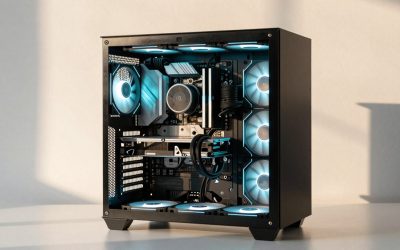
The best custom gaming PC builders are the boutique companies that assemble to order and back the system with long support: Falcon Northwest, Maingear, Origin PC and Digital Storm at the premium end, and CyberPowerPC and iBUYPOWER for configurators at lower cost. Micro Center’s in-store build service suits buyers who want a person to assemble parts they choose. These are editorial picks based on published warranty pages and configurator features, not performance results.
Searches for the best custom PCs, the best boutique computer builders or the best place to build a gaming PC cover three different needs: a premium machine from a specialist, a configurable system from a large online builder, and an assembly service where you pick the parts. This guide compares all three by the criteria that matter after the box arrives: warranty, support, parts choice, build quality and what the builder will and will not do if you later upgrade.
As an Amazon Associate we earn from qualifying purchases at no extra cost to you.


Our Top Picks


Top 3 picks at a glance
How we chose the builders
We read vendor warranty and service pages where they loaded and cross-checked them against editorial coverage. We did not order from or use these builders for this article. Some sources were older than a year, and some vendor pages failed to load, so uncertain items are marked as not confirmed. Rankings below are our editorial judgement from the criteria, not a performance or benchmark result.
Criteria, in order of weight:
- Warranty and lifetime support: parts and labor length, who pays shipping, whether technical support continues after the warranty.
- Parts choice: can you choose the CPU cooler, power supply, motherboard tier, memory kit, SSD and case, or only the headline CPU and GPU?
- Standard parts: standard ATX parts keep upgrades and repairs cheap.
- Assembly quality: cable routing, cooling, burn-in before shipping.
- Upgrade policy: what happens to the warranty if you add parts.
- Financing and return terms: whether custom builds can be returned.
Quick comparison
| Builder | Tier | Warranty and support as stated by sources | Customization | Upgrade note | Best for |
|---|---|---|---|---|---|
| Falcon Northwest | Premium boutique | Three years on desktops, first year with overnight service both ways; lifetime technical support (vendor warranty page) | High, including small-form-factor systems | Replacing certain major parts, such as the motherboard, may void technical support | Compact high-end systems with close support |
| Maingear | Premium boutique | One year limited by default, two or three years optional; lifetime technical support (vendor warranty page) | High | Warranty transfers with the system; upgrade service costs parts and labor | Cleanly assembled builds, resale value |
| Origin PC | Premium boutique, Corsair-owned | Lifetime phone and online support and labor; selectable one, two or three year parts cover (older terms page) | Very high, including custom artwork | Confirm current terms | Heavily customised and liquid-cooled builds |
| Digital Storm | Premium boutique | Three years of labor and one year of parts, lifetime support, longer options (vendor warranty page) | High | No warranty service on hardware not bought from them | Liquid-cooled enthusiast builds |
| CyberPowerPC | Volume builder | Roundups cite a three-year labor plan and one-year parts; confirm | High, configurator | Case and PSU choice matter | Value-led custom configurations |
| iBUYPOWER | Volume builder | Roundups cite two-year parts on configurator builds; confirm | High | Check defaults | Choosing parts on a mid-range budget |
| Micro Center build service | In-store assembly | 90-day labor warranty on the build, parts under manufacturer warranties | You choose all parts | You own standard parts | Buyers near a store who want a person to build and set up |
What “custom” really means
A custom gaming PC can mean three different things, and the right builder depends on which one you want.
- Configurator build: you choose each major part from a list on the builder’s site, and the builder assembles and ships it. CyberPowerPC and iBUYPOWER offer this at lower cost, and boutiques offer it with more options.
- Boutique build: a specialist assembles, tunes and checks the system, and often offers custom paint, hard-line liquid cooling or small-form-factor cases. Falcon Northwest, Maingear, Origin PC and Digital Storm fit here.
- Assembly service: you buy parts and a technician builds them. Micro Center runs an in-store service, and its published terms include a 90-day labor warranty with parts covered by the manufacturer’s warranties.
The boutique builders in detail
Falcon Northwest
Founded in 1992, Falcon Northwest is one of the longest-running names in the category. Its warranty page lists a three-year parts and labor warranty on desktops, with the first year including Falcon Overnight service in which the company covers overnight shipping both ways for major repairs. Technical support is described as lifetime for as long as you own the system. The page also warns that replacing major components such as the motherboard yourself may void technical support and recommends contacting support first. Strengths: a small-form-factor focus and a support model built around fast turnaround. Trade-offs: high prices relative to the parts and limited low-end options.
Maingear
Maingear’s warranty page describes a one-year limited hardware warranty by default with two or three year options, free lifetime technical support, and shipping paid by Maingear for covered problems in the first 30 days. A remaining factory warranty transfers if the system changes hands, which helps resale value. Upgrade services are billed for parts and labor, even under warranty. It is known for tidy cable work and custom liquid cooling.
Origin PC
Origin is owned by Corsair, according to the sources we read. An older terms page lists lifetime phone and online support plus lifetime labor, with a one, two or three year parts warranty you select at purchase, and shorter cover for painted cases and artwork. Because the page is dated, confirm current terms. Origin is known for the broadest customization, including custom artwork and liquid cooling.
Digital Storm
Digital Storm’s warranty page states lifetime expert support and a three-year limited warranty covering three years of labor and one year of parts, with step-ups to four and five years. Lifetime refers to support, not repairs. After the parts period ends, the company will help replace defective parts while a manufacturer’s warranty still applies. Upgrades are allowed, but it will not give warranty service for hardware it did not supply. Strengths: liquid-cooled builds and a clear warranty structure. Trade-off: shipping a heavy system for labor coverage.
The value configurators
CyberPowerPC and iBUYPOWER give you much of the control of a boutique at lower cost, but the defaults matter. CyberPowerPC’s homepage offers a guided finder and a build-your-own flow and lists Affirm financing, with 0% APR up to six months for qualifying U.S. customers within a stated 0% to 36% APR range. Retail roundups cite iBUYPOWER’s two-year parts warranty on its configurator builds and a three-year labor plan at CyberPowerPC, but we could not confirm either on the vendor pages.
When you use any configurator, change the defaults deliberately: choose a named power supply with adequate headroom, a cooler matched to the CPU, two memory sticks for dual channel, and a recognised SSD. Low-cost defaults are where a builder quietly saves money on your system.
In-store assembly: Micro Center
Micro Center sells prebuilt PCs under its PowerSpec name and also offers a custom build service. The service is in store only, includes driver and BIOS updates, a stability check and a 90-day labor warranty, and it will build with parts bought elsewhere if they are new and compatible, according to its published pages. The build fee is non-refundable once collected, and you must pick the finished build up within five calendar days of notification. For returns, sources say computer hardware has a 15-day window and disagree on whether custom builds can be returned, so ask before buying parts. This is a good route when you want standard parts that you can service yourself and a local person to blame if the build is wrong.
Worked example: sizing a power supply for a custom build
A configurator will often ask you to choose a power supply wattage, and this is one of the choices where informed buyers save money and avoid failures. As an approximation, add up the graphics card’s rated board power, the CPU’s maximum power draw, and 75 to 100 watts for the motherboard, memory, drives and fans, then add headroom of at least 30 to 40 percent for transient spikes and efficiency. Always confirm each part’s rating on the manufacturer’s spec sheet, because high-end graphics cards are specified well above mid-range cards.
| Build tier (approximate) | Typical GPU board power class | Typical CPU max power class | Rest of system | Suggested PSU class |
|---|---|---|---|---|
| Mainstream 1080p | Roughly 150 to 200 watts | Roughly 65 to 120 watts | About 75 watts | 650 to 750 watt class |
| High refresh 1440p | Roughly 200 to 300 watts | Roughly 90 to 150 watts | About 85 watts | 750 to 850 watt class |
| High-end 4K | Roughly 300 to 575 watts | Roughly 120 to 250 watts | About 100 watts | 850 to 1,200 watt class, with a modern high-power GPU connector |
These are planning ranges, not specifications. A sample calculation: a card rated at 250 watts, a CPU peaking at 120 watts and 85 watts for the rest comes to 455 watts. Adding 35 percent headroom gives about 615 watts, so a 750 watt unit from a reputable maker is a sensible choice rather than a 550 watt unit.
Upgradeability and warranty: read before you modify
Custom builders handle post-purchase changes differently. Falcon Northwest recommends contacting support before replacing major components and warns that some changes may void technical support. Digital Storm allows upgrades but will not service hardware it did not supply. Maingear provides upgrade services at cost. NZXT’s warranty on its prebuilts also excludes issues from third-party components or modifications. In practice: add storage and memory freely if support agrees, and ask in writing before swapping the motherboard, power supply or cooler.
What the premium actually buys you
Boutique builders charge more than volume builders for the same graphics card and processor class, and the difference is almost entirely in labor, parts selection and support rather than in frame rates. A boutique system should arrive with cables routed and tied, a cooler mounted with even paste coverage, airflow tuned to the case, memory running at its rated profile, and a clean operating system install without bundled clutter. Those things matter because poor cable routing and weak airflow raise temperatures and noise, and a loose or mis-seated part is the most common cause of early failures in any system.
The second part of the premium is the relationship. Lifetime technical support, as stated by Falcon Northwest, Maingear, Origin PC and Digital Storm on their pages, means you can phone a person about a driver or BIOS problem years later. That has value if you do not enjoy troubleshooting. If you are comfortable diagnosing problems yourself, the support premium buys less, and a configurator build or a store-assembled system may be better value.
Custom builder, prebuilt company or DIY: cost of your time
| Route | Cash cost | Time cost | Warranty | Risk |
|---|---|---|---|---|
| Boutique builder | Highest | Low, but longer lead time | One system-level warranty with lifetime support | Low |
| Configurator at a volume builder | Medium | Low | System-level, shorter on some lines | Medium, depends on defaults |
| Store assembly service | Parts plus an assembly fee | Low to medium | Labor warranty on the build, parts under manufacturer warranties | Medium |
| Build it yourself | Lowest | Highest | Separate warranty per part | Higher for a first build |
The difference between a system-level warranty and part-by-part warranties is bigger than it looks. If a DIY build will not boot, you spend an evening isolating the fault and then handle claims with whichever manufacturer owns the broken part. With a builder, one company owns the diagnosis.
Questions to ask any builder before you pay
- Which exact power supply, motherboard and cooler models will be in my system?
- How long is the lead time, and what happens if a part is out of stock?
- What does the warranty cover for parts, labor and shipping, and for how long?
- Is technical support lifetime, and is it phone, chat or email only?
- Can I add memory or storage myself without voiding anything?
- What is the return policy for a custom build, and who pays shipping?
- Do you run a stability and thermal check before shipping, and can I see the result?
- Will the system ship with the operating system installed and updated?
- If I move or sell the system, does the warranty transfer?
A builder that answers these in writing, with part model names, is usually more reliable than one that answers in marketing language.
Common mistakes with custom builds
- Fixating on the GPU and ignoring the power supply. A weak or unnamed PSU is the most common hidden saving in a configurator default.
- Choosing a case for looks only. Glass-front cases with little intake airflow run hotter, which can throttle a powerful CPU.
- Single-channel memory. One stick of memory can cut performance in some games compared with two matched sticks.
- Too little VRAM for the monitor. For 1440p and above, 8GB graphics cards leave less headroom in newer games than 12GB or 16GB cards.
- Forgetting the upgrade path. A motherboard with one spare M.2 slot or two memory slots limits later upgrades.
- Not reading exclusions. Warranty text about third-party parts and modifications applies the moment you open the case.
- Paying a boutique premium for parts you could swap yourself. Custom paint and liquid cooling add cost without adding frames.
Shipping and lead times
Lead times are an honest part of the choice. A roundup describes about a week for CyberPowerPC shipping, and Micro Center says a standard custom build can be done the same day if bought early enough, while intricate liquid-cooled builds take longer. Boutique builders with custom cooling or artwork typically quote longer times. Large heavy systems are best shipped with the GPU braced, and Falcon Northwest, for example, spells out overnight courier handling for repairs. Ask whether the builder photographs the system before shipping, and keep packaging until you are certain the system is fine.
Which builder fits which buyer?
| You are | Choose | Why | Skip if |
|---|---|---|---|
| Building a compact, premium machine | Falcon Northwest | Small-form-factor focus, overnight service | You want a bargain |
| Wanting transferable cover and tidy work | Maingear | Warranty follows the system | You will not buy the longer term |
| Wanting extensive customization | Origin PC | Wide options, lifetime support and labor | You cannot verify current terms |
| Wanting liquid cooling with clear terms | Digital Storm | Three-year labor, lifetime support | You dislike shipping a system for repairs |
| Wanting control at lower cost | CyberPowerPC, iBUYPOWER | Large configurators | You will accept default parts |
| Wanting a person to build parts you chose | Micro Center | In-store assembly, labor warranty | No store nearby |
| Enjoying the process | Build it yourself | Cheapest per part, full control | You want warranty on the whole system |
Configurator checklist
- Name the power supply model, wattage and efficiency tier.
- Choose a cooler that matches the CPU’s heat output and the case size.
- Pick a motherboard with enough memory slots and M.2 slots for future upgrades.
- Pick a case with front intake airflow and room for the GPU length.
- Select two matched memory sticks for dual channel at the rated speed.
- Choose an SSD from a recognised maker with enough capacity for your library.
- Request a burn-in or stability check before shipping, if offered.
- Ask about lead time in writing.
- Ask what the policy is for returning a custom build.
- Photograph the system on arrival and keep the packaging.
Frequently asked questions
Who are the best custom gaming PC builders?
For premium builds, Falcon Northwest, Maingear, Origin PC and Digital Storm. For lower cost configurators, CyberPowerPC and iBUYPOWER. For in-person assembly, Micro Center. The right choice depends on budget and support needs.
Is a custom PC from a boutique builder worth it?
If you value assembly quality, cooling tuning and long support, yes. If you only want frames per dollar, a volume builder or your own build costs less.
What is the difference between a custom PC builder and a prebuilt company?
A custom builder assembles to your parts choices; a prebuilt company sells fixed models. The lines blur because many companies do both.
Can I upgrade a custom gaming PC without losing the warranty?
Usually for memory and storage, but each builder has rules. Falcon Northwest warns some major part swaps may void support, and Digital Storm will not service parts it did not supply.
How long does a custom build take?
It varies. Configurator builds ship in about a week according to a roundup, boutique builds can take longer, and Micro Center can finish a standard build the same day if purchased early enough.
Can I return a custom-built PC?
Policies are stricter than for stock models. One source says Micro Center custom builds cannot be returned, so confirm before ordering any custom build.
Is it cheaper to build a gaming PC myself?
Usually, because you avoid assembly and support charges. You also take on the risk of diagnosing problems and handling returns of individual parts.
Sources
- Falcon Northwest warranty page
- Maingear warranty policy page
- Digital Storm warranty page
- Origin PC terms page and SlashGear custom builder coverage
- Micro Center custom build service pages
- CyberPowerPC website
Last updated: October 2026
Related guides
- How to Screenshot on a Chromebook: Keyboard Shortcuts, Screen Capture Tool and Tablet Buttons
- Best Gaming PC Financing Options and What to Check First: 4 Compared (2026)
- Best Websites to Buy a Gaming PC, Compared by Return Policy: 4 Compared (2026)
- Best Specs for a Gaming PC by Resolution and Use: 4 Compared (2026)