An Intel Xeon workstation is a desktop built on Intel’s professional processor line, which brings ECC memory support, much larger memory capacity and, in some models, two processor sockets. Every system below is a renewed unit on an older Xeon platform, so the real question is which generation and layout fits your job. The PCSP and Dell Precision 7920 towers lead on raw core count, the HP Z4 G4 and Dell Precision 5820 suit fast single-thread work, and the older Dell T-series boxes are budget options that need a graphics card or operating system. Prices change often, so check the listing. All specs are the sellers’ own claims.
Our Top Picks
Top 3 picks at a glance
Quick picks
As an Amazon Associate we earn from qualifying purchases at no extra cost to you.


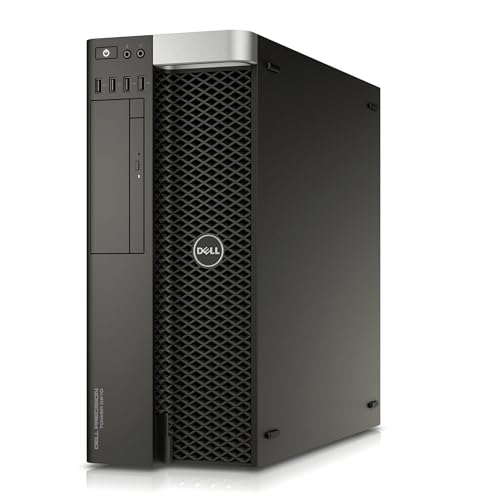

- PCSP Precision 7920 (2x Xeon Platinum 8160) – most cores here, 48 cores and 384GB
- Dell Precision 7920 (2x Xeon Gold 6130) – best balance of 32 cores, 192GB and four drives
- Dell T7810 (2x E5-2690 v4) – 28 cores for cheap CPU rendering, no drive or OS
- Dell Precision T7810 (2x E5-2670 v3) – dual-socket value with 128GB and an SSD
- Dell Precision T5810 (E5-2680 v3) – single-socket 12-core starter with 64GB
- HP Z4 G4 (Xeon W-2133) – best ready-to-run single-socket Xeon W
- Dell Precision 5820 (Xeon W-2123) – best for CAD-style single-thread work
- PCSP P520 (Xeon W-2135) – a bare-bones base to build on, no graphics, drive or OS
Compared in one table
| Model | Type | Key specs as stated in the title | Best for |
|---|---|---|---|
| PCSP Precision 7920 | Dual-socket tower | 2x Xeon Platinum 8160 (48 cores, 96 threads), 384GB DDR4, 1TB NVMe + 4TB HDD, Quadro P2000 5GB | Maximum cores |
| Dell Precision 7920 | Dual-socket tower | 2x Xeon Gold 6130 (32 cores), 192GB DDR4, 2x1TB SSD + 2x4TB HDD, Quadro P1000 4GB | Balanced heavy work |
| Dell T7810 (Chia Farming) | Dual-socket tower | 2x E5-2690 v4 (28 cores, 56 threads), 128GB DDR4, Quadro K620 2GB, no HDD, no OS | Budget CPU rendering |
| Dell Precision T7810 | Dual-socket tower | 2x E5-2670 v3 2.3GHz 12-core, 128GB DDR4, Quadro NVS 315, 480GB SSD, no OS | Dual-socket value |
| Dell Precision T5810 | Single-socket tower | E5-2680 v3 12-core 2.5GHz, 64GB DDR4, NVS 315, 480GB SSD, no OS | Starter 12-core |
| HP Z4 G4 | Single-socket tower | Xeon W-2133 6-core up to 3.9GHz, 64GB, 512GB NVMe + 2TB HDD, Quadro P400 2GB, Windows 11 Pro | Ready to run |
| Dell Precision 5820 | Single-socket tower | Xeon W-2123 4C 3.6GHz, 64GB, 1TB NVMe, Quadro P2000, Windows 11 | CAD, fast cores |
| PCSP P520 | Single-socket tower | Xeon W-2135 3.70GHz 6-core, 16GB DDR4, no graphics, no drive, no OS | Blank base |
The eight Xeon systems, from most cores to least
PCSP High-End Precision 7920 with Dual Xeon Platinum 8160
The largest machine on the list: two Xeon Platinum 8160 processors for 48 cores and 96 threads, 384GB of DDR4, a 1TB NVMe drive with a 4TB hard drive, a Quadro P2000 with 5GB and Windows 11 Pro. The “Precision 7920” name is Dell’s, while the seller is PCSP, so this is a third-party refurbishment; read the seller’s warranty terms rather than assuming a Dell one.
With 96 threads, some Windows applications split their work across processor groups and may not use every thread, so confirm your software can. For rendering, simulation and virtual machines the core count is the draw. For modeling, per-core speed matters more, and the title gives no clock speed. Power draw and noise will be well above a single-socket tower, and a 384GB memory pool is only worth having if your scenes or virtual machines will fill it.
Pros
- 48 cores and 384GB of RAM in one box
- Fast NVMe drive plus a large hard drive
- Windows 11 Pro installed
Cons
- Quadro P2000 is an older, modest graphics card
- Heavy power use and noise
- Third-party refurbishment
Who it’s for: render, simulation and virtualization users who need maximum threads.
Who should skip it: CAD modelers who care about per-core speed, or anyone on a tight power or noise budget.
Dell Precision 7920 Tower with Dual Xeon Gold 6130
Sold as a VR, CG, AI and 4K editing and rendering machine: two Xeon Gold 6130 processors (the title says up to 3.7GHz and 32 cores in total), 192GB of DDR4, two 1TB SSDs and two 4TB hard drives, a Quadro P1000 with 4GB, and Windows 11 Pro. Four drives give you room to separate system, scratch, project and archive storage.
It is the more balanced of the two 7920 listings: fewer cores, but more storage and a simpler memory layout. The Quadro P1000 is a modest card, so treat it as a display adapter and plan to upgrade if you need GPU rendering. As with all dual-socket systems, check that your software licenses are not capped per socket or per core. Ask which drives are the SSDs, as the title lists them together.
Pros
- 32 cores and 192GB of RAM
- Four drives for scratch, projects and archives
- Windows 11 Pro installed
Cons
- P1000 is an entry-level professional GPU
- Dual-socket power use and size
Who it’s for: video, CG and virtual machine users who want many cores and room for storage.
Who should skip it: buyers who need strong GPU rendering out of the box.
Dell T7810 “Chia Farming” Workstation (2x E5-2690 v4)
Titled as a “Workstation/Server” for chia farming, which was a crypto storage workload and has nothing to do with professional use. The hardware is what counts: two Xeon E5-2690 v4 processors (28 cores and 56 threads total, up to 3.5GHz), 128GB of DDR4 and a Quadro K620 with 2GB, with no hard drive and no operating system.
That makes it a barebones CPU engine. You will need to buy a drive and a Windows license, and the E5 v4 generation is old enough that Windows 11 may not be officially supported; check Microsoft’s list. Our comparison of the Xeon E5-2696 v4 and a rival chip is a useful read for how the v4 family behaves. As a render node on Linux or Windows 10 it is cheap and capable.
Pros
- 28 cores and 128GB of RAM
- Dual-socket tower with expansion room
Cons
- No drive and no operating system
- Windows 11 support is doubtful for this generation
- Chia-farming wording hints at past heavy use
Who it’s for: cost-focused buyers who will add their own drive and run CPU renders or virtual machines.
Who should skip it: anyone who wants a ready-to-run Windows 11 machine.
Dell Precision T7810 (2x Xeon E5-2670 v3, 128GB)
Two Xeon E5-2670 v3 processors at 2.3GHz, 128GB of DDR4, a Quadro NVS 315, a 480GB SSD and no operating system. The title says “12-Core” without saying whether that means each processor or the total. The E5-2670 v3 is a 12-core part in Intel’s specifications, which would make 24 cores in total, so confirm with the seller.
The NVS 315 is an entry-level display card meant for driving monitors, not 3D work. Compared with the E5-2690 v4 build above, the v3 generation is a step older and the clock speed is lower, in exchange for a simpler configuration that includes an SSD. Budget for a Windows license and a real GPU if you need one. Dell towers of this era are generally easy to service, but check the power supply wattage in the listing before adding a card, because a dual-socket board plus a graphics card draws a fair amount.
Pros
- Dual-socket with 128GB of RAM
- 480GB SSD included
Cons
- No operating system
- Ambiguous core count in the title
- Display-only graphics card
Who it’s for: builders who want cheap dual-socket threads for batch jobs.
Who should skip it: users who need graphics or a ready-to-use machine.
Dell Precision T5810 (Xeon E5-2680 v3, 12-core, 64GB)
The single-socket relative of the T7810: one Xeon E5-2680 v3 (12 cores at 2.5GHz), 64GB of DDR4, a Quadro NVS 315 and a 480GB SSD, with no operating system. It occupies the same budget space as the T7810 but with half the sockets and half the memory.
One socket means lower power use and simpler licensing, and 12 cores is enough for light rendering and virtual machines. The clock speed is low for modeling work. This is the entry price point for E5 v3 hardware, but the missing operating system and the display-only graphics card both add to the final cost. If you only need a handful of cores for scripting, compiling or a home lab, it is a reasonable low-cost box. For anything where clock speed matters, the Xeon W towers below do better per core.
Pros
- Single socket keeps power and noise down
- 64GB of RAM and an SSD included
Cons
- No operating system
- Low clock speed
- Display-only GPU
Who it’s for: learners and small labs that want a Xeon box for virtual machines.
Who should skip it: people who want a CAD or video seat out of the box.
HP Z4 G4 Workstation (Xeon W-2133, 64GB, Quadro P400)
A renewed HP Z4 G4 with a six-core Xeon W-2133 (up to 3.9GHz), 64GB of DDR4, a 512GB NVMe drive plus a 2TB hard drive, a Quadro P400 with 2GB, USB 3.1 and Windows 11 Pro. It is the best-prepared single-socket system here: operating system included, fast boot drive and enough memory for most work.
The Quadro P400 is an entry-level card, so if you plan GPU work, budget for an upgrade. Xeon W platforms support ECC memory in general, but the title does not say the installed RAM is ECC. This is a good machine for mixed office, CAD and light video work. The 2TB hard drive is the slow part, so keep active projects on the NVMe drive. Because the title says Renewed, confirm the condition grade and whether the Windows license is genuine and transferable.
Pros
- Windows 11 Pro and NVMe included
- Six cores at a high boost clock
- 64GB of RAM
Cons
- Entry-level GPU
- ECC support not confirmed in the title
Who it’s for: buyers who want a usable Xeon workstation without extras.
Who should skip it: those who want many cores or strong graphics.
Dell Precision Tower 5820 (Xeon W-2123, 64GB, Quadro P2000)
A four-core Xeon W-2123 at 3.6GHz, 64GB of memory, a 1TB NVMe drive, a Quadro P2000 and Windows 11. Fewer cores than the HP above, but faster per core in the listing, and with a better graphics card and bigger boot drive. The title spells the OS as “Win 11” without the edition, so check which one.
This is the pick where per-core speed matters more than thread count, such as CAD, light simulation setup and general professional work. It is a poor choice if you need to render large projects on the CPU alone. The Quadro P2000 is a step above the P400 in the HP listing, and the 1TB boot drive doubles the HP’s capacity, so it is the neater package for design work. Ask the seller which Windows 11 edition is installed and whether the license is included, since the title does not say. Four cores also means background tasks and the app compete for the same few threads during an export.
Pros
- High clock speed per core
- 1TB NVMe and a Quadro P2000
- 64GB of RAM
Cons
- Only four cores
- Windows edition not specified
Who it’s for: CAD and design users who want a quick, simple Xeon W tower.
Who should skip it: render-heavy workloads.
PCSP P520 Workstation (Xeon W-2135, bare-bones)
The most stripped-back listing: a six-core Xeon W-2135 at 3.70GHz and 16GB of DDR4, with no graphics card, no hard drive and no operating system. That makes it a base for a build rather than a ready computer.
If you already own a graphics card, drives and a Windows license, this could be an inexpensive way to get a Xeon W platform. If you do not, the extras add up fast. Check the power supply rating before dropping in a large card. Because the title lists no storage at all, you also need to choose how to boot: an NVMe or SATA SSD plus a fresh Windows install is the simplest path, and a license is a separate cost. Confirm the memory is a matched kit and whether it is ECC, and ask whether the seller ships with a power cord and rails for the drive bays.
Pros
- Xeon W-2135 with a good clock speed
- Low entry price for the platform
Cons
- Needs graphics, storage and an operating system
- Only 16GB of RAM
Who it’s for: tinkerers who have spare parts and want a Xeon W base.
Who should skip it: anyone who wants a machine that works on arrival.
How we picked these
We started from the listings supplied for this keyword and kept the eight that best span the Xeon range: single-socket Xeon W towers, older dual-socket E5 machines and the large Scalable-class Precision 7920 builds. The basis is published specifications, manufacturer documentation and buyer reviews, and nothing else. Nobody on the team used or measured these units. Two entry-level listings, a Xeon E-class tower and an older E5-1600 desktop, were left out as too far from workstation territory. Every system is renewed, and titles are seller claims, so we flagged missing operating systems, unclear core counts and typographical oddities instead of guessing.
Reading a Xeon listing before you buy
Decoding the Xeon names in a title
Xeon is a brand covering several generations that behave differently. The table decodes the names that appear in these listings; the generalizations come from Intel’s public product families, so confirm the specific part on each listing.
| Name in the title | Family | Sockets | What it means for you |
|---|---|---|---|
| Xeon W-2123, W-2133, W-2135 | Xeon W (workstation) | One | Fewer cores, higher clocks, suits CAD and mixed work |
| Xeon E5-2670 v3, E5-2680 v3, E5-2690 v4 | Older E5 server-class | One or two | Many cores at lower clocks, old but cheap, Windows 11 doubtful |
| Xeon Gold 6130, Platinum 8160 | Scalable | Two | Many cores, large memory capacity, higher power use |
Cores versus clock speed
As an idealized example, a job that scales perfectly would finish about eight times faster on 96 threads than on 12. Real scaling is lower because memory bandwidth, clock speed and software limits all intervene. Rendering, encoding and virtual machines scale well; CAD modeling and most game-like workloads do not. Choose the Xeon W towers for the latter and the dual-socket machines for the former. A quick check: if your software maxes out one core while the others idle during the slow step, extra cores will not help, and the 3.6GHz four-core Dell 5820 will feel quicker than the 48-core PCSP.
ECC memory and capacity
Xeon platforms support error-correcting (ECC) memory and much larger capacity than consumer chips. ECC matters for long simulations and data work, where a single flipped bit can corrupt hours of results. Listings rarely state whether the installed modules are ECC, so ask. Also ask about free memory slots, since dual-socket boards spread slots across both processors and populating them unevenly can cost bandwidth. Per Intel’s published platform specs, Xeon W-2100 chips use four memory channels, E5 v3 and v4 chips use four per socket, and Scalable chips use six per socket, so slot count and module layout differ from machine to machine.
Windows 11, licensing and processor groups
Windows 11 needs a processor on Microsoft’s supported list, and older E5 generations may not qualify, so some listings here will fit Windows 10 or Linux better. Windows 11 Pro supports two physical processor sockets, which covers these systems. With more than 64 logical processors, Windows divides threads into groups, and some programs only use one group. Professional software may also license by core count, so check before buying a 48-core system. Linux is a fine alternative for render nodes and servers, and it avoids the Windows 11 processor question entirely.
Graphics, power and noise
Most of these listings pair strong CPUs with weak graphics, such as the Quadro NVS 315, K620, P400 and P1000. If your work involves GPU rendering or large 3D viewports, plan a card upgrade and check the power supply and connectors first. Dual-socket towers draw more power and run louder under load than single-socket machines, which matters in a small office. A large Precision 7920 tower is also heavy and deep, so measure your desk or rack space; the Gold and Platinum builds are workshop machines more than quiet desk companions. For the chassis side, see our workstation case guide if you plan to rehouse parts.
Renewed unit checks
Ask about the condition grade, warranty length and who handles it. Confirm what is actually installed, since a title may omit the drive, operating system or graphics card entirely. Finally, run a stability check during the return window with your real software, including a long CPU load, to catch cooling or memory faults early. A simple routine: install your software, open your largest project, run a full render or export, and watch temperatures and fan noise while it works. Do this on day one, not on day thirty, because return windows are short.
Xeon buying slips to avoid
Paying for cores you cannot use. A 96-thread machine is wasted on single-thread CAD or office work. Match the CPU to the job.
Overlooking the missing parts. Several titles state “no OS”, “no HDD” or “no graphics”. Add the cost of a Windows license, drive and card before comparing prices.
Assuming Windows 11 will work. Older E5 v3 and v4 platforms may not meet the requirements, even if a driver pack boots.
Reading “12-Core” loosely. In a dual-socket title the number may be per processor or total. Ask the seller.
Forgetting power and noise. Two-socket towers run hot and loud under a long load, so plan their location and check the circuit it will run on.
Trusting the model name alone. A 7920 or T7810 can ship with very different processors, memory and drives. The processor line in the title is the spec that matters.
Bottom line
For a ready-to-run Xeon workstation, the HP Z4 G4 is the safest single-socket choice and the Dell Precision 5820 is better for fast per-core work. If you want maximum threads, the Dell Precision 7920 with two Gold processors is the balanced pick, and the PCSP 7920 is the core-count champion. The T7810 and T5810 boxes are budget CPU engines that need a drive, an operating system and a better GPU. Confirm the exact configuration of any listing before ordering, and remember that every unit here is renewed, so warranty and return terms deserve as much attention as the processor.
Related guides
- Nvidia Control Panel Best Settings For Gaming
- How To Test Gpu Stability After Overclocking
- Cpu Cores And Threads For Gaming Explained
Frequently asked questions
Is a Xeon workstation better than a regular desktop?
It depends on the job. Xeon systems offer ECC memory support, higher memory capacity and, in some models, two sockets, which suit rendering, simulation and virtual machines. For everyday tasks and gaming, a modern consumer desktop is often faster per core and simpler. Match the platform to your workload and budget, and remember that renewed Xeon towers trade modern efficiency for low cost.
Do Xeon workstations run Windows 11?
Some do and some do not. Windows 11 requires a processor on Microsoft’s supported list, and older Xeon E5 v3 and v4 platforms may not qualify. Newer Xeon W and Scalable parts are more likely to be supported. Always confirm the exact processor against Microsoft’s list before buying, and consider Linux or Windows 10 for older render nodes.
Is dual-socket worth it for rendering?
For rendering, simulation and virtual machines that scale across many threads, yes, dual-socket systems provide a large core count at a modest price. For modeling or office work, extra sockets add heat, noise and licensing cost without much benefit. Choose based on how well your software scales across threads, and check any core-based licensing.
Is a renewed Xeon workstation worth buying?
Renewed Xeon workstations offer strong value because the platforms were built to last, but condition and warranty vary. Read the return window, confirm which components are included, and avoid listings that omit the drive, graphics card or operating system unless you plan to supply them yourself and have budgeted for the extra parts.
Is ECC memory necessary?
Not for everyday use, but it is valuable for long simulations, data processing and anything where silent errors would be costly. Xeon platforms support ECC, but a listing does not guarantee the installed memory is ECC, so ask the seller before relying on it, especially if the machine will run unattended for days.