
The Nintendo Switch 2 broke from tradition by requiring microSD Express cards instead of the standard UHS-I cards that worked in the original Switch. Your old cards will not expand storage on the new console, and that has caught a lot of owners off guard. Here is how microSD Express works, what to look for, and how to pick a card that keeps load times fast without overpaying.
Our Top Picks
 SANDISK 512GB microSD Express Card for Nintendo Switch512GB0.59 x 0.43 x 0.1 inches0 PoundsCheck on Amazon
 Samsung P9 Express microSDXC 512GB for Nintendo Switch™512GB0.59 x 0.43 x 0.1 inches0 poundsCheck on Amazon


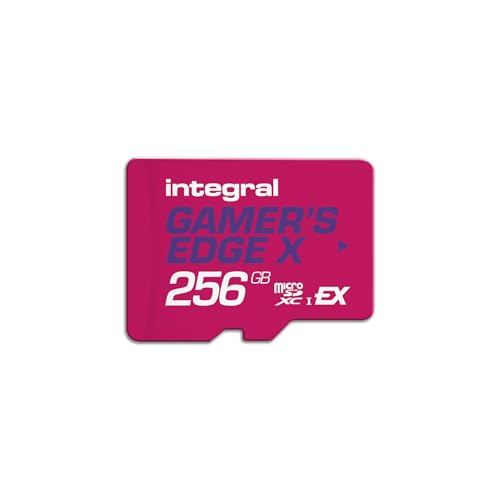
Top 3 picks at a glance


Why the Switch 2 needs a different card
Standard microSD cards use the UHS-I bus, which tops out around 104 MB/s. microSD Express adds a PCIe/NVMe lane to the card, pushing sequential reads to roughly 800-900 MB/s, closer to a laptop SSD than an old memory card. The Switch 2 uses fast internal storage, so Nintendo mandated Express cards to avoid a slow bottleneck when games run from the card.
As an Amazon Associate we earn from qualifying purchases at no extra cost to you.



How to spot a real Express card
Look for the “EX” logo on the card and packaging. If it only shows UHS speed classes like U3, A2, or V30 without “Express,” it is not compatible with Switch 2 storage expansion. The extra row of pins on the back is another giveaway.
What to prioritize when buying
| Spec | What to look for | Why it matters |
|---|---|---|
| Type | microSD Express (EX logo) | Required by Switch 2 |
| Sequential read | ~800 MB/s | Fast game loading |
| Capacity | 256GB or higher | Modern games are large |
| Brand reputation | Established memory makers | Reliability and warranty |
| Warranty | Multi-year / limited lifetime | Long-term peace of mind |
Capacity guidance
256GB is the practical starting point
Switch 2 games can be tens of gigabytes each, and some are download-only. A 256GB card holds a healthy rotation of titles. If you buy a lot digitally or want to avoid managing storage, step up to 512GB or 1TB. Smaller 128GB Express cards exist but fill up fast and rarely save enough money to justify.
Speed differences you will actually feel
All Express cards are dramatically faster than old UHS-I cards, so the biggest jump is simply moving to Express at all. Between Express cards the load-time gaps are smaller, so once you are in the 800 MB/s class, prioritize capacity, brand, and warranty over chasing the last few MB/s.
Watch the price per gigabyte
Express cards cost more than the old UHS-I cards did, so compare price per gigabyte across capacities. Larger cards usually offer better value per gigabyte, and buying one bigger card beats juggling several small ones.
Managing storage smartly
Even with a fast Express card, a little management keeps things smooth. Install the games you play most on the console’s internal storage or the card, and archive finished titles rather than deleting them so you can re-download later without buying again. Physical game cards still stream some data, so keeping frequently played digital titles on the fastest storage you have gives the snappiest load times.
Handle and back up your card
microSD Express cards are small and easy to lose, and like all flash they can fail. Keep save data synced to the cloud where the console supports it, and avoid removing the card while the system is writing. When transferring a card between devices, eject it properly to prevent corruption. Treat the card as convenient game storage, not as the only home for anything irreplaceable.
Watch the temperature and counterfeits
Buy from reputable sellers, because counterfeit cards with faked capacity are a real problem in the memory-card market. A genuine card from an established brand with a proper warranty protects you from a drive that claims 512GB but corrupts data past 64GB. If a deal looks far cheaper than every other Express card, be suspicious.
FAQ
Can I use my old Switch microSD card in the Switch 2?
Not for game storage. The Switch 2 requires microSD Express cards to expand storage; standard UHS-I cards from the original Switch are not supported for that purpose. You can still use old cards in other devices, but you will need a new Express card for the Switch 2.
Do more expensive Express cards load games noticeably faster?
The huge leap comes from using Express at all versus an old UHS-I card. Between Express cards, differences are modest because they all sit near the same 800-900 MB/s range. Spend the money on more capacity and a trusted brand rather than tiny speed gains.
Bottom line: For the Switch 2, only a microSD Express card (look for the EX logo) will expand storage. Aim for a 256GB or larger card from a reputable brand with a strong warranty, and prioritize capacity over chasing marginal speed differences, since every Express card is already far faster than the cards you used before.


