Choosing home studio monitors means choosing how you hear every vocal, guitar, drum, and synth in a mix, and a small room can make that choice harder than it looks. A monitor that sounds full in a shop can sound boomy beside a wall, while a monitor that sounds thin at first can reveal detail that helps a mix hold up on headphones, in a car, and on a phone speaker.
This guide covers five powered studio monitors for home recording, from compact 3.5-inch pairs for a tight desk to 5-inch pairs for a larger room. Each pick below comes from its Amazon listing name and listed specs, with a clear use case, so you can match woofer size, inputs, and room control to the way you record, mix, and listen.
Top 3 picks at a glance


Quick Picks
As an Amazon Associate we earn from qualifying purchases
| Product | Best for | Key spec from title |
|---|---|---|
| JBL Professional 305P MkII 5-Inch 2-Way Powered, Active Monitor Speaker for Near Field Music Production, Studio Monitor, Desktop Computer, Hi-Fi Audio. Sold Individually, Black | Detailed mixing in a small room | 5-inch 2-way powered monitor |
| YAMAHA Hs5 Powered Studio Monitor, Pair | Clean vocal and instrument mixes | 5-inch powered monitor pair |
| KRK RP5G5 ROKIT 5 Generation Five 5″ Powered Studio Monitor Pair | Electronic and hip-hop production | 5-inch powered monitor pair |
| PreSonus Eris 3.5 Studio Monitors, Pair — Powered, Active Monitor Speakers for Near Field Music Production, Desktop Computer, Hi-Fi Audio | A compact desk in a bedroom studio | 3.5-inch powered monitor pair |
| Edifier MR4 Powered Studio Monitor Speakers, 4″ Active Near-Field Reference Speaker – Black (Pair) | First home studio on a tight desk | 4-inch active near-field pair |
How to Choose
Match the woofer to the room
A 3.5-inch or 4-inch woofer suits a desk against a wall, a bedroom, or a shared room, because it keeps low-end energy under control and leaves more space for a keyboard, an interface, and a screen. A 5-inch woofer suits a larger room with space behind the monitors, where extra low-end reach helps drums and bass feel full without crowding the desk. Measure the desk depth first, then leave room for the monitor to breathe, and pick the size that fits the room you have, not the room you wish you had.
Check the inputs on the back
Most home interfaces send audio through balanced TRS or XLR, while a phone, a laptop, or a turntable may use RCA or a 3.5 mm jack, so the input set decides how many cables and adapters you need. Look for the inputs your interface already has, and favor a monitor that accepts them directly, with no extra box in the chain. A front headphone jack and a front volume knob also help when you record late at night, switch between speakers and headphones, or share a room with someone else.
Listen for a flat, honest response
A home studio monitor should show a mix as it is, with no extra warmth or sparkle added to flatter the sound, because a flattering speaker hides problems that appear later on other systems. A flat response makes a muddy vocal, a harsh cymbal, or a boomy bass line easier to hear and fix while you still have the session open. Use familiar songs as a reference, move the monitors away from corners, and give your ears time to adjust before you judge a new pair.
Use the room controls
Many studio monitors include rear-panel controls for high and low frequencies, plus a boundary setting for a desk or a wall, and those controls matter more in a small home room than in a large treated space. A monitor placed close to a wall can gain low-end energy, while a monitor on a bare desk can gain reflections from the surface, so a small cut can bring the balance back toward neutral. Adjust one control at a time, listen to a familiar track after each change, and write down the setting that sounds most even.
The 5 Best Options
JBL Professional 305P MkII 5-Inch 2-Way Powered, Active Monitor Speaker for Near Field Music Production, Studio Monitor, Desktop Computer, Hi-Fi Audio. Sold Individually, Black

The JBL Professional 305P MkII 5-Inch 2-Way Powered, Active Monitor Speaker for Near Field Music Production, Studio Monitor, Desktop Computer, Hi-Fi Audio. Sold Individually, Black brings a wide sweet spot to a small home studio, thanks to its Image Control Waveguide, which spreads the sound evenly across the listening position. Its 5-inch woofer and 1-inch tweeter give vocals, guitars, and drums a clear, even balance, while the rear-panel controls help you tune the monitor to a desk near a wall.
Specs
- 5-inch woofer with 1-inch tweeter in a 2-way powered design
- Image Control Waveguide for a wide listening area
- XLR and balanced TRS inputs on the rear panel
- Sold individually in black
Best for: Detailed mixing in a small room where you sit close to the monitors.
Watch out for: It is sold as a single monitor, so you need two units for a stereo pair.
ASIN: B077N2GQXC
YAMAHA Hs5 Powered Studio Monitor, Pair
The YAMAHA Hs5 Powered Studio Monitor, Pair is a long-running choice for home recording, with a black cabinet and a white woofer cone that has become familiar in bedrooms and small studios. Its 5-inch woofer and 2-way bi-amplified design give vocals and acoustic instruments a clean, direct sound, with little color added to the mix. The pair format suits a two-monitor setup on a desk, and the rear-panel controls help you shape the sound for a room with hard walls.
Specs
- 5-inch woofer in a 2-way bi-amplified near-field design
- Pair of two monitors for a stereo home studio setup
- Black cabinet with a white woofer cone
- Rear-panel controls for room and high-frequency adjustment
Best for: Clean vocal and instrument mixes in a home studio with a dedicated desk.
Watch out for: Low-end reach is limited by the 5-inch size, so deep bass needs careful checking on headphones.
ASIN: B075Q5T7Q1
KRK RP5G5 ROKIT 5 Generation Five 5″ Powered Studio Monitor Pair
The KRK RP5G5 ROKIT 5 Generation Five 5″ Powered Studio Monitor Pair adds on-screen tuning to the familiar yellow-cone KRK design, with three voicing modes that shift the balance between a flat mix reference and a more energetic writing sound. Its 5-inch woven Kevlar woofer and 1-inch silk dome tweeter give drums, bass, and synths a firm, lively feel, while the LCD menu and app control make room adjustments easier to see and repeat.
Specs
- 5-inch woven Kevlar woofer with 1-inch silk dome tweeter
- 55 watts per speaker, 35 watts LF plus 20 watts HF, Class D
- Three voicing modes: Mix, Focus, and Create
- 25 boundary and tuning EQ combinations
Best for: Electronic and hip-hop production where voicing modes and room tuning help.
Watch out for: The menu and app add steps to setup, so allow time to learn the controls.
ASIN: B0CYM2RH6W
PreSonus Eris 3.5 Studio Monitors, Pair — Powered, Active Monitor Speakers for Near Field Music Production, Desktop Computer, Hi-Fi Audio

The PreSonus Eris 3.5 Studio Monitors, Pair — Powered, Active Monitor Speakers for Near Field Music Production, Desktop Computer, Hi-Fi Audio fits a compact desk where larger monitors would crowd the screen and the keyboard. Its 3.5-inch woofers keep the sound focused at close range, while the front-panel volume, Aux In, and headphone jack put everyday controls within reach. The rear-panel acoustic tuning controls help you tame a bright or boomy corner without moving furniture.
Specs
- 3.5-inch powered studio monitors, sold as a pair
- Balanced TRS and RCA inputs on the rear panel
- Acoustic tuning controls on the rear panel
- Front-panel volume, Aux In, and headphone jack
Best for: A compact desk in a bedroom studio where space is tight.
Watch out for: The 3.5-inch woofers give less low-end depth than a 5-inch pair.
ASIN: B0C88ZB3D9
Edifier MR4 Powered Studio Monitor Speakers, 4″ Active Near-Field Reference Speaker – Black (Pair)
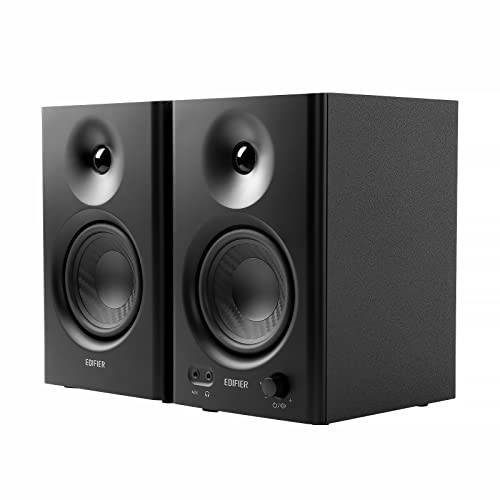
The Edifier MR4 Powered Studio Monitor Speakers, 4″ Active Near-Field Reference Speaker – Black (Pair) suits a first home studio, with a 4-inch size that sits between the compact 3.5-inch pairs and the larger 5-inch pairs in this guide. Its Monitor mode favors an even sound for mixing, while Music mode favors a warmer sound for listening after a session. The front multifunction knob, headphone jack, and Aux input keep daily use simple, with no extra hardware on the desk.
Specs
- 4-inch woofers with 1-inch silk dome tweeters
- 42 watts RMS total output
- Monitor mode and Music mode for mixing and listening
- RCA, TRS, and AUX inputs with a front headphone jack
Best for: A first home studio on a tight desk, for recording and everyday listening.
Watch out for: The 4-inch size still needs headphone checks for very deep bass.
ASIN: B09DKV849B
Which One Fits Your Situation
Recording vocals in a bedroom
A 5-inch pair like the Yamaha HS5 or the JBL 305P MkII gives a vocal a clear, direct sound at close range, with enough detail to hear breath, sibilance, and room tone. Place the monitors at ear height, keep them away from a corner, and use the rear controls to tame any boom from the wall behind the desk.
Mixing electronic music at a desk
The KRK RP5G5 pair suits electronic and hip-hop work, with voicing modes that let you switch between a flat mix reference and a livelier writing sound. Its 5-inch Kevlar woofer gives synths and drums a firm feel, while the EQ combinations help you adapt the pair to a small, untreated room.
A compact desk with a laptop and interface
The PreSonus Eris 3.5 pair fits a tight desk, with front-panel volume, Aux In, and a headphone jack close at hand. Its 3.5-inch woofers keep low-end energy modest in a small room, and the rear acoustic tuning controls help you adjust the sound without moving the desk or the bed.
A first studio for recording and listening
The Edifier MR4 pair suits a first studio, with Monitor mode for mixing and Music mode for listening after a session. Its 4-inch size fits a small desk, its front knob and headphone jack keep daily use simple, and its RCA, TRS, and AUX inputs accept a laptop, an interface, or a phone.
Common Mistakes
- Placing monitors hard against a wall or in a corner, which adds low-end energy and hides mix problems.
- Sitting too close to one monitor and too far from the other, which skews the stereo image.
- Mixing at a high volume for long sessions, which tires your ears and hides small balance errors.
- Skipping the rear-panel controls, which can correct a boomy desk or a bright, bare room.
- Judging a new pair with unfamiliar songs, instead of tracks you already know well.
Frequently Asked Questions
Do I need two monitors for a home studio?
Yes, a pair gives you a stereo image, so you can hear panning, width, and balance between left and right. A single monitor works for checking a vocal or a podcast voice, but it cannot show how instruments sit across the stereo field, and most mixes are made for two speakers or two headphone drivers.
What size monitor suits a small bedroom?
A 3.5-inch or 4-inch pair suits most bedrooms, because it keeps low-end energy under control and fits a desk with a laptop, an interface, and a screen. A 5-inch pair can also work if you have space behind the monitors and room to move them away from the wall, but it needs more care with placement.
Can I connect studio monitors to an audio interface?
Yes, most interfaces send audio through balanced TRS or XLR outputs, and the monitors in this guide accept one or both of those inputs. Use a matched pair of cables, keep the cable run short, and set the interface output and the monitor volume to a comfortable level before you begin a session.
Do studio monitors need a treated room?
No, a treated room helps, but you can get useful results in a normal room with careful placement and the rear-panel controls. Keep the monitors away from corners, add a rug, curtains, or bookshelves to soften reflections, and check each mix on headphones and another speaker before you call it done.
Related guides
More from Amazon
Programs that pair well with the guide above. Offers and eligibility are set by Amazon and may change.
A free business account with business pricing and bulk-buying tools for work, shop or home office.
Create a business accountFree shipping on eligible items, Prime Video and more. Eligible new members can start with a free trial.
Start a Prime free trialAudiobooks and podcasts to listen to on the go. Eligible new members can start with a free trial.
Try Audible freeAd-free music streaming. Eligible new subscribers can start with a free trial.
Try Music Unlimited freeAs an Amazon Associate we earn from qualifying purchases.


