The best 1000Hz gaming mouse for most players is a lightweight wired or 2.4GHz wireless model with a flagship-grade optical sensor, such as the Logitech G Pro X Superlight 2 or the Razer DeathAdder V3. A 1000Hz polling rate means the mouse reports its position to the PC 1,000 times per second, or once every 1 millisecond, and that is the standard that nearly every competitive gaming mouse supports. If you only need a dependable 1000Hz mouse on a tight budget, the Logitech G203 Lightsync does the job for well under $40.
As an Amazon Associate we earn from qualifying purchases at no extra cost to you.

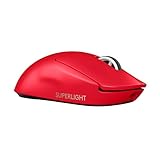


Top 3 picks at a glance
Quick comparison of the best 1000Hz gaming mice
| Pick | Best for | Key specs (per manufacturer spec sheets) | Typical price range |
|---|---|---|---|
| Logitech G Pro X Superlight 2 | Best overall, esports | Wireless, around 60 g, HERO 2 sensor up to 44,000 DPI, 1000Hz or higher polling options | $140-$160 |
| Razer DeathAdder V3 | Best wired for comfort | Wired, around 59 g, Focus Pro 30K optical sensor, 1000Hz polling | $60-$70 |
| Logitech G502 X Plus | Best for feature-heavy play | Wireless, around 106 g, HERO 25K sensor, 13 programmable controls, 1000Hz | $140-$160 |
| Glorious Model O 2 Wireless | Best lightweight value | Wireless, about 65 g, honeycomb shell, 1000Hz | $80-$100 |
| Logitech G203 Lightsync | Best budget | Wired, about 85 g, 8,000 DPI sensor, 1000Hz | $20-$40 |
What 1000Hz actually means
Polling rate is how often the mouse sends a position update to the computer. At 125Hz, the old default for office mice, the gap between updates is 8 ms. At 500Hz it is 2 ms, and at 1000Hz it is 1 ms. Higher-end mice now offer 2000Hz, 4000Hz or even 8000Hz, which cuts the gap to 0.5 ms, 0.25 ms and 0.125 ms respectively. The simple formula is interval in milliseconds = 1000 divided by polling rate.
For most players, 1000Hz is the sweet spot. It cuts the worst-case input delay from the polling stage to 1 ms, which is below what a 144Hz monitor (6.9 ms per frame) or a 240Hz monitor (4.2 ms per frame) can even display. Going beyond 1000Hz mainly helps on 360Hz-plus displays and in games that read raw input at very high rates, and it costs more CPU time and battery life.
Worked example: what polling rate does to your cursor
Say you sit at 800 DPI and flick your hand at 20 inches per second. The mouse generates 800 x 20 = 16,000 counts per second. At 1000Hz, each report carries about 16 counts. At 125Hz, each report would carry 128 counts, bunched into much coarser steps. That coarseness is why 125Hz mice feel slightly jumpy in fast flicks even when the sensor is accurate.
Now the battery side. Wireless mice at 1000Hz typically last noticeably longer than at 4000Hz or 8000Hz because the radio and sensor wake far less often. Manufacturers usually publish battery figures at 1000Hz for exactly this reason, so a quoted 95 hours may drop to a fraction of that at 8000Hz. If you play more than four hours a day, 1000Hz saves you from charging every few days.
Best overall: Logitech G Pro X Superlight 2
The Superlight 2 is the benchmark that other esports mice are measured against. It weighs about 60 g, uses a symmetrical shape that fits palm and claw grips, and its wireless link holds 1000Hz stable in published reviews. It also supports higher polling modes if you later buy a 360Hz monitor. The trade-off is price: it costs several times as much as a basic 1000Hz mouse, and its side buttons are limited to two per side.
Best wired for comfort: Razer DeathAdder V3
The DeathAdder V3 keeps the classic ergonomic right-handed shape that has defined the line for years but drops to roughly 59 g. It is wired, so there is no battery to worry about and no wireless interference. According to Razer’s spec sheet it runs at up to 1000Hz, and the optical switches avoid the double-click failures that plague older mechanical designs. The trade-off is that it is only for right-handed users and the shape is tall, which suits palm grip better than fingertip grip.
Best for feature-heavy play: Logitech G502 X Plus
If you play MMOs, strategy games or anything with many binds, the G502 X Plus gives you 13 programmable controls, a tiltable scroll wheel and RGB lighting. It is heavy at around 106 g, so it is not the first choice for fast aim duels. Wireless 1000Hz is more than enough for the tracking that these games need.
Best lightweight value: Glorious Model O 2 Wireless
The Model O 2 Wireless brings a perforated shell and about 65 g weight at a price that undercuts the big Logitech and Razer flagships. It runs at 1000Hz and is meant for claw and fingertip grips. The trade-off is software polish: the companion app and long-term firmware support are less mature than Logitech G Hub or Razer Synapse.
Best budget: Logitech G203 Lightsync
The G203 has a basic 8,000 DPI sensor and is capped at 1000Hz, which is exactly what you need for most games. It is wired, plastic and about 85 g, with a small body that suits small to medium hands. You give up the lightweight shell and the premium sensor, but not the polling rate that matters for responsiveness.
How to choose: a decision matrix
| Your situation | Choose | Why |
|---|---|---|
| 144Hz or 165Hz monitor, mixed gaming | Any 1000Hz mouse | 1 ms polling is far faster than the 6-7 ms frame time |
| 240Hz monitor, competitive shooters | Lightweight 1000Hz or 2000Hz mouse under 70 g | Weight affects flicking more than polling above 1000Hz |
| 360Hz-plus monitor | Mouse that offers 2000Hz-8000Hz | Frame time is under 2.8 ms, so extra reports can help |
| Weak or older CPU | Stay at 1000Hz | Higher polling uses more CPU interrupts |
| Wireless and long sessions | 1000Hz with a proper receiver | Best balance of latency and battery life |
Settings to check after buying
- Set the polling rate in the mouse’s own software to 1000Hz; some models ship at 500Hz or default to a battery-saving profile.
- Plug the wireless receiver into a front or rear USB port using the short extension cable if supplied. Keeping it within about 20 cm of the mouse avoids dropped reports.
- Use 800 DPI or 1600 DPI as a starting point and adjust in-game sensitivity. Very high DPI does not improve accuracy by itself.
- Turn off Windows pointer acceleration (Enhance pointer precision) so movement is one-to-one.
Frequently Asked Questions
Is 1000Hz enough for competitive gaming?
Yes. A 1000Hz polling rate gives a 1 ms update interval, which is much shorter than the frame time of even a 240Hz display. Most professional players still use 1000Hz or 2000Hz in their settings.
Does a higher polling rate like 4000Hz or 8000Hz make me better?
It can make cursor movement slightly smoother on very high refresh rate monitors, but the benefit is small for most players. It also raises CPU use and drains wireless batteries faster, so test whether it helps in your own games before leaving it on.
Will 1000Hz cause lag or FPS drops?
On a modern CPU the effect is negligible. Very high rates such as 8000Hz can cost a few frames in CPU-limited games, but 1000Hz is the long-established default and is safe on nearly any current system.
How do I check my mouse polling rate?
Open the mouse’s companion software and look for a report rate setting, or use a free web-based polling rate checker and move the mouse in circles. The reading should hover close to 1000 when the mouse is set to 1000Hz.
Is wireless as good as wired at 1000Hz?
Modern 2.4GHz wireless links from Logitech, Razer and similar brands match wired response times at 1000Hz in published latency measurements. Bluetooth is a different story and is usually slower and lower in polling, so use the dedicated receiver for games.
Related guides
More from Amazon
Programs that pair well with the guide above. Offers and eligibility are set by Amazon and may change.
A free business account with business pricing and bulk-buying tools for work, shop or home office.
Create a business accountFree shipping on eligible items, Prime Video and more. Eligible new members can start with a free trial.
Start a Prime free trialAudiobooks and podcasts to listen to on the go. Eligible new members can start with a free trial.
Try Audible freeAd-free music streaming. Eligible new subscribers can start with a free trial.
Try Music Unlimited freeAs an Amazon Associate we earn from qualifying purchases.


