The best FPS gaming mouse is a lightweight wireless model between roughly 50 and 65 grams, with a top-tier optical sensor, a polling rate of at least 1,000 Hz and a shape that fits your grip. For most players, the Logitech G Pro X Superlight 2 or Razer Viper V3 Pro is the safe flagship pick, the Razer Viper V3 HyperSpeed or Logitech G305 covers budget, and the Zowie EC2-CW is a strong choice for larger hands who want a familiar shape.
As an Amazon Associate we earn from qualifying purchases at no extra cost to you.

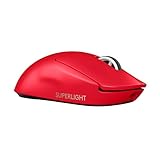


Top 3 picks at a glance
Quick comparison of FPS gaming mouse picks
| Pick | Best for | Key specs | Typical price range |
|---|---|---|---|
| Logitech G Pro X Superlight 2 | Best overall | About 60 g, wireless, up to 32,000 DPI sensor class, 2,000 Hz-capable receiver option | Usually $140-$160 |
| Razer Viper V3 Pro | Best ultralight esports pick | About 54 g, symmetrical, wireless, high polling rate up to 8,000 Hz | Usually $150-$170 |
| Razer Viper V3 HyperSpeed | Best value wireless | Lightweight wireless, AA battery, symmetrical shape | Usually $60-$90 |
| Logitech G305 | Best budget wireless | About 99 g with battery, 12,000 DPI sensor, AA battery | Usually $35-$60 |
| Zowie EC2-CW | Best for larger hands and palm grip | Ergonomic right-handed shape, no software, wireless | Usually $120-$160 |
| Pulsar X2 V2 class | Best for small to medium hands | Lightweight symmetrical mouse, around 50-60 g | Usually $90-$130 |
Specs follow the manufacturers’ published sheets; confirm the current polling and weight numbers for the exact version you buy.
What matters in an FPS mouse
First-person shooters reward consistent flicks, small corrections and stable tracking. These factors affect that the most:
- Weight: Under about 65 g reduces fatigue in long sessions and makes fast direction changes easier. Many esports players prefer 50-60 g.
- Shape and grip: Palm, claw and fingertip grips need different shapes. A mouse that fits wrongly will cost accuracy more than any sensor spec.
- Sensor quality: Modern flagship sensors (Logitech Hero 2, Razer Focus Pro class, PixArt 3395 and 3950 class) are accurate well beyond what gameplay needs. Look for no smoothing, acceleration or spin-out at normal speeds.
- Polling rate: The rate at which the mouse reports to the PC. Higher is more responsive on paper but demands more CPU.
- Click latency and switch type: Optical switches avoid double-click wear and have a short, consistent actuation.
- Wireless or wired: Modern 2.4 GHz wireless matches wired performance in practice for most players, according to manufacturer and independent measurement claims, with the main cost being battery management.
Worked example: polling rate and timing
Polling rate sets the time between position reports:
| Polling rate | Interval between reports | Max reports during one 144 Hz frame (6.94 ms) |
|---|---|---|
| 125 Hz | 8 ms | Less than 1 |
| 500 Hz | 2 ms | About 3 |
| 1,000 Hz | 1 ms | About 7 |
| 4,000 Hz | 0.25 ms | About 27 |
| 8,000 Hz | 0.125 ms | About 55 |
At 144 Hz, 1,000 Hz already gives several position updates per frame. Moving to 4,000 or 8,000 Hz mostly helps at very high refresh rates (360 Hz and above) and when the game and CPU can keep up. On 8,000 Hz, a busy CPU core can cost frames in some titles, so try it and compare frame-time stability before keeping it on.
Worked example: set your sensitivity in centimeters per 360
Use physical distance rather than raw sensitivity numbers so settings transfer between games. The formula is: inches per 360 = 360 / (DPI x in-game sensitivity x game yaw), then multiply by 2.54 for centimeters.
- Counter-Strike 2 (yaw 0.022): at 800 DPI and 1.0 sensitivity, 360 / (800 x 1.0 x 0.022) = 20.45 inches, or about 52 cm per 360.
- Valorant (yaw 0.07): at 800 DPI and 0.4 sensitivity, 360 / (800 x 0.4 x 0.07) = 16.07 inches, or about 41 cm per 360.
Many competitive players settle between about 25 and 55 cm per 360 for tactical shooters, and lower sensitivities help precision at the cost of needing more mousepad space. A 40 cm per 360 setting needs a roughly 40 cm wide movement for a full turn, so pair it with a large pad. These ranges are typical of what players report, not rules, and you should adjust based on comfort.
Best overall: Logitech G Pro X Superlight 2
This mouse is a common pick for good reason: a lightweight shell near 60 g, a reliable wireless connection, hybrid optical-mechanical switches and a sensor with no practical limits for gaming. It suits claw and fingertip grips on medium to large hands. The trade-off is price and the shape: it is symmetrical with a low profile, which some palm grippers find flat.
Best ultralight esports pick: Razer Viper V3 Pro
At around 54 g with support for very high polling rates, the Viper V3 Pro is for players who want the lightest shell and the lowest latency. It suits claw and fingertip grips on small to medium hands. The trade-off is price and durability perception: the very light shell and thin side grips feel less substantial, and 8,000 Hz needs a compatible receiver and CPU headroom.
Best value wireless: Razer Viper V3 HyperSpeed
This model uses a lightweight, symmetrical shell and AA battery power to cut cost. It is a smart pick for players who want a wireless esports shape without flagship spending. The trade-off is a slightly heavier body than the Pro version and a less advanced sensor, though both are more than enough for most players.
Best budget wireless: Logitech G305
The G305 remains a common budget recommendation because its sensor is reliable and its wireless link is solid. It runs on one AA battery for long periods per the manufacturer’s claimed battery life. The trade-off is weight (around 99 g with the battery) and a smaller, plain shape that suits small hands and claw grip best.
Best for larger hands and palm grip: Zowie EC2-CW
Zowie’s EC shape is a long-running favorite for palm and relaxed claw grips. There is no software to install, with settings handled by on-mouse buttons, which tournament organizers like. The trade-off is that it is a right-handed shape, heavier than the ultralight picks, and has fewer customization options.
Best for small to medium hands: Pulsar X2 V2 class
Lightweight symmetrical mice from Pulsar and similar brands offer a low weight and a compact size at lower prices than the biggest brands. They suit fingertip and claw grippers with small to medium hands. The trade-offs are software quality, quality-control variation and warranty support, which differ by brand.
How to choose: a decision matrix
| Your situation | Choose | Reason |
|---|---|---|
| Hand length over 19 cm, palm grip | Zowie EC2-CW or a full-size ergonomic shape | Shape supports the palm |
| Hand length 16-19 cm, claw grip | Superlight 2 or Viper V3 Pro | Low, symmetrical shell |
| Hand length under 16 cm | Compact symmetrical mouse | Easier fingertip control |
| Tight budget | Logitech G305 or Viper V3 HyperSpeed | Good sensor at a low price |
| 360 Hz monitor | Mouse with 4,000 Hz or higher polling | More updates per frame |
Setup tips that help accuracy
- Turn off Windows pointer acceleration (Enhance pointer precision) and keep the Windows pointer speed at the default 6 of 11.
- Use 800 or 1,600 DPI and change sensitivity in the game, not the mouse, so you can keep one setup across titles.
- Use a cloth mousepad sized to your sensitivity, and replace grip tape or skates when they wear.
- Plug the wireless receiver into a front or rear USB port using the included extension cable to keep it within a foot or two of the mouse.
Frequently Asked Questions
Is a lighter mouse always better for FPS games?
No. Lighter mice reduce fatigue and speed up flicks, but extremely light shells can feel twitchy for players who prefer to anchor with the palm. Under about 65 grams is a practical target, and shape matters more than shaving the last few grams.
Is wireless good enough for competitive shooters?
Yes. Current 2.4 GHz wireless mice from major brands report latency comparable to wired, and many tournament players use them. Just keep a charged battery or spare and keep the receiver close to the mouse.
What DPI should I use for FPS games?
800 to 1,600 DPI is typical. Higher DPI does not make you more accurate; it only changes the cursor speed, so pick a DPI and adjust sensitivity in the game until your centimeters per 360 feels right.
Do I need an 8,000 Hz polling rate?
Not for most players. 1,000 Hz is enough for 144 and 240 Hz monitors, while 4,000 to 8,000 Hz can help a little on 360 Hz and faster displays. It also increases CPU load, so test frame-time stability before relying on it.
How do I know which grip I use?
Palm grip rests your whole hand on the mouse, claw grip arches the fingers while the palm touches the back, and fingertip grip uses only the fingertips. Pick a shape whose hump and length match your grip rather than the most popular model.
Related guides
More from Amazon
Programs that pair well with the guide above. Offers and eligibility are set by Amazon and may change.
A free business account with business pricing and bulk-buying tools for work, shop or home office.
Create a business accountFree shipping on eligible items, Prime Video and more. Eligible new members can start with a free trial.
Start a Prime free trialAudiobooks and podcasts to listen to on the go. Eligible new members can start with a free trial.
Try Audible freeAd-free music streaming. Eligible new subscribers can start with a free trial.
Try Music Unlimited freeAs an Amazon Associate we earn from qualifying purchases.


