The best AC1900 wireless routers in 2026 are the Netgear Nighthawk R7000 for all-round reliability, the TP-Link Archer A9 for budget buyers, the ASUS RT-AC68U for features and mesh support, and the Synology RT1900ac for advanced controls. AC1900 is an older Wi-Fi 5 class that still handles gigabit-or-slower internet and online gaming well in a small or mid-sized home. If you are buying new and the price is close, a Wi-Fi 6 router is usually the better deal.
As an Amazon Associate we earn from qualifying purchases at no extra cost to you.



Top 3 picks at a glance
What “AC1900” actually means
AC1900 is a marketing label that adds two theoretical link rates: up to 600 Mbps on 2.4 GHz and up to 1,300 Mbps on 5 GHz. Nobody gets 1,900 Mbps from one device. The 600 Mbps figure on 2.4 GHz usually depends on a vendor-specific 1024-QAM mode (Broadcom’s TurboQAM); standard 256-QAM gives 450 Mbps, and only compatible clients benefit. The 1,300 Mbps figure assumes a 3×3 client on an 80 MHz channel, and almost no phone or laptop has three antennas.
Quick comparison of the picks
| Pick | Best for | Key specs (per manufacturer) | Price range |
|---|---|---|---|
| Netgear Nighthawk R7000 | Best overall | AC1900, dual-core 1 GHz CPU, 3 external antennas, 4x gigabit LAN, USB 3.0 + USB 2.0 | Mid-range |
| TP-Link Archer A9 | Best budget | AC1900, MU-MIMO, 4x gigabit LAN, beamforming, app setup | Budget |
| ASUS RT-AC68U | Best features / AiMesh | AC1900, dual-core CPU, 4x gigabit LAN, USB 3.0 + USB 2.0, AiMesh node support | Mid-range (often limited stock or refurbished) |
| Synology RT1900ac | Best for control and security | AC1900, dual-core 1 GHz CPU, 4x gigabit LAN, USB 3.0 + SD slot, SRM software | Mid-range to upper mid-range |
Availability of AC-class routers varies by region and some are now sold mainly as stock remnants or refurbished units. Check the exact hardware revision and return policy before buying.
Best overall: Netgear Nighthawk R7000
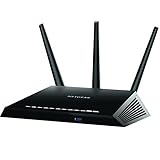
The R7000 is the reference AC1900 router: three external antennas, a dual-core processor, four gigabit LAN ports and two USB ports for a shared drive or printer. It supports QoS and has a mature, widely documented firmware ecosystem, including third-party options on supported revisions. It suits a typical apartment or a house of up to roughly 1,500 to 2,000 square feet with a central placement.
Trade-off: It has no MU-MIMO and no Wi-Fi 6, so many simultaneous clients will contend for airtime. Netgear’s stock firmware also pushes some features, such as advanced QoS, toward app prompts.
Best budget: TP-Link Archer A9
The Archer A9 gives you the AC1900 feature set, including MU-MIMO and beamforming, at a budget price. Setup runs through the Tether app, and it covers the common gaming case of a wired console or PC plus a few phones and a streaming stick.
Trade-off: Its USB capability and CPU headroom are more modest than the R7000 or RT-AC68U, so heavy QoS with a fast connection can hold throughput back. Treat it as a router for connections up to about 500 Mbps.
Best for features and mesh: ASUS RT-AC68U
The RT-AC68U has a strong reputation for stable firmware, a detailed QoS and traffic analyzer, and built-in AiProtection security. It can also act as an AiMesh node, which lets you pair it with a newer ASUS router and extend coverage without replacing everything. That makes it a good pick if you already own one or want a path to mesh later.
Trade-off: It is an older design with limited stock. Some units on the market are refurbished, so confirm the firmware is current and that ASUS still lists security updates for your revision.
Best for control and security: Synology RT1900ac
The RT1900ac runs Synology’s SRM operating system. It includes a VPN server, per-device traffic reports, web filtering, a guest network with schedules, and Safe Access parental controls. It suits a home lab or someone who already owns a Synology NAS and wants a tidy setup.
Trade-off: It is more expensive than a basic AC1900 router, and the interface goes deeper than most gamers need. Gaming-specific features like a one-click game mode are limited.
Worked example: will AC1900 cover your household?
Use a quick airtime budget. Typical figures are approximate: a 4K stream takes about 25 Mbps, a 1080p stream 5 to 8 Mbps, cloud gaming at 1080p60 about 20 to 30 Mbps, a video call 3 to 5 Mbps, and online game traffic only 1 to 3 Mbps. Downloads are the heavy item because they take whatever is available.
| Device / activity | Typical demand (Mbps) |
|---|---|
| Two 4K streams (50 each at worst case 25 x 2) | 50 |
| One cloud gaming session, 1080p60 | 25 |
| One video call | 4 |
| Online game on wired PC | 3 (and not on Wi-Fi at all) |
| Total sustained demand | about 82 |
| Game download on a Wi-Fi laptop (burst) | up to the link limit |
Now the ceiling. A common 2×2 laptop on 5 GHz at 80 MHz has a 867 Mbps link rate. Real throughput is typically 50 to 65 percent of that because of protocol overhead, so roughly 430 to 560 Mbps in a good position. A 1×1 phone has a 433 Mbps link rate, which gives roughly 215 to 280 Mbps. So a router in this class cannot be the limit for any internet plan up to about 500 Mbps, and for gigabit plans the Wi-Fi client will cap you well before the WAN port does. The 82 Mbps sustained load above uses under a fifth of even the weaker phone ceiling, which is why the router is fine for streaming and gaming but less so for one person saturating a gigabit plan.
How to choose: a decision matrix
| Your situation | Choose | Why |
|---|---|---|
| Internet plan up to 300 Mbps, small home, 5 to 10 devices | Archer A9 | Budget price, ample Wi-Fi 5 capacity |
| Plan 300 to 500 Mbps, a few gamers, USB drive wanted | Netgear R7000 | Stronger CPU and USB 3.0 |
| Want QoS tuning, security suite, mesh later | ASUS RT-AC68U | AiMesh and a detailed traffic analyzer |
| Own a Synology NAS, want VPN and filtering | Synology RT1900ac | SRM software and integration |
| Gigabit plan, many Wi-Fi devices, or a large home | A Wi-Fi 6 class router instead | OFDMA and better multi-device efficiency |
Specs that matter more than the AC1900 number
- Wired gigabit ports: All four picks have four gigabit LAN ports. For a gaming PC or console, a cable removes Wi-Fi latency and jitter entirely.
- CPU and RAM: A dual-core 1 GHz class chip with at least 256 MB RAM handles QoS and VPN better than weaker designs.
- Firmware support: Check that the manufacturer still issues security updates for your hardware revision. An unpatched router is a larger risk than slower Wi-Fi.
- MU-MIMO: It helps only when several compatible clients are active at once and is a small advantage in most homes.
Settings that help gaming on an AC1900 router
- Use 5 GHz for the gaming device: It has more channels and less interference than 2.4 GHz. Keep 2.4 GHz for smart-home gadgets.
- Channel width 80 MHz in quiet areas, 40 MHz in crowded buildings: A narrower channel loses peak speed but often reduces interference and retries.
- Pick a non-DFS channel (36 to 48) if your router drops out: DFS channels can force a channel change when radar is detected, which causes brief disconnects.
- Enable QoS only if you see bufferbloat: On connections above about 300 Mbps it can cut throughput on a weaker CPU, so run a speed test with and without it.
- Place the router high and central: Aim antennas vertically for the best coverage on one floor.
Is AC1900 still worth buying in 2026?
It is worth buying when the price is clearly lower than a Wi-Fi 6 model, your plan is under about 500 Mbps and your devices are mostly Wi-Fi 5. It is not worth it if you want Wi-Fi 6 clients to perform at their best, or if you have a gigabit plan and several people using Wi-Fi at once. In those cases a budget Wi-Fi 6 router such as an AX1800 or AX3000 class model gives better efficiency, WPA3 and longer firmware support for a similar budget.
Frequently Asked Questions
Does AC1900 mean 1,900 Mbps speed?
No. It is the sum of the 2.4 GHz and 5 GHz theoretical maximums (600 plus 1,300 Mbps). A single device uses one band at a time, and real-world throughput is typically half or less of the link rate.
Is an AC1900 router good enough for online gaming?
Yes. Online games use only a few Mbps, and latency depends on your connection quality and whether the console or PC is wired. An AC1900 router with a wired gaming device performs as well as far more expensive models for that task.
Is AC1900 better than AX1800?
Not usually. AX1800 is Wi-Fi 6, which handles many devices more efficiently and supports WPA3, even though its peak link rate is lower on paper. AC1900 can win on peak speed to one close 3×3 client, but few devices have 3×3 radios.
Do AC1900 routers support mesh?
Some do. The ASUS RT-AC68U can join an AiMesh system with other supported ASUS routers, while others like the R7000 and Archer A9 generally need a separate extender or a different system. Check the manufacturer’s compatibility list before assuming mesh will work.
Will an AC1900 router handle a gigabit internet plan?
Its WAN port is gigabit, so wired devices can reach near full speed. Over Wi-Fi, most clients will reach roughly 250 to 550 Mbps at best, which is below the full plan speed. If wireless speed on a gigabit plan matters, a Wi-Fi 6 or Wi-Fi 6E router is a better fit.
How long will an AC1900 router keep getting updates?
It depends on the model and region. Many of these routers are well past launch, so check the manufacturer’s support page for your hardware revision. If updates have ended, replace it rather than leave an exposed device on your network.
Related guides
More from Amazon
Programs that pair well with the guide above. Offers and eligibility are set by Amazon and may change.
A free business account with business pricing and bulk-buying tools for work, shop or home office.
Create a business accountFree shipping on eligible items, Prime Video and more. Eligible new members can start with a free trial.
Start a Prime free trialAudiobooks and podcasts to listen to on the go. Eligible new members can start with a free trial.
Try Audible freeAd-free music streaming. Eligible new subscribers can start with a free trial.
Try Music Unlimited freeAs an Amazon Associate we earn from qualifying purchases.


