The best slim business laptop for most people in 2026 is the Lenovo ThinkPad X1 Carbon (Gen 13 or newer), which combines a weight of roughly 1 kg, a strong keyboard, enterprise security and a 16:10 screen. If you work in a Mac environment, the MacBook Air 13-inch or 15-inch with an M4 chip is the strongest alternative. Windows buyers who prioritise manageability and a premium chassis should also look at the HP EliteBook X G1a, HP EliteBook Ultra G1i and the Microsoft Surface Laptop for Business.
As an Amazon Associate we earn from qualifying purchases at no extra cost to you.
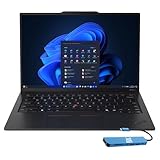


Top 3 picks at a glance
Quick comparison of the best slim business laptops
Weights and battery sizes below are approximate, based on manufacturer spec sheets for the base configurations. Exact figures change with screen, battery and configuration, so check the SKU you are buying.
| Pick | Best for | Key specs | Price range |
|---|---|---|---|
| Lenovo ThinkPad X1 Carbon Gen 13 | Best overall | 14-inch 16:10, roughly 1 kg, around 57 Wh battery, Intel Core Ultra 200V, up to 32 GB RAM | Premium |
| Apple MacBook Air 13-inch / 15-inch (M4) | Best battery life and quiet operation | About 1.24 kg / 1.51 kg, fanless, 16 GB RAM base, roughly 54 Wh / 66 Wh battery | Mid-range to premium |
| HP EliteBook X G1a (14-inch) | Best AMD Ryzen AI business option | Roughly 1.3 kg, Ryzen AI Pro, HP Wolf Security, vPro-class manageability on the Intel sibling | Premium |
| Lenovo ThinkPad T14s Gen 6 | Best value for fleets | About 1.2 kg, 14-inch, full-size port selection, strong repair documentation | Mid-range to premium |
| Microsoft Surface Laptop for Business (13.8-inch / 15-inch) | Best display and design for client-facing work | 3:2 touch screen, roughly 1.3 kg / 1.7 kg, Snapdragon X or Intel options by model | Mid-range to premium |
| ASUS ExpertBook B9 OLED | Lightest 14-inch for frequent travellers | Under 1 kg class, OLED panel, business security features | Premium |
Best overall: Lenovo ThinkPad X1 Carbon
The X1 Carbon remains the reference point for a slim business laptop because it avoids the usual trade-offs. It is carbon-fibre and magnesium, near the 1 kg mark, yet it keeps a deep-travel keyboard, a physical TrackPoint and a full-size HDMI port. Per Lenovo’s spec sheet it offers a fingerprint reader, IR camera for Windows Hello, a TPM 2.0 chip and optional vPro on the Intel models.
Who it suits: consultants, managers and anyone typing for several hours a day. Main trade-off: a premium price for the thinnest configurations, and RAM is soldered, so the amount you order is the amount you keep.
Best for Mac users: MacBook Air M4
Apple rates the MacBook Air at up to 18 hours of video playback, and the fanless design means no noise in a meeting room. For email, documents, spreadsheets and video calls it is faster than most Windows machines in this weight class. The 15-inch model adds a larger screen and a bigger battery for only about 0.27 kg more.
Main trade-off: port selection is limited to two Thunderbolt/USB-C ports plus MagSafe, so docks and dongles are part of the budget. It is also a poor fit if your company relies on Windows-only line-of-business software.
Best AMD-based and fleet-friendly: HP EliteBook X G1a and ThinkPad T14s
The HP EliteBook X G1a pairs a Ryzen AI Pro processor with HP’s security stack and a metal chassis around 1.3 kg. It suits IT departments that standardise on HP and want strong efficiency without Intel vPro as a requirement. The ThinkPad T14s Gen 6 is the more practical choice if you value ports and serviceability over absolute thinness, since it keeps a rugged lid and a keyboard that holds up under daily use.
Main trade-off: both weigh more than the lightest ultrabooks, and you should confirm that your management tools support the processor platform before ordering in volume.
Best for client-facing work: Surface Laptop for Business
The 3:2 aspect ratio shows more of a document or spreadsheet per screen, and the touch display and speakers are excellent for presentations. Microsoft sells business variants with Windows 11 Pro and enterprise support. Main trade-off: limited ports, and on the Snapdragon X models you must check that niche VPN clients, drivers and legacy apps run natively or through emulation.
Best for the lightest carry: ASUS ExpertBook B9 OLED
If you fly weekly, the B9 is among the lightest 14-inch business laptops available. The OLED panel is vivid but can show glare in bright offices. Main trade-off: a thinner chassis typically means fewer ports and less cooling headroom under sustained heavy loads.
How to choose: decision matrix
| Your situation | Choose | Why |
|---|---|---|
| Long typing days, mostly Windows apps | ThinkPad X1 Carbon or T14s | Best keyboard, strong security options |
| Travelling most weeks, long flights | MacBook Air 13-inch or ASUS ExpertBook B9 | Lowest weight and strongest efficiency |
| Spreadsheets and multiple windows | MacBook Air 15-inch or Surface Laptop 15-inch | Larger or taller screen at modest weight |
| IT-managed fleet with vPro requirements | Intel ThinkPad or HP EliteBook Ultra | Remote management features |
| Lots of USB-A, HDMI, Ethernet devices | ThinkPad T14s | More built-in ports, fewer dongles |
| Windows-only legacy software | Intel or AMD Windows models | Avoids ARM compatibility risk |
Worked example: will the battery last a workday?
Manufacturer battery claims come from light tests, so calculate against your own workload. Runtime in hours equals battery capacity in watt-hours divided by average power draw in watts. Take a laptop with a roughly 57 Wh battery:
- Documents and browsing at about 6 W average: 57 ÷ 6 ≈ 9.5 hours
- Mixed office work with Teams or Zoom at about 9 W: 57 ÷ 9 ≈ 6.3 hours
- Constant video calls plus screen sharing at about 13 W: 57 ÷ 13 ≈ 4.4 hours
These are illustrative averages, and real draw varies with screen brightness, processor, background apps and wireless use. The point is the method: if you spend most of the day in calls, plan for around two-thirds of the advertised runtime, or choose a machine with a larger battery. Because airlines limit spare batteries and laptops to about 100 Wh, any internal battery in this class is well within the limit.
What matters more than thinness
Memory and storage
Choose 16 GB of RAM as the practical minimum in 2026, and 32 GB if you run many browser tabs, virtual machines or heavy Excel models. Because most slim laptops solder the memory, you cannot upgrade later. A 512 GB SSD is a sensible floor; cloud-heavy workflows can manage with that, but large local files justify 1 TB.
Security and manageability
Look for TPM 2.0, a fingerprint reader or IR camera, a webcam privacy shutter and BIOS-level protection. If a company manages the device, confirm support for your MDM, such as Intune or Jamf, before purchase.
Screen and webcam
A 16:10 or 3:2 display gives more vertical space than 16:9. For brightness, aim for at least 400 nits if you work near windows. A 1080p webcam is now a reasonable baseline for video calls.
Ports and charging
Two Thunderbolt or USB4 ports allow one-cable docking with power, monitors and peripherals. Check that the charger is USB-C Power Delivery, since this lets you carry a single charger for phone and laptop.
Warranty and service
Business lines typically offer on-site service upgrades and longer support windows than consumer models. For small teams, that can be worth more than a lighter chassis.
Frequently Asked Questions
What weight counts as a slim business laptop?
Most buyers treat anything under about 1.4 kg with a thickness near 15 to 17 mm as slim. Under 1.1 kg is the ultralight tier. Beyond roughly 1.6 kg, the weight difference stops mattering much for a commute.
Is a MacBook Air good enough for business use?
Yes, for most office, finance, design and development workflows, and it is especially strong on battery life and noise. The limits are port count and Windows-only software. Check your company’s application list before committing.
Do I need Intel vPro?
Only if your IT department uses vPro features such as out-of-band remote management. Individual users and small businesses rarely need it. AMD Ryzen Pro and Apple silicon machines also offer solid security and management through other tools.
Is 16 GB of RAM enough in 2026?
For typical business work it is enough, but 32 GB gives more headroom for several years of updates and heavier apps. Since slim laptops usually have soldered memory, buying extra at purchase is cheaper than replacing the machine early.
Should I choose a 13-inch, 14-inch or 15-inch model?
Thirteen inches suits frequent travellers, 14 inches is the best balance for most people, and 15 inches suits those who work on the laptop screen without an external monitor. If you dock at a desk most days, screen size matters less than keyboard quality and ports.
Related guides
More from Amazon
Programs that pair well with the guide above. Offers and eligibility are set by Amazon and may change.
A free business account with business pricing and bulk-buying tools for work, shop or home office.
Create a business accountFree shipping on eligible items, Prime Video and more. Eligible new members can start with a free trial.
Start a Prime free trialAudiobooks and podcasts to listen to on the go. Eligible new members can start with a free trial.
Try Audible freeAd-free music streaming. Eligible new subscribers can start with a free trial.
Try Music Unlimited freeAs an Amazon Associate we earn from qualifying purchases.


