The best external hard drive for most people in 2026 is a 2.5-inch portable drive like the WD My Passport or Seagate Portable for cheap bulk storage. Pick a desktop 3.5-inch drive like the WD Elements Desktop or Seagate Expansion Desktop if you need 8TB or more. Choose a portable SSD such as the Samsung T7 Shield or Samsung T9 if you run games or edit video from the drive, because a spinning drive is roughly 5 to 8 times slower in sustained transfers.
As an Amazon Associate we earn from qualifying purchases at no extra cost to you.


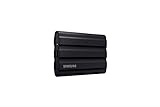

Our Top Picks


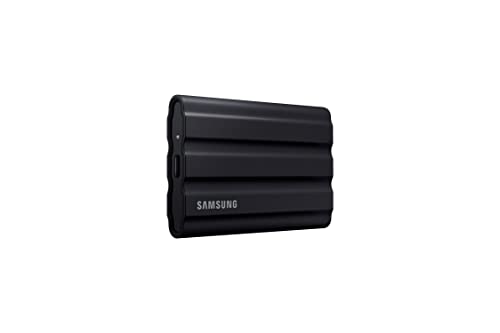

Top 3 picks at a glance
Quick comparison of the picks
| Pick | Best for | Key specs (per manufacturer spec sheets) | Price range |
|---|---|---|---|
| WD My Passport (HDD) | Best overall for backups | 2.5-inch, USB 3.0 Micro-B/USB-C cable, bus-powered, capacities up to about 5TB, typically 100-130 MB/s real-world | Budget to mid-range |
| Seagate Portable Drive (HDD) | Best budget | 2.5-inch, USB 3.0, bus-powered, up to about 5TB, no-frills plastic shell | Budget |
| WD Elements Desktop / Seagate Expansion Desktop | Best for large libraries | 3.5-inch, external power adapter, capacities from roughly 8TB to 20TB+ depending on the generation, around 180-250 MB/s | Mid-range to premium |
| Samsung T7 Shield (SSD) | Best rugged all-rounder | USB 3.2 Gen 2 (10Gbps), up to about 1,050 MB/s read, IP65 rating, up to 4TB | Mid-range to premium |
| Samsung T9 (SSD) | Best for fast video and large game installs | USB 3.2 Gen 2×2 (20Gbps), up to about 2,000 MB/s read, up to 4TB | Premium |
| LaCie Rugged (HDD) | Best for travel and field use | Drop-resistant rubber bumper, USB-C, up to 5TB-class capacities | Mid-range |
| WD_Black P10 Game Drive (HDD) | Best for console libraries | 2.5-inch, USB 3.2 Gen 1, up to about 5TB, bus-powered | Mid-range |
Decision criteria: what actually matters
Most buyers compare brand and capacity first. Four other factors decide whether you will be happy a year later: the drive type, the job it does, how it is powered, and the interface it connects through.
1. HDD versus SSD: speed is the real difference
A portable hard drive stores data on spinning platters. It is cheap per terabyte but slow and sensitive to knocks while running. A portable SSD has no moving parts, survives drops better, and moves data far faster, but costs several times more per terabyte. Here is what that means for a 1TB copy (1,000,000 MB), using typical sustained speeds:
| Drive type | Typical sustained speed | Time to copy 1TB | Time to copy a 100GB game |
|---|---|---|---|
| 2.5-inch portable HDD | 120 MB/s | about 2 h 19 min | about 14 min |
| 3.5-inch desktop HDD | 200 MB/s | about 1 h 23 min | about 8 min |
| USB 10Gbps portable SSD | 900 MB/s | about 19 min | about 2 min |
| USB 20Gbps portable SSD | 1,800 MB/s | about 9 min | about 1 min |
These are arithmetic from the stated speeds, not benchmark results. Real drives vary with file size, how full the drive is and the host port. Many small files copy much slower than one large file. Cheap SSDs can also drop in speed once their cache fills during very long transfers.
2. Match the drive to the job
Use the matrix below to map your situation to a choice.
| Your situation | Choose | Why |
|---|---|---|
| Weekly PC backup, rarely read back | Portable or desktop HDD | Speed matters little, and the cost per TB is lowest |
| Backing up more than 6TB | 3.5-inch desktop HDD | Highest capacity for the money; needs wall power |
| Playing PC games from the drive | Portable SSD (10Gbps or faster) | Load times and texture streaming suffer on a 120 MB/s HDD |
| Steam Deck or handheld PC | Portable SSD, or a microSD card for small games | Low power draw and shock tolerance while moving |
| PS5 (PS4 games and archiving PS5 games) | HDD is fine | PS5 games must run from internal or M.2 storage; PS4 titles can run from USB |
| Xbox Series X|S | USB HDD for older games and archiving; SSD for faster use | Series X|S games can be stored externally but must run from the internal drive or a Storage Expansion Card |
| Editing 4K video directly from the drive | 20Gbps SSD | Multi-stream timelines can exceed what an HDD can sustain |
| Carrying data in a bag or on location | Rugged SSD (T7 Shield class) or LaCie Rugged | Drop and dust resistance matter more than peak speed |
3. Capacity: plan for formatted size and growth
Drive makers count 1TB as 1,000,000,000,000 bytes, but Windows reports in binary units. A 4TB drive therefore shows about 3.64TB in File Explorer (4 × 10¹² ÷ 1.0995 × 10¹²). Nothing is missing; it is a unit difference. Format overhead takes a little more.
A worked sizing example is a gamer with a 1.5TB game library and 300GB of photos and documents. That is 1.8TB of data. Add 30% growth headroom and you need about 2.3TB. A 4TB drive is the sensible buy, because 2TB would be 90% full and would also slow down as it fills. For a proper backup, use at least double your current data so you can keep more than one version.
4. Power and ports
Portable drives are bus-powered. A 2.5-inch HDD typically draws about 0.7-0.9A at 5V, or roughly 3.5-4.5W, at spin-up. Some older USB-A ports, unpowered hubs and handheld devices cannot supply that, and the drive will click or disconnect. Plug it straight into a rear motherboard port, or use a powered hub. Desktop 3.5-inch drives use a 12V wall adapter, so power is rarely an issue but you lose portability.
For ports, a 5Gbps USB port is enough for any HDD. An SSD needs a 10Gbps port to show its speed, and a 20Gbps SSD like the T9 needs a matching USB 3.2 Gen 2×2 port. On a 5Gbps port, the same SSD tops out near 400-450 MB/s in practice. That is still faster than any hard drive, but you are paying for speed you cannot use.
Best overall: WD My Passport
The WD My Passport is the default recommendation for backups and general file storage. It is a compact 2.5-inch drive with a bus-powered USB connection and capacities up to roughly 5TB. WD includes backup software and password protection with hardware encryption, per the manufacturer’s spec sheet. The trade-off is speed: expect about 100-130 MB/s and a drive that should not be moved while running.
Best budget: Seagate Portable Drive
The Seagate Portable Drive is the cheapest route to several terabytes in a pocketable format. It is plain and lightly built, but it does the job for cold storage and weekly backups. It suits students and anyone moving old photos or media off a PC. The trade-off is durability and no included hardware encryption on the basic model, so keep it in a case and avoid moving it while active.
Best for large libraries: WD Elements Desktop or Seagate Expansion Desktop
If you are archiving a big game collection, a media server’s worth of video or a full-system backup, a 3.5-inch desktop drive gives the most terabytes per unit of money. Both lines use an external power adapter and offer capacities well past what 2.5-inch drives reach. They are also faster than portables, at around 180-250 MB/s. The trade-offs are bulk, fan-less heat in a closed shelf and the need for a wall outlet. For anything irreplaceable, buy two smaller drives rather than one giant one, so a single failure does not take everything.
Best rugged SSD: Samsung T7 Shield
The T7 Shield pairs a 10Gbps USB interface with an IP65 rating and a rubberized shell. It suits students, travellers, photographers and PC gamers who want a game drive that survives a backpack. It is also a fine Steam Deck companion. The trade-off is price per terabyte, which is several times that of an HDD.
Best for speed: Samsung T9
The T9 uses USB 3.2 Gen 2×2 at 20Gbps, with rated reads of up to about 2,000 MB/s per Samsung’s spec sheet. It matters for 4K or higher-bitrate video editing, large project files and installing huge games quickly. You will only see the full speed on a matching 20Gbps port; on a 10Gbps port it behaves like a normal fast SSD. It is a premium purchase, so only buy it if your computer has the right port.
Best for travel: LaCie Rugged
The LaCie Rugged line is a hard drive with an orange rubber bumper and drop and weather resistance. It suits people who need a lot of space in the field and cannot afford an SSD at that size. It is thicker and heavier than a plain portable HDD, and speeds are still HDD-class. Treat the drop rating as protection when the drive is off, not a license to bump it while it is writing.
Best for consoles: WD_Black P10 Game Drive
This is a 2.5-inch HDD aimed at console owners. It is a good archive for PS4 titles and for parking Xbox and PS5 games you are not playing, so you can move them back instead of redownloading. It works on PC too. For Xbox Series X|S games you want to actually run, you still need the internal drive or an expansion card.
Setup tips that prevent data loss
- Format correctly: use exFAT if you share the drive between Windows and Mac, NTFS for Windows only. Avoid FAT32 for large files, because it caps files at 4GB.
- Eject first: use “Safely Remove Hardware” before unplugging. Pulling a drive mid-write is the most common cause of corrupted file tables.
- Follow 3-2-1: keep three copies of important data, on two different media, with one off-site or in the cloud. One external drive is a copy, not a backup strategy.
- Check health yearly: read the SMART status with a tool such as CrystalDiskInfo. Rising reallocated sectors mean it is time to replace the drive.
- Keep HDDs still: do not move a spinning drive while it is active. Even short drops can damage heads.
Frequently Asked Questions
Are external hard drives or SSDs better?
Neither is better for everything. Hard drives win on price per terabyte and suit backups and archives. SSDs win on speed, durability and size, and suit game libraries, video editing and travel. Many people use an SSD for active work and an HDD for backup.
How long does an external hard drive last?
A typical external HDD lasts about three to five years of regular use, though some run longer and some fail early. Failure rates vary by model and handling, and drops while spinning cut life sharply. Because failure is a matter of when, not if, keep a second copy of anything you cannot replace.
Can I play PC games from an external hard drive?
Yes, and many older or less demanding games run fine from a USB HDD. Expect longer load times, and some modern open-world games may stutter when assets stream in. A USB SSD with 10Gbps or faster gets much closer to internal-drive behavior.
How much capacity do I need?
Add up your data, add about 30% for growth, and round up. For a game library plus documents that is often 2 to 4TB. For a full-system backup, aim for at least twice the size of the data being protected so you can keep multiple versions.
Why is my external drive not showing up?
The usual causes are a weak USB port or cable, an unpowered hub, or a drive that has no drive letter. Try a rear port directly on the motherboard and the original cable first. Then open Disk Management in Windows to check whether the drive appears and needs a letter assigned or initialization. Do not initialize if it already holds data you want.
Do external hard drives work with PS5 and Xbox?
Yes, with limits. A USB HDD works with the PS5 for PS4 games and for storing PS5 games you are not playing. Xbox Series X|S can store Series games externally but needs the internal drive or an expansion card to run them, though USB drives can run older Xbox One and Xbox 360 titles.
Related guides
More from Amazon
Programs that pair well with the guide above. Offers and eligibility are set by Amazon and may change.
A free business account with business pricing and bulk-buying tools for work, shop or home office.
Create a business accountFree shipping on eligible items, Prime Video and more. Eligible new members can start with a free trial.
Start a Prime free trialAudiobooks and podcasts to listen to on the go. Eligible new members can start with a free trial.
Try Audible freeAd-free music streaming. Eligible new subscribers can start with a free trial.
Try Music Unlimited freeAs an Amazon Associate we earn from qualifying purchases.


