The best angle for most antennas is vertical (90°) for a Wi-Fi router on the same floor as your gaming PC, with one antenna tilted about 45° if you have two or more, and a horizontal rod or loop for U.S. over-the-air TV. A standard dipole antenna sends its signal out sideways in a donut shape and almost nothing off its tip, so the right angle depends on where the receiving device sits relative to the antenna, not on a universal number.
This guide treats “angle” as a buying decision. It covers which antenna type fits your layout, how to set its angle, and what extra gain is worth paying for. The focus is Wi-Fi for gaming, with a section on TV antennas because the logic is the same.
As an Amazon Associate we earn from qualifying purchases at no extra cost to you.

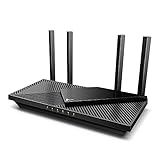

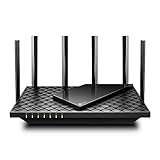
Our Top Picks
 TP-Link Dual-Band AX3000 Wi-Fi 6 Wireless Gigabit InternetAX300012.99 x 9.45 x 2.87 inches1.66 poundsCheck on Amazon
 TP-Link AXE5400 Tri-Band WiFi 6E RouterWiFi 6E, Tri-Band AXE540012.91 x 10.43 x 4.72 inches1.5 poundsCheck on Amazon


Top 3 picks at a glance
Quick comparison: antenna setups and their best angles
| Pick | Best for | Key specs | Best angle | Price range |
|---|---|---|---|---|
| Dual-polarization external dipoles (3-4 swappable or fixed rods, 3-6 dBi) | Most homes, mixed devices | Roughly 70°-80° vertical beamwidth at 2 dBi; wider coverage than high-gain rods | One vertical, one at 45°, one horizontal if present | Budget to mid-range |
| Mid-gain dipoles (5-9 dBi) | Single-floor, long homes | Narrower vertical beam, so the angle matters more | Vertical (90°) only if all devices are on one floor | Budget |
| Router with internal antennas (Wi-Fi 6E/7 class) | Simple setups, tidy desks | No adjustable angle; orientation of the whole unit matters | Upright on a shelf, 1-1.5 m off the floor | Mid-range to premium |
| Directional patch or panel antenna | Point-to-point, outbuildings, garages | Beamwidth around 60°-90°, gain often 8-14 dBi | Aimed straight at the other end, matching polarization | Mid-range |
| Indoor or outdoor TV antenna (dipole, loop, Yagi) | Over-the-air channels | UHF/VHF, 25-70 mile classes | Rods horizontal; aim at towers by compass | Budget to mid-range |
Why the angle matters: the donut pattern and polarization
A dipole antenna is strongest perpendicular to its length and weakest along it. Picture a donut with the antenna running through the hole. A vertical antenna covers the floor it sits on well, but it covers the ceiling above and the floor below poorly.
Polarization is the second factor. A vertical transmitting antenna talks best to a vertical receiving antenna. Per standard antenna theory, the power lost from mismatched polarization is proportional to cos² of the angle between them:
- 0° offset: no loss
- 45° offset: about 3 dB (half the power)
- 60° offset: about 6 dB
- 90° offset: in theory total loss, in practice 15-25 dB because indoor reflections scramble polarization
Laptops and phones sit at random orientations, which is why a router with all antennas perfectly vertical is not automatically ideal.
Worked example: upstairs gaming room, router downstairs
Say your router is on the ground floor and your gaming PC is 5 m away horizontally and 2.7 m higher (one storey). The elevation angle from the router to the PC is atan(2.7 / 5), about 28° above horizontal.
The ideal half-wave dipole pattern is cos((π/2)·sin θ) / cos θ, where θ is the elevation angle from the horizontal plane. For a vertical antenna that gives:
| Elevation to device | Relative field strength | Loss vs. horizontal plane | Typical situation |
|---|---|---|---|
| 0° (same level) | 1.00 | 0 dB | Same-room PC |
| 28° | 0.84 | about 1.5 dB | Next floor, 5 m away |
| 45° | 0.63 | about 4 dB | Next floor, 2.7 m away |
| 60° | 0.42 | about 7.6 dB | Directly above, off to one side |
| 90° (straight up) | 0 | deep null | Right above the router |
The conclusion: at 28° the vertical antenna still works fine, losing only about 1.5 dB on paper. Tilting the antenna to 45° would reduce that loss slightly for upstairs devices but add polarization mismatch for same-floor devices. If your PC sits almost directly above the router, a vertical antenna loses about 7.6 dB or more, and moving the router is worth more than any tilt.
These are idealized free-space numbers. Walls, floors and metal studs change real results, so treat them as a way to choose a starting angle, not a prediction.
Best overall: dual-polarization dipoles (one vertical, one at 45°)
Most Wi-Fi 6, 6E and 7 routers with 3-4 external antennas use MIMO, which sends separate streams through separate antennas. Mixing orientations gives each stream a different path and polarization, so at least one is usually well matched to your device.
Setup: antenna 1 vertical (90°), antenna 2 tilted 45° toward the room you care about most, antenna 3 (if present) tilted 45° the other way or horizontal. This suits households with phones, consoles and laptops in several rooms. The trade-off is that a single wired-style PC placed 3 m away might see slightly less than with all antennas vertical, though a PC that matters should be on Ethernet anyway.
Best for a single floor: vertical, mid-gain dipoles
If every device is on the same level, such as a bungalow or apartment, keep all antennas at 90°. Higher-gain rods (5-9 dBi) do not create power. They squeeze the donut flatter, concentrating signal horizontally. That helps long, single-storey layouts and hurts multi-storey homes, since the vertical beam narrows to roughly 30°-40° or less for the higher-gain classes (approximate; check the manufacturer’s datasheet). Do not tilt these much, and do not buy them for a two-floor home.
Best for multi-floor homes: tilt 30°-45° or use a second access point
For a router on one floor serving another, tilt the antennas 30°-45° toward the target floor, but keep one vertical for same-floor devices. Beyond one storey, an extra access point or mesh node on the far floor beats any angle adjustment. A vertical dipole’s null along its axis means that stacking nodes directly above each other gives the weakest link between them, so offset them horizontally.
Best for outbuildings and long links: directional patch or panel antennas
For a detached garage or a link between two points, a panel or patch antenna works best when aimed directly at the other end. Match polarization: if one side is vertical, the other must be vertical too. A misalignment of 10°-15° in azimuth is usually tolerable at beamwidths of 60°-90°, but a high-gain parabolic dish can lose significant signal with a few degrees of error. The trade-off is that a directional antenna leaves the rest of the house with a weak signal, so it suits a dedicated link, not whole-home coverage.
Best for TV: horizontal rods, aimed by compass
Over-the-air TV in the U.S. is commonly broadcast with horizontal polarization, so rabbit-ear dipoles generally work best laid or spread horizontally, or at a wide V. Flat indoor antennas are usually designed with that in mind and work best flat against a window facing the towers. Outdoor Yagi antennas should be mounted with elements horizontal and rotated toward the tower bearing. Use a signal map from the FCC’s DTV reception tool or a similar service to find that bearing, then adjust in small steps and rescan channels after each change. For distance-based picks, see our guide to indoor over-the-air TV antennas.
Decision matrix: match your situation to a setup
| Your situation | Antenna choice | Angle to set |
|---|---|---|
| Router and PC in the same room, one floor | Standard or mid-gain dipoles | All vertical (90°) |
| Phones, consoles, laptops across two floors | 3-4 dipoles of about 5 dBi | One vertical, others 45° |
| PC directly above the router | Move the router or add a node | Tilt will not fix a null |
| Internal-antenna router | Reposition the unit | Upright, high, away from walls and metal |
| Garage or shed 20+ m away | Directional panel pair | Aim at each other, same polarization |
| Weak TV channels | Outdoor or window antenna | Horizontal elements, aimed by tower bearing |
How to choose: numbers that matter
- Wavelength: 2.4 GHz is about 12.5 cm, 5 GHz about 6 cm and 6 GHz about 5 cm. Higher bands lose more through walls, so angle tuning helps less than line of sight does.
- Gain: every 3 dBi of antenna gain flattens the pattern further. For multi-floor homes, stay near 3-5 dBi.
- Cable and connectors: if you swap antennas, check the connector type (usually RP-SMA) and keep extension cables short. Long thin cables can eat several dB at 5-6 GHz.
- Placement first: raise the router 1-1.5 m off the floor and keep it 1 m or more from microwaves, baby monitors and large metal objects before you touch the angles.
How to fine-tune in four steps
- Baseline: run a wired-adjacent speed test and note latency and signal strength (RSSI) on your gaming device at its normal position.
- Set the default angles: one vertical, others at 45° for mixed households, or all vertical for single-floor homes.
- Change one antenna at a time: wait 30 seconds, then test again. A shift of 3 dB is noticeable, and anything smaller is usually noise.
- Stop when you hit diminishing returns: if the best angle gains less than 3 dB, a wired connection or a node closer to the PC is the better fix.
Frequently Asked Questions
What is the best angle for router antennas?
Vertical (90°) is the best starting point for devices on the same floor. If you have multiple antennas and devices on different floors, tilt one or two about 45° so they cover both vertical and angled paths.
Should Wi-Fi antennas be horizontal or vertical?
Vertical works best for coverage across one floor, since a dipole radiates sideways. Horizontal placement shifts the strong zone up and down, which can help devices above and below but weakens coverage on the same floor.
Do higher-gain antennas always improve gaming Wi-Fi?
No. Higher gain narrows the vertical coverage, which helps long single-storey layouts but can hurt devices on other floors. For most homes, 3-5 dBi dipoles with mixed angles are the safer choice.
What angle should a TV antenna be at?
For rabbit-ear and Yagi-style antennas in the U.S., keep the elements horizontal, since broadcast signals are commonly horizontally polarized. Rotate the whole antenna toward the broadcast towers and rescan channels after each adjustment.
Does the angle of antennas matter on a router with internal antennas?
You cannot tilt individual antennas, but the orientation and position of the whole router still matter. Place it upright, high and away from walls and metal, and avoid tucking it in a cabinet.
How much should I tilt antennas for a two-story house?
A tilt of 30°-45° toward the other floor is a reasonable starting point. If the second-floor device is almost directly above the router, no tilt will help much, so move the router or add a mesh node.
Related guides
More from Amazon
Programs that pair well with the guide above. Offers and eligibility are set by Amazon and may change.
A free business account with business pricing and bulk-buying tools for work, shop or home office.
Create a business accountFree shipping on eligible items, Prime Video and more. Eligible new members can start with a free trial.
Start a Prime free trialAudiobooks and podcasts to listen to on the go. Eligible new members can start with a free trial.
Try Audible freeAd-free music streaming. Eligible new subscribers can start with a free trial.
Try Music Unlimited freeAs an Amazon Associate we earn from qualifying purchases.


