The best webcam for most people in 2026 is a 1080p model with a good sensor, a physical privacy shutter and a USB connection that matches your PC, such as the Logitech Brio 500 or the Elgato Facecam MK.2. Pick a 4K webcam only if you crop in or record at high quality, because most video-call and streaming platforms compress the image well below 4K anyway. This guide covers the picks, the USB bandwidth math, and a matrix that maps your setup to a choice.
Note: the original search phrase was oddly worded, so this guide covers the closest sensible buying question: which webcams are worth buying for gaming streams, calls and everyday use, including models with privacy shutters. Prices are described as budget, mid-range or premium classes, since street prices shift often.
As an Amazon Associate we earn from qualifying purchases at no extra cost to you.
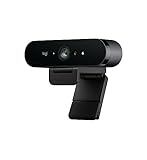
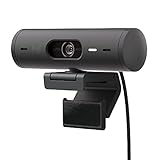
Quick comparison of the best webcams
| Pick | Best for | Key specs (per manufacturer) | Price class |
|---|---|---|---|
| Logitech Brio 500 | Best overall for calls and light streaming | 1080p30, up to 90° field of view, USB-C, built-in privacy shutter, dual mics | Mid-range |
| Elgato Facecam MK.2 | Best for streaming | 1080p60, HDR, USB 3 connection, privacy cover included | Mid-range to premium |
| Logitech Brio 100 | Best budget | 1080p30, fixed focus, privacy shutter, auto light correction | Budget |
| Logitech C920s HD Pro | Best proven classic | 1080p30, autofocus, privacy shutter, USB-A | Budget to mid-range |
| Insta360 Link 2 | Best for tracking and desk demos | 4K30, 2-axis gimbal, AI tracking, USB-C | Premium |
| Razer Kiyo Pro Ultra | Best for low-light image quality | 4K30, large sensor, USB 3 | Premium |
| Obsbot Tiny 2 | Best for hands-free movement | 4K30, gimbal, AI tracking, voice and gesture control | Premium |
Best overall: Logitech Brio 500
The Brio 500 suits office workers, students and casual streamers who want a webcam that looks good with no tuning. Logitech’s software offers automatic light correction and a selectable field of view up to 90 degrees, which helps in small rooms. The built-in shutter physically blocks the lens, which is more reassuring than a software toggle. The trade-off is that it tops out at 1080p30, so it will not match a 60 fps streaming camera for motion smoothness.
Best for streaming: Elgato Facecam MK.2
If you stream and want your face to look smooth next to 60 fps gameplay, the Facecam MK.2 is built for that. Elgato’s spec sheet lists 1080p at 60 fps and HDR. Its software exposes manual controls for exposure, white balance and ISO, so your picture stays consistent from stream to stream. The trade-off is that it needs a proper USB 3 port and works best with extra lighting. It is also more than a casual caller needs.
Best budget: Logitech Brio 100
The Brio 100 is a sensible choice for a secondary PC, a dorm desk or a work laptop. It delivers 1080p30, includes a privacy shutter and corrects lighting automatically. The trade-offs are fixed focus and a narrower field of view (around 58 degrees per Logitech). You cannot sit far back, and you cannot fit two people in the frame.
Best proven classic: Logitech C920s HD Pro
This is a long-running 1080p30 model with autofocus, a wider lens than the Brio 100 and a privacy shutter. It works with nearly every app without drivers. The trade-off is an older sensor that struggles in dim rooms, with noise and soft detail under ordinary lamp lighting.
Best for tracking: Insta360 Link 2
The Link 2 is a gimbal webcam that follows you as you move, which is useful for standing desks, whiteboard explanations and product demos. It records at up to 4K30 and has a desk-friendly design. The trade-offs are the premium price and the fact that tracking can be distracting if you fidget a lot. You can switch it off.
Best low-light image: Razer Kiyo Pro Ultra
This model uses a large sensor, which gathers more light than the small sensors in most webcams. That matters in rooms lit mainly by a monitor and a dim lamp. The trade-off is cost and size. It is a bulky camera on a thin monitor, and it needs a USB 3 port to deliver its higher modes.
Best hands-free movement: Obsbot Tiny 2
The Tiny 2 is a 4K30 gimbal camera with AI tracking plus voice and gesture control. It suits presenters, teachers and creators who move around. The trade-off is that its gimbal and tracking features are more than a basic call needs, and its software is a separate install.
The USB bandwidth math most buying guides skip
A webcam’s resolution and frame rate decide which USB connection it needs. Uncompressed video bandwidth is width × height × bits per pixel × frames per second. A common uncompressed format (YUY2) uses 16 bits per pixel.
| Mode | Calculation | Uncompressed data rate | Minimum practical connection |
|---|---|---|---|
| 720p30 | 1280 × 720 × 16 × 30 | about 0.44 Gbps | USB 2.0 (480 Mbps) is borderline |
| 1080p30 | 1920 × 1080 × 16 × 30 | about 1.0 Gbps | USB 2.0 needs compression (MJPEG) |
| 1080p60 | 1920 × 1080 × 16 × 60 | about 1.99 Gbps | USB 3.0 (5 Gbps) |
| 4K30 | 3840 × 2160 × 16 × 30 | about 3.98 Gbps | USB 3.0 only just fits; compression is usually used |
What this means in practice: a 1080p30 camera on a USB 2.0 port works because it compresses the video, but the compression adds artifacts and some latency. A 1080p60 uncompressed stream needs about 2 Gbps, so plug it into a blue or USB-C 3.x port directly on the motherboard, not an unpowered hub. If you also run a capture card and a headset DAC on the same controller, the camera can drop frames. Spread devices across different ports on the back of the PC.
How to choose: decision matrix
| Your situation | Pick this | Why |
|---|---|---|
| Work calls on a laptop, privacy matters | Logitech Brio 500 or Brio 100 | Physical shutter, automatic light correction |
| Streaming next to 60 fps gameplay | Elgato Facecam MK.2 | 1080p60 and manual controls |
| Dim room, no light budget | Razer Kiyo Pro Ultra | Larger sensor collects more light |
| Standing desk or demos | Insta360 Link 2 or Obsbot Tiny 2 | Gimbal tracking keeps you framed |
| Older PC with only USB 2.0 ports | Brio 100 or C920s | Compressed 1080p30 fits the bandwidth |
| Shared family PC, tight spending | Brio 100 | Cheapest option with a physical shutter |
Settings that matter more than extra resolution
- Lock exposure and white balance. Auto modes hunt when you move, so the picture pulses. Manual values hold your look steady.
- Match frame rate to light. At 30 fps the longest possible exposure is 1/30 s, and at 60 fps it is 1/60 s. A 60 fps mode in dim light gets noisy or dark, so add a lamp or stay at 30 fps.
- Put the key light in front. A soft light behind the monitor, angled at your face, improves a small sensor more than a pricier camera.
- Set the camera at eye level. A clamp or monitor mount avoids the unflattering upward angle of a laptop camera.
- Use a dedicated mic. Built-in webcam mics pick up keyboard clatter. A headset or USB mic nearly always sounds better.
Privacy: shutter versus software
A physical shutter or lens cover is the only control that does not depend on software. Webcam indicator lights and OS permissions help, but a sliding cover removes doubt. The Logitech Brio 100, Brio 500 and C920s all include one, and Elgato supplies a cover with the Facecam MK.2. If your webcam has none, a small adhesive slider cover is a cheap fix. Also revoke camera permission for apps you rarely use in your operating system’s privacy settings.
Frequently Asked Questions
Is a 4K webcam worth it for streaming?
Usually not. Most streaming platforms and video-call apps compress to 1080p or lower, and a 4K image only helps if you crop in or record locally. A 1080p60 camera with good light often looks better live than a 4K30 camera in a dim room.
Do I need USB 3.0 for a webcam?
For 1080p30 you can get by with USB 2.0, because the camera compresses the stream. For 1080p60 uncompressed or 4K modes, use USB 3.x, as these need about 2 to 4 Gbps by the pixel math above. A direct motherboard port is safer than a hub.
Is a webcam better than a mirrorless camera or phone?
A mirrorless camera with a clean HDMI output and a capture card gives a better image, especially with blurred backgrounds. It also costs more, needs power and adds setup complexity. A good webcam is simpler and fine for most calls and streams.
Do webcams with privacy shutters make a difference?
Yes, a physical shutter ensures nobody can see through the lens, whatever software is installed. It is a simple safeguard for shared or work computers. Check the manufacturer’s spec sheet, because some models only ship with a removable cover.
Why does my webcam look dark or grainy?
The cause is almost always light. Small webcam sensors need bright, soft light on your face, and auto-exposure raises gain (noise) when it is dim. Add a lamp in front of you, lock exposure manually and consider 30 fps instead of 60 fps.
Can I use a webcam on a console?
It depends on the console and the app. Many consoles accept standard USB (UVC) webcams only in specific apps, and support changes over time. Check the console’s current support page before buying.
Related guides
More from Amazon
Programs that pair well with the guide above. Offers and eligibility are set by Amazon and may change.
A free business account with business pricing and bulk-buying tools for work, shop or home office.
Create a business accountFree shipping on eligible items, Prime Video and more. Eligible new members can start with a free trial.
Start a Prime free trialAudiobooks and podcasts to listen to on the go. Eligible new members can start with a free trial.
Try Audible freeAd-free music streaming. Eligible new subscribers can start with a free trial.
Try Music Unlimited freeAs an Amazon Associate we earn from qualifying purchases.


