The best ergonomic gaming chair is the one whose seat height, seat depth, lumbar position and armrests can be adjusted to match your body and desk, not the one with the most aggressive racing styling. For most players, the Secretlab Titan Evo is the safest all-round pick. The Herman Miller Embody Gaming Chair is the premium answer for long daily sessions, and a mesh chair such as the Sihoo Doro C300 covers the budget-conscious, hot-room case.
“Ergonomic” is not a regulated label on gaming chairs, so the useful approach is to treat it as a checklist of adjustments and then measure yourself against it. The sections below give the picks first, then the numbers to check before you buy.
As an Amazon Associate we earn from qualifying purchases at no extra cost to you.

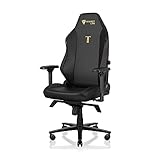

Our Top Picks
 Razer Iskur V2 X Ergonomic Gaming ChairStandard27.58 x 27.58 x 49.64 inches50.26 poundsCheck on Amazon

Top 3 picks at a glance
Quick comparison of ergonomic gaming chair picks
| Pick | Best for | Key ergonomic features | Price tier |
|---|---|---|---|
| Secretlab Titan Evo | Best overall | Three body-size options, integrated adjustable lumbar, 4D armrests, tilt up to roughly 85 degrees recline | Mid-range to premium |
| Herman Miller Embody Gaming Chair | Best premium / all-day sitting | Pixelated back support that follows the spine, deep tilt, high-end adjustable arms | Premium |
| Razer Iskur V2 | Best for lumbar support | Built-in adjustable lumbar curve, 4D armrests, multi-layer synthetic leather | Mid-range to premium |
| Sihoo Doro C300 | Best mesh value | Breathable mesh back, adjustable lumbar and headrest, adjustable arms | Budget to mid-range |
| Steelcase Leap V2 / Herman Miller Aeron | Best non-gaming alternative | Office-grade adjustability, long warranties, no racing-style bolsters | Premium |
Features and size options change between revisions, so confirm the current details on the manufacturer’s spec sheet before purchase.
Best overall: Secretlab Titan Evo
The Titan Evo works for most people because it comes in multiple sizes (small, regular and XL, per Secretlab’s own size guidance), so the seat width and back height are not one-size-fits-all. It has a built-in lumbar system you can tune in depth and height, and 4D armrests that move up, forward, sideways and rotate. That matters more than any cushion.
Trade-off: the firm, bolstered seat and the cold-cure foam suit upright sitting but can feel narrow for very broad hips. The leatherette options run warm, so choose the fabric variant in a hot room.
Best premium: Herman Miller Embody Gaming Chair
This is the office-chair engineering of the Embody adapted for gaming, with a back that flexes along the spine rather than relying on a fixed lumbar bump. It suits people who sit six to ten hours a day, whether that is work plus play or long streaming sessions. Its strength is staying supportive as you shift between leaning forward in a shooter and reclining for a strategy game.
Trade-off: the cost is high, and the thin, firm seat takes a few days to adapt to. If your budget stops at mid-range, a Titan Evo or Iskur V2 gets you most of the adjustability.
Best for lumbar support: Razer Iskur V2
Older Iskur models were criticized for a fixed lumbar curve. The V2 uses a built-in, adjustable lumbar that lets you move the support rather than adding a loose pillow. It is a good fit for people with a flat or low lower back who found earlier gaming chairs pushed them forward.
Trade-off: the seat is firm and the styling is bold, and sizing is less granular than Secretlab’s lineup.
Best mesh value: Sihoo Doro C300
If you run hot or play in a warm room, a mesh back avoids the sweat problem of synthetic leather. The Doro C300 offers adjustable lumbar, a headrest and adjustable arms at a lower tier than the big-name chairs. It behaves more like a conventional ergonomic office chair than a bucket seat.
Trade-off: mesh gives less side support, and long-term durability of the mechanism is less proven than at Herman Miller or Steelcase.
Best non-gaming alternative: Steelcase Leap V2 or Herman Miller Aeron
Gaming chairs are not automatically more ergonomic than office chairs. Both of these have deeper adjustment ranges and long warranties (per the manufacturers’ published terms). Choose them if you want the best posture support and don’t care about the look.
How to choose: measure first
These checks take five minutes and prevent most bad purchases.
1. Seat height from your lower leg
Measure from the floor to the back of your knee while sitting with your feet flat (the popliteal height). Your seat should sit at that height, so your knees are about 90 to 100 degrees and your feet rest flat. Typical adult values run from about 38 cm to 50 cm. Most chairs with a class-4 gas lift cover roughly 40 to 52 cm, so very short users (under about 160 cm) may need a footrest or a small-size chair.
2. Desk and armrest height: a worked example
Take a 178 cm player with a popliteal height of 45 cm. The seat goes to about 45 cm. Seated elbow height above the seat is usually around 23 to 27 cm, so say 25 cm. Elbows at 90 degrees put the armrests, and the ideal keyboard surface, at about 45 + 25 = 70 cm from the floor. A standard 73 to 75 cm desk is then 3 to 5 cm too high. Either raise the chair to about 48 to 50 cm and add a footrest, or lower the desk. This is why 4D armrests and an adjustable-height desk matter more than a headrest pillow.
3. Seat depth: the two-to-three finger rule
With your back against the backrest, you should fit about 5 to 7 cm (roughly 2 to 3 fingers) between the seat edge and the back of your knee. Too shallow and your thighs go unsupported. Too deep and the front edge cuts off circulation. Short users usually need a small-size chair or a seat-depth slider.
4. Weight rating
Pick a chair rated at least 20 percent above your body weight, because the rating assumes static load, not repeatedly dropping into the seat. A 100 kg user should look for 120 kg or higher. Heavier users should look at XL-size models, which have a wider seat and a reinforced base.
5. Lumbar: adjustable beats padded
Your lower-back curve peaks at a different height depending on torso length. Look for lumbar that adjusts in depth and height. Strap-on pillows slide around, and they cannot fix a chair whose backrest is the wrong height.
Decision matrix: match your situation to a chair
| Your situation | Choose | Why |
|---|---|---|
| Under 165 cm, small frame | Titan Evo small size | Shorter seat depth and backrest keep lumbar at the right height |
| 175 to 190 cm, average build | Titan Evo regular or Iskur V2 | Adjustable lumbar and 4D arms cover the common range |
| Over 190 cm or over 100 kg | Titan Evo XL or a heavy-duty office chair | Wider seat, higher weight rating, taller back |
| Hot room, sweat-prone | Sihoo Doro C300 or a mesh office chair | Airflow through the back |
| 8+ hours daily | Embody Gaming Chair, Leap V2 or Aeron | Dynamic back support and long warranties |
| Lower back pain, flat lumbar | Razer Iskur V2 | Adjustable built-in lumbar |
What to skip
- Fixed-arm chairs: if the armrests only move up and down, they cannot match a narrow keyboard or mouse position.
- Loose neck and lumbar pillows as the main support: they signal that the backrest itself is poorly shaped.
- Class-2 or unrated gas lifts on heavy users: look for a class-4 cylinder in the spec sheet.
- Extreme recline marketing: a 180-degree recline is useful for napping, but you will use the 100 to 110 degree range for gaming.
Setting up the chair once you have it
- Set seat height first, then the desk or armrests.
- Place the lumbar peak at your belt line, then move it half a centimetre at a time.
- Recline the back to about 100 to 110 degrees, which reduces disc pressure compared with a rigid 90 degrees.
- Stand up and walk for a couple of minutes every 30 to 45 minutes. No chair fixes static posture.
Frequently Asked Questions
Are gaming chairs actually ergonomic?
Some are, but the label alone says little. A chair is ergonomic if it adjusts to your seat height, seat depth, lumbar position and arm height. Many racing-style models offer only a fixed bucket shape and a pillow, so check the adjustments listed rather than the styling.
Is a gaming chair or an office chair better for your back?
Premium office chairs often have deeper adjustment ranges and longer warranties. The best gaming chairs, such as the Titan Evo, Iskur V2 and Embody Gaming Chair, close that gap. The better choice is whichever fits your body measurements and is comfortable over several hours.
How much should I spend on an ergonomic gaming chair?
Budget chairs can work if they have adjustable arms and a class-4 gas lift, but lumbar and mechanisms improve noticeably at the mid-range. If you sit more than six hours a day, a premium chair with a long warranty is usually the better value over its lifetime.
Is mesh or leatherette better for long sessions?
Mesh breathes better and is preferable in warm rooms. Leatherette and fabric foam seats give more cushioning and side support. Many people prefer a hybrid, a mesh back with a foam seat.
How do I know if a chair is the right size?
Sit back fully. Your feet should be flat at roughly 90 to 100 degrees at the knee, you should have 5 to 7 cm behind your knee, and your elbows should rest at desk height without shrugging. If you cannot meet all three, move to a different size or add a footrest.
Do I need a headrest?
Not necessarily. A headrest helps when you recline, but most upright gaming does not need it. Prioritize lumbar and arm adjustment, and treat the headrest as a bonus.
Related guides
More from Amazon
Programs that pair well with the guide above. Offers and eligibility are set by Amazon and may change.
A free business account with business pricing and bulk-buying tools for work, shop or home office.
Create a business accountFree shipping on eligible items, Prime Video and more. Eligible new members can start with a free trial.
Start a Prime free trialAudiobooks and podcasts to listen to on the go. Eligible new members can start with a free trial.
Try Audible freeAd-free music streaming. Eligible new subscribers can start with a free trial.
Try Music Unlimited freeAs an Amazon Associate we earn from qualifying purchases.


