The best gaming desk for a two-monitor setup is one at least 55 to 63 inches wide and 27 to 30 inches deep, with a steel frame and a load rating well above your total gear weight. For most people that means a height-adjustable desk like the Flexispot E7 Pro or Uplift V2, or a gaming-focused steel desk like the Secretlab Magnus Pro XL. This guide assumes “two” means two monitors; a short section on sharing a desk with another person is in the FAQ.
As an Amazon Associate we earn from qualifying purchases at no extra cost to you.


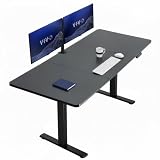
Our Top Picks
Top 3 picks at a glance
Quick comparison of the picks
| Pick | Best for | Key specs (check the maker’s spec sheet) | Price range |
|---|---|---|---|
| Secretlab Magnus Pro XL | Best overall for cable-managed gaming setups | Steel-frame desk with magnetic accessory system, built-in cable tray, wide top for two 27-32″ monitors | Usually $500–$900 |
| Flexispot E7 Pro | Best height-adjustable value | Dual-motor frame, wide size options, high lift capacity per manufacturer | Usually $400–$650 |
| Uplift V2 | Best premium, most customizable | Dual-motor frame, many top sizes and materials, long warranty | Usually $600–$1,200 |
| Fixed-height 55-63″ steel desk class | Best budget | Carbon-fiber-look or MDF top, 1.5″ or thicker, fixed 29-30″ height | Usually $100–$250 |
| L-shaped gaming desk class (e.g. Eureka Ergonomic’s L-shaped models) | Best for 2 monitors plus a PC and peripherals | Roughly 60-63″ main run, side return, often LED strip and monitor shelf | Usually $200–$450 |
| IKEA Idåsen or Mittzon class | Best for clean, non-“gamer” looks | Large tops, sit-stand options, simple cable routing | Usually $300–$700 |
Work out the width first: a worked example
Panel width is set by diagonal and aspect ratio. For 16:9 monitors, width is about 0.87 × the diagonal. For 21:9 ultrawides, it is about 0.92 × the diagonal. Add roughly 1 to 2 inches of bezel and stand gap in total.
| Two monitors | Width each | Combined width | Minimum desk if on stands | Comfortable desk |
|---|---|---|---|---|
| 2 × 24″ 16:9 | ~20.9″ | ~42″ | 47″ | 55″ |
| 2 × 27″ 16:9 | ~23.5″ | ~47″ | 51″ | 55-60″ |
| 2 × 32″ 16:9 | ~27.9″ | ~56″ | 59″ | 63-71″ |
| 34″ ultrawide + 24″ side | ~31.2″ + ~20.9″ | ~52″ | 55″ | 60-63″ |
Example: two 27-inch monitors measure 2 × 23.5 = 47 inches. Add about 2 inches for the gap and bezels and you have 49 inches. Stands mean you cannot tuck either monitor past the desk’s edge. So a 48-inch desk is too tight and 55 inches is the practical floor. Your keyboard, mouse and elbows sit in front of the monitors, so the desk needs extra width beyond the screens for mouse swings. Gamers who use low sensitivity and big mouse pads should go to 60 inches or more.
Monitor arms change the math. A dual arm lets the screens overhang the desk edges slightly and frees the desk surface. It can cut the needed width by about 4 to 6 inches, provided the desk top is thick enough to clamp (usually 0.5 to 3.5 inches per arm spec).
Best overall: Secretlab Magnus Pro XL
The Magnus Pro XL suits players who want a gaming-focused desk with integrated cable management, a magnetic accessory system and a metal frame. It fits two 27-inch monitors or a 32-inch pair, depending on the size you pick. Check the listed width against the table above. The trade-off is price and the fact that it comes in fixed-height and electric variants. Make sure you buy the version you actually want, because the fixed-height model costs less but cannot go to standing height.
Best height-adjustable value: Flexispot E7 Pro
The E7 Pro is a dual-motor sit-stand frame sold with a range of top sizes, including ones wide enough for two 32-inch monitors. According to the manufacturer, it carries a higher lifting capacity than entry-level single-motor frames, which matters when you add two monitors, arms and a heavy PC. The trade-off is that tops vary in thickness and finish, and you may need to buy a separate large desk mat for a clean gaming look.
Best premium: Uplift V2
The Uplift V2 is the pick for buyers who want to configure everything: top size, material, grommets, cable trays and a stable frame at standing height. Wobble at full height is the main complaint with cheaper standing desks, and a dual-motor frame with a crossbar helps here. The trade-off is cost. A big top with extras can push the price well past the budget picks.
Best budget: fixed-height 55-63″ steel desk
A fixed-height steel-frame desk in this class gives you the width you need for about a quarter of the price of an electric desk. Look for a 1-inch or thicker top, an adjustable foot on each leg and a 100+ lb listed capacity. You give up sit-stand and often have to manage cables yourself. For two monitors on arms, check that the top can handle a clamp.
Best for a full battlestation: L-shaped desk
An L-shaped desk gives you a main run for the two monitors and a return for a PC tower, streaming gear or a second keyboard. Choose one if your room has a corner to fill. The trade-off is that corner reach can be awkward, and most L-shaped desks are not height-adjustable. Wobble is also more common with long, thin return sections.
Best for a clean, non-gamer look: IKEA Idåsen or Mittzon class
Large, plain desks with simple lines suit shared rooms and home offices. Some models offer sit-stand mechanisms and big tops, and they work well with dual monitor arms. The trade-off is fewer gaming extras: no RGB, no cup holders, and cable management is up to you.
Decision matrix: match your situation to a desk
| Your situation | Choose | Why |
|---|---|---|
| 2 × 27″ monitors, small room | 55-60″ × 27″ fixed or electric | Fits ~49″ of screens with mouse room |
| 2 × 32″ monitors | 63-71″ × 30″ | ~56″ of screens needs depth for viewing distance |
| 34″ ultrawide + vertical or side monitor | 60-63″ wide, arms recommended | Ultrawide is 31″ wide; side screen adds ~21″ |
| You sit 8+ hours a day | Dual-motor sit-stand | Posture changes and higher lift capacity |
| Budget under $250 | Fixed steel desk, 55″+ | Spend the savings on monitor arms |
| Corner room, PC tower on desk | L-shaped | Separates screens from peripherals |
How to choose: the numbers that matter
Depth and viewing distance
Aim for at least 27 inches of depth for 24 to 27 inch monitors and 30 inches for 32-inch screens. A common ergonomic rule is to sit at roughly an arm’s length from the screen. Two 32-inch monitors on a 24-inch-deep desk will sit too close for comfortable use.
Load capacity
Add up the weight: two 27-inch monitors at about 11 to 15 lb each, a dual arm at 8 to 12 lb, a PC tower at 20 to 35 lb if it sits on the desk, plus a keyboard, speakers and a lamp. A typical load is 80 to 110 lb. A desk rated for 150 lb or more leaves a safe margin, and standing desks typically list capacities from about 220 lb up per the manufacturers.
Top thickness and stability
Thin tops flex under a monitor arm clamp. For clamped arms, look for tops of about 1 inch or more, and use the manufacturer’s recommended clamp pad. Dual-motor frames with a crossbar tend to wobble less at standing height than single-motor frames.
Cable management
Two monitors mean at least four cables (power and video each), plus a PC, peripherals and maybe a headset stand. A rear cable tray or grommet hole saves tangled power bricks. Check that the tray fits a power strip.
Frequently Asked Questions
What size desk do I need for two monitors?
For two 27-inch monitors, 55 to 60 inches wide is the practical range. For two 32-inch monitors, plan on 63 to 71 inches. Depth should be at least 27 to 30 inches.
Is a standing gaming desk worth it for dual monitors?
It is worth it if you sit for long sessions and want to change position. Choose a dual-motor frame with a high weight rating, because two monitors, arms and a PC add up. If you never stand, a fixed desk saves money.
Should I use monitor arms or the stock stands?
Arms free up desk space, let you adjust height and depth, and can reduce the width you need by a few inches. Check that your monitors have a VESA mount and that your desk top is thick enough to clamp.
What if “two” means a desk for two people?
For two people side by side, plan on at least 90 to 120 inches of total width, or use two separate desks. Each person needs roughly 55 to 60 inches for dual 27-inch monitors. A single long desk works only if it has a sturdy middle support.
Is an L-shaped desk good for gaming?
Yes, if you have the room. It separates the monitor run from the PC and accessories. The drawbacks are corner reach and the lack of sit-stand on most models.
Do I need a large desk mat?
Not required, but a mat of about 35 × 16 inches or larger protects the surface and gives a consistent mouse area. On wide desks, it also helps define the active zone for your keyboard and mouse.
Related guides
More from Amazon
Programs that pair well with the guide above. Offers and eligibility are set by Amazon and may change.
A free business account with business pricing and bulk-buying tools for work, shop or home office.
Create a business accountFree shipping on eligible items, Prime Video and more. Eligible new members can start with a free trial.
Start a Prime free trialAudiobooks and podcasts to listen to on the go. Eligible new members can start with a free trial.
Try Audible freeAd-free music streaming. Eligible new subscribers can start with a free trial.
Try Music Unlimited freeAs an Amazon Associate we earn from qualifying purchases.


