A sound card records only as well as its inputs, and that is the real decision here. These cards take microphones and line sources through unbalanced 3.5 mm jacks and feed a DAW over ASIO drivers. They do not offer XLR connectors or phantom power for condenser microphones, and no setting changes that. So the honest question is whether your recording work, a two-person podcast, vocals over backing tracks, synth line-in, or home demos, fits inside what a card’s inputs can actually capture cleanly.
The picks below serve four groups: podcasters who need to record two microphones at the same time, singers tracking vocals at home over backing tracks, home producers recording hardware synths and instruments through line-in, and streamer-creators who want a physical desk control module for microphone and volume while they produce. Both cards were chosen from the product names and specifications published on their Amazon product pages.
Quick Picks
As an Amazon Associate we earn from qualifying purchases
| Product | Best for | Key spec from title |
|---|---|---|
| Creative Sound Blaster Audigy PCIe RX 7.1 | Recording two microphones at once on a PCIe card | PCIe 7.1 sound card with dual microphone inputs and ASIO2 |
| Creative Sound Blaster AE-7 | High-resolution playback with a desk mic and volume module | Hi-res PCIe DAC with Audio Control Module mic input and ASIO support |
How to Choose
Count the inputs your sessions actually use
Input count decides this purchase before anything else, because a card cannot record a source it has no socket for. A solo singer needs one microphone input plus a stereo line-in for backing tracks. A two-host podcast needs two microphone inputs that work simultaneously, which rules out most single-input cards immediately. A synth producer needs a clean line-in more than microphone sockets, and a digital optical-in matters only if an external device sends it. List the sources in your busiest session, then buy the card whose back panel matches that list, not the card with the longest feature sheet.
Check ASIO support and the recording ceiling
Your DAW needs a low-latency driver path, and on a PC sound card that means ASIO. Without proper ASIO support, monitoring your own voice or instrument through effects arrives late enough to wreck a performance, so confirm ASIO appears in the card’s specification rather than assuming it. Then check the recording resolution separately from playback: a card may play back at 24-bit/192 kHz while its inputs capture at a lower ceiling such as 24-bit/96 kHz. For vocals, podcast speech, and line-in instruments, that recording ceiling is still plenty, but it is the recording figure, not the playback headline, that describes your tracks.
Judge the input-side noise floor, not just playback
Specifications shout about playback quality, yet your recordings are limited by the analog-to-digital side: the ADC dynamic range and signal-to-noise ratio on the inputs. A noisy recording cannot be repaired later, because the hiss is printed into every take and plug-ins only amplify it along with the voice. A card rated around 106 dB SNR records noticeably more background noise than one built around a quieter converter stage, and the gap shows up most on quiet vocal passages and spoken word. If you record soft sources, weight the input noise figures heavily; playback numbers describe what you hear, not what you keep.
Plan the monitoring path you will track through
Recording means listening to yourself in real time, so the headphone output is part of the recording chain, not an accessory. A dedicated headphone amplifier that can drive higher-impedance studio headphones keeps monitoring clean at sensible volumes, while a weak output forces you to push levels and second-guess takes. Decide where your headphones will plug in, the card itself, a desk module, or a separate output, and check the supported impedance range against the headphones you own. Surround analog outputs and optical-out also matter if the same PC feeds speakers or a receiver between sessions.
The 2 Best Options
Creative Sound Blaster Audigy PCIe RX 7.1

For podcasters and small home setups, this is the card whose inputs match the job: two 3.5 mm microphone sockets that record at the same time, a line-in for instruments or mixers, and ASIO2 drivers so a DAW hears those sources with workable latency. The E-MU chipset and bundled recording software make it a practical starter recording card inside a desktop PC, provided your microphones are the dynamic or self-powered type that works through a 3.5 mm connection rather than a phantom-powered studio condenser.
Specs
- E-MU chipset
- 106 dB SNR
- Dual microphone inputs (2 x 3.5 mm)
- Line in
- 7.1 analog out
- TOSLINK optical out
- 600-ohm headphone amp
- 24-bit/192 kHz playback
- 24-bit/96 kHz recording
- ASIO2 driver support
- Bundled Creative WaveStudio and Smart Recorder software
Best for: Two-person podcast recording and home demo work that needs two microphone inputs plus line-in on one PCIe card.
Watch out for: This is an older-generation card, so its 106 dB SNR sits well below the AE series, the inputs are 3.5 mm unbalanced only with no XLR and no phantom power, and the driver vintage means you should confirm Windows 11 support on the listing before relying on it.
Creative Sound Blaster AE-7
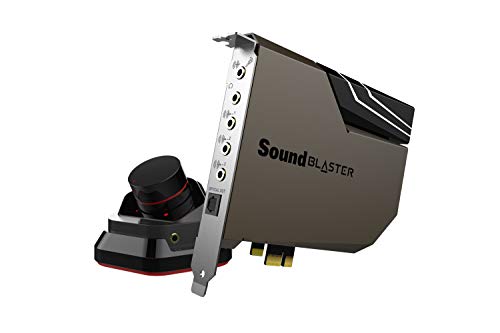
The AE-7 is the pick when playback quality and a tidy desk setup matter as much as the recording itself. Its converter stage is far quieter than the Audigy class, the discrete headphone amplifier drives demanding studio headphones properly, and the included Audio Control Module puts a volume knob and a microphone input on the desk where a streamer or vocalist can reach both without diving behind the PC. Recording runs through that single module input with ASIO support, so it suits one voice at a time rather than multi-microphone sessions.
Specs
- 127 dB DNR
- ESS SABRE-class 9018 DAC
- Xamp discrete headphone bi-amp driving 16-600 ohm headphones
- Included Audio Control Module with desktop volume knob and built-in microphone input
- ASIO playback and recording support
- Dolby Digital Live and DTS encoding for optical surround output
- PCIe interface
Best for: A single-voice creator who wants reference-grade playback, a strong headphone output, and desk-level mic and volume control.
Watch out for: The Audio Control Module can distort at high volumes with high-impedance headphones, so many users plug headphones into the card directly instead; its recording path is the module’s single mic input rather than a multi-input recorder, the drivers are Windows-first, and it needs a free PCIe slot.
Which One Fits Your Situation
A podcaster recording two microphones at once
Two hosts means two simultaneous microphone inputs, and only one card here has them: the Audigy PCIe RX 7.1. Its dual 3.5 mm inputs let both voices land on separate tracks in your DAW over ASIO2, with the line-in free for a music bed or a remote guest feed. Keep microphones to dynamic or self-powered models, because neither input supplies phantom power for a condenser.
A singer recording vocals over backing tracks at home
If your microphone is a dynamic or self-powered model on a 3.5 mm connection, either card records it; the choice turns on monitoring. The AE-7’s quieter converter and discrete headphone amplifier make takes easier to judge, and its module keeps the mic input on the desk. The Audigy still works when budget or a second input matters more than playback refinement.
A synth and line-in home producer recording hardware instruments
Hardware synths, drum machines, and grooveboxes arrive at line level, so microphone sockets barely matter; a clean line-in and low-latency ASIO drivers do. The Audigy PCIe RX 7.1 covers this directly with its line-in, 24-bit/96 kHz recording, and bundled editing software, while its 7.1 and optical outputs also feed a monitoring setup. The AE-7 has no comparable line-in story, so line-level producers should start with the Audigy.
A streamer-creator who wants a desk control module
Reaching behind a tower to change volume mid-session breaks concentration, and the AE-7 exists for exactly this desk. Its Audio Control Module combines the microphone input and a physical volume knob in one desktop unit, backed by the quietest playback stage in this guide and ASIO support for your DAW. One microphone at a time is the limit, which suits a solo creator perfectly.
Common Mistakes
- Buying a card for a condenser microphone without checking phantom power: these inputs are unbalanced 3.5 mm sockets with no phantom power, so a studio condenser that needs 48V will not work without separate hardware in the chain.
- Reading the playback resolution as the recording resolution: a card can play back at 24-bit/192 kHz while recording at 24-bit/96 kHz, and only the recording figure describes the tracks you capture.
- Assuming one microphone input can cover a two-person podcast with a splitter: a splitter merges both voices into one track and one level, removing any ability to balance or edit the hosts separately afterward.
- Ignoring the monitoring path: recording through a weak headphone output makes singers push their voice and misjudge takes, so match the headphone amplifier’s impedance range to the headphones you actually own.
- Forgetting the physical fit: both cards here are PCIe, so a laptop-only setup or a motherboard with no free PCIe slot cannot use either one, regardless of how well the specifications match the project.
Frequently Asked Questions
Can these sound cards power a studio condenser microphone?
No. Both cards take microphones through unbalanced 3.5 mm inputs, and neither supplies the phantom power a studio condenser microphone requires to operate. Dynamic microphones and self-powered models work directly. If your recording plan depends on a phantom-powered condenser, that requirement points beyond what an internal sound card offers, because the limitation sits in the input hardware itself, not in any driver or software setting you can change later.
Is 24-bit/96 kHz recording enough for vocals and podcasts?
Yes, for the work these cards target. Spoken word, sung vocals, and line-level instruments sit comfortably inside a 24-bit/96 kHz capture, which preserves more resolution than the finished podcast or demo will ever carry on release. The practical limits on your results will come from microphone placement, room noise, and the input noise floor long before the sampling specification becomes the weak point in the chain.
Why does ASIO support matter for home recording?
ASIO gives your recording software a direct, low-latency path to the card, so the voice or instrument you hear in your headphones lines up with the performance instead of trailing behind it. Without that path, monitoring delay makes singing and playing to a backing track genuinely difficult. Both cards here list ASIO support, which is a baseline requirement worth confirming on any sound card bought for DAW work.
Should I plug headphones into the AE-7 control module or the card?
Start with whichever is more convenient, but know the trade-off. The Audio Control Module keeps volume and the microphone input within reach on the desk, yet it can distort at high volumes with high-impedance headphones. Plugging straight into the card uses the Xamp headphone amplifier directly and avoids that issue. Many owners monitor from the card and keep the module for its knob and mic input.
Related guides
More from Amazon
Programs that pair well with the guide above. Offers and eligibility are set by Amazon and may change.
A free business account with business pricing and bulk-buying tools for work, shop or home office.
Create a business accountFree shipping on eligible items, Prime Video and more. Eligible new members can start with a free trial.
Start a Prime free trialAudiobooks and podcasts to listen to on the go. Eligible new members can start with a free trial.
Try Audible freeAd-free music streaming. Eligible new subscribers can start with a free trial.
Try Music Unlimited freeAs an Amazon Associate we earn from qualifying purchases.


