The best touch-screen Chromebook for most people in 2026 is a Chromebook Plus convertible such as the Acer Chromebook Plus Spin 714: a 14-inch 16:10 touch panel, a 360-degree hinge, 8GB or more of RAM and a recent Intel Core processor. If you want something cheaper, a basic 11 to 14-inch convertible costs $250 to $400, and an 11-inch detachable such as the Lenovo Chromebook Duet Gen 9 works best as a tablet. This guide assumes “chrome laptops” means Chromebooks running ChromeOS, and it maps your situation to a choice.
As an Amazon Associate we earn from qualifying purchases at no extra cost to you.
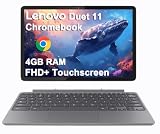
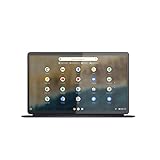


Top 3 picks at a glance
Quick comparison of the picks
| Pick | Best for | Key specs (typical, varies by configuration) | Price range |
|---|---|---|---|
| Acer Chromebook Plus Spin 714 | Best overall | 14″ 16:10 touch, 360° hinge, Intel Core Ultra, 8-16GB RAM, 128-256GB storage | Usually $650–$850 |
| HP Chromebook Plus x360 14 | Best value Plus-tier convertible | 14″ touch, 360° hinge, Core i3-class chip, 8GB RAM, 128GB storage, FHD webcam | Usually $450–$650 |
| Entry convertible (spec class) | Best budget | 11.6-14″ HD/FHD touch, MediaTek or Celeron chip, 4-8GB RAM, 64GB eMMC | Usually $250–$400 |
| Lenovo Chromebook Duet Gen 9 | Best tablet-style 2-in-1 | 11″ touch, detachable keyboard and kickstand, MediaTek Kompanio-class chip, 4-8GB RAM | Usually $300–$450 |
| Plus-tier with Wi-Fi 6E/7 (spec class) | Best for cloud gaming and Android games | Core i5 or Ryzen 5 class, 8-16GB RAM, FHD IPS touch, Wi-Fi 6E or 7 | Usually $600–$900 |
Specs here follow manufacturer spec sheets. Retailers often sell several configurations of one model, so check the RAM, storage and processor on the exact listing.
Best overall: Acer Chromebook Plus Spin 714
This is the one to buy if you want a touch Chromebook that feels like a normal laptop. The 16:10 aspect ratio gives more vertical space for documents and web pages. The 360-degree hinge supports tent and tablet modes, and the Core Ultra chip with 8GB or more of RAM keeps many tabs and Android apps responsive. It suits students, remote workers and anyone who will keep the machine for years.
Main trade-off: it is the most expensive pick, and a 14-inch convertible is heavier than a detachable when used as a tablet.
Best value Plus-tier convertible: HP Chromebook Plus x360 14
This model hits Google’s Chromebook Plus baseline for less money. Google’s published Chromebook Plus requirements are a 12th-gen Intel Core i3 or Ryzen 3 7000-series processor or better, 8GB RAM, 128GB storage, a full-HD IPS display and a full-HD webcam. That is a big step up from entry models. It handles heavy multitasking, video calls and Linux apps without the stutter of 4GB machines.
Main trade-off: the chip is less powerful than the Core Ultra in the Acer, and screen brightness on mid-priced models is often only adequate outdoors.
Best budget: an entry convertible
If you only need web browsing, streaming, Google Docs and light Android apps, a $250 to $400 convertible is enough. Look for 8GB of RAM if you can find it, an IPS panel rather than a TN panel, and a stated update-support date. Skip anything with 32GB of storage. ChromeOS, Android apps and downloads fill that quickly.
Main trade-off: 4GB models slow down with more than about 8 to 10 active tabs, and the display is often 1366×768, which looks soft at 14 inches.
Best tablet-style 2-in-1: Lenovo Chromebook Duet Gen 9
A detachable is the better choice if you will mostly hold the device, draw on it, read, or use it on a couch or in a classroom. The screen, processor and battery are all in the tablet half, and a kickstand and keyboard cover turn it into a small laptop. It is light, and the touch experience is designed around the tablet rather than added to a laptop.
Main trade-off: the keyboard cover is cramped for long typing sessions, the lap stability is worse than a convertible’s, and the processor is slower than Core-class chips.
Best for cloud gaming and Android games: Plus-tier with Wi-Fi 6E or 7
No Chromebook runs demanding PC games natively. The practical gaming route is cloud streaming (GeForce NOW, Xbox Cloud Gaming) plus Android titles. For that, the network card and display matter more than the CPU. Choose a Core i5 or Ryzen 5 class machine with 8GB or more of RAM, an FHD IPS touch display and Wi-Fi 6E or 7. Touch is useful for Android games and menus, but a Bluetooth or USB controller is better for cloud titles.
Main trade-off: you pay $600 to $900 for a machine whose gaming ability depends entirely on your internet connection and subscriptions.
How to choose: decision matrix
| Your situation | Choose | Why |
|---|---|---|
| Student, 6-8 hours of work and tabs daily | Plus-tier convertible, 8GB RAM | Handles 20+ tabs; 128GB storage fits offline files |
| Child or light home use, under $350 | Entry convertible, IPS panel | Touch plus durability for the price |
| Note-taking or sketching with a stylus | Convertible with stylus support (check for USI pen) | Hinge flips flat for writing |
| Reading, video, couch use | 11-inch detachable | Lightest to hold; keyboard optional |
| Cloud gaming | Plus-tier, Wi-Fi 6E/7, FHD IPS | Lower wireless latency; sharper stream |
| Keep it 5+ years | Newest platform with a long update promise | Google lists up to 10 years of updates for recent Chromebook platforms |
Worked example 1: battery life with touch use
Runtime is battery capacity in watt-hours divided by average power draw. Manufacturers’ hour claims use light workloads, so do the math yourself with realistic draws:
- A 50Wh battery at 6W (web and documents, medium brightness) gives about 8.3 hours.
- The same battery at 10W (video calls or Android games with brightness raised) gives about 5 hours.
- At 14W (cloud-game streaming at full brightness with a controller connected) it gives about 3.6 hours.
The practical rule is to buy a battery at least 20% larger than your session needs. A 4-hour cloud gaming session at 10W needs 40Wh, so aim for 48Wh or more. Touch panels draw somewhat more power than non-touch ones, and a bright OLED or high-nit panel can use noticeably more than a dim one.
Worked example 2: bandwidth for cloud gaming
NVIDIA’s published guidance for GeForce NOW is roughly 15Mbps for 720p at 60fps, 25Mbps for 1080p at 60fps and 35Mbps for 4K streaming. Take a household with two other people streaming video at 10Mbps each. A 1080p cloud session needs 25 + 20 = 45Mbps of real throughput. On a 50Mbps plan, that leaves almost no headroom, so cap the stream at 720p or upgrade the plan. Wi-Fi 6E or 7 helps with latency and congestion but cannot create bandwidth your internet plan does not provide.
What to check before you buy
- Chromebook Plus branding: it guarantees the 8GB RAM, 128GB storage and FHD IPS baseline described above.
- Update expiry (AUE) date: Google publishes automatic update expiration dates per model. Avoid any model that expires within 3 years.
- Storage type: eMMC is slower than NVMe or UFS. It is fine for browsing but sluggish when installing Android apps.
- Display: choose 1920×1200 or better at 14 inches. At 250 nits, glossy touch screens are hard to read near windows, so aim for 300 nits or more.
- Stylus: only some models include or support a USI 2.0 pen, so confirm before buying.
- Ports and charging: two USB-C ports with charging on both sides are more convenient in tablet mode.
Frequently Asked Questions
Are touch-screen Chromebooks worth it?
Yes, if you use Android apps, take notes with a stylus, or switch between laptop and tablet modes. ChromeOS supports touch gestures well, and most convertibles cost only a little more than non-touch versions. If you only use a keyboard and trackpad for web work, a non-touch model saves money and slightly extends battery life.
Can a touch-screen Chromebook play PC games?
Not natively. You can stream PC games with cloud services such as GeForce NOW or Xbox Cloud Gaming, run Android games from Google Play, or install Steam on supported Chromebooks. Cloud gaming works best with a stable 25Mbps or faster connection and a controller. Local performance varies widely by chip, game and settings.
How much RAM do I need?
Choose 8GB for a machine you will keep for several years. 4GB works for basic browsing but struggles with many tabs, Android apps and Linux. 16GB is worth it only if you run Linux development tools or heavy multitasking.
Is a convertible or a detachable better?
A convertible is better for typing, lap use and general work. A detachable is better for reading, drawing and carrying, because it is lighter in tablet form. Detachables usually have slower processors and smaller keyboards, so avoid them as a primary work machine.
How long will a new Chromebook get updates?
Google lists up to 10 years of automatic updates for recent Chromebook platforms, but the exact date depends on the processor platform and model. Check Google’s Auto Update Expiration list for the specific model before buying. A newer processor generation usually means a later expiry date.
Do touch-screen Chromebooks support styluses?
Some do. Many Chromebooks support the USI 2.0 pen standard, while others accept only finger input. Check the manufacturer’s spec sheet for pen support, and see whether a pen is included or sold separately.
Related guides
More from Amazon
Programs that pair well with the guide above. Offers and eligibility are set by Amazon and may change.
A free business account with business pricing and bulk-buying tools for work, shop or home office.
Create a business accountFree shipping on eligible items, Prime Video and more. Eligible new members can start with a free trial.
Start a Prime free trialAudiobooks and podcasts to listen to on the go. Eligible new members can start with a free trial.
Try Audible freeAd-free music streaming. Eligible new subscribers can start with a free trial.
Try Music Unlimited freeAs an Amazon Associate we earn from qualifying purchases.


