The best Android burner phone for most people in 2026 is the Samsung Galaxy A16 5G: it is cheap enough to lose, has a 5,000 mAh battery, and gets years of security patches. If you want the lowest cost, a Moto G Play-class phone is the pick, and if privacy is the priority, a Google Pixel 9a is the one that can run hardened software such as GrapheneOS. A “burner” here means a low-cost, prepaid, temporary phone for travel, events, marketplace sales, a work trip, or a backup line. It is not a way around the law or SIM registration rules, which vary by country.
As an Amazon Associate we earn from qualifying purchases at no extra cost to you.



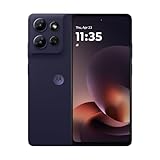
Our Top Picks
Top 3 picks at a glance
Quick comparison of the picks
| Pick | Best for | Key specs (per manufacturer) | Typical price |
|---|---|---|---|
| Samsung Galaxy A16 5G | Best overall | 6.7-inch AMOLED, 90Hz, 5,000 mAh, 5G, long update promise | $150–$250 |
| Moto G Play (2024/2025 editions) | Best budget | ~6.5-inch 90Hz LCD, 5,000 mAh, microSD slot, 3.5mm jack | $100–$170 |
| Moto G Power 5G (2025) | Best battery and hotspot use | ~6.8-inch 120Hz, 5,000 mAh, 5G, water-resistance rating | $200–$300 |
| Google Pixel 9a | Best for privacy | OLED, 7 years of updates promised, GrapheneOS-compatible | $400–$500 |
| Entry-level Android class (3–4GB RAM, 32–64GB) | Cheapest throwaway line | HD+ LCD, 4G or basic 5G, 4,000–5,000 mAh | $50–$100 |
Prices are general market ranges. Prepaid carrier versions are often cheaper but may be carrier-locked, and specs differ slightly between regional and annual editions. Check the exact model number before buying.
Best overall: Samsung Galaxy A16 5G
The Galaxy A16 5G is the safest default. It has a bright AMOLED screen, a 5,000 mAh battery that comfortably lasts a day or two of light use, and Samsung’s long software support promise, which matters if the phone stays in use longer than planned. It works on all the major US prepaid networks. The trade-off is performance: it is fine for calls, maps, messaging and banking, but heavy games will stutter, and 4GB of RAM models feel slow with many apps open.
Best budget: Moto G Play
The Moto G Play line is the classic disposable Android. It is cheap and has a 5,000 mAh battery, a headphone jack, and a microSD slot, which is handy for offloading photos from a trip phone. The trade-offs are a slow processor, a modest camera, and a short update promise (often one major OS upgrade). Many units are sold carrier-locked on prepaid brands, so confirm “unlocked” if you plan to swap SIMs between carriers or countries.
Best for battery life and hotspot use: Moto G Power 5G (2025)
If the phone will tether a laptop or sit in a bag as a travel hotspot, the Moto G Power 5G is the stronger choice. It pairs a 5,000 mAh battery with a more efficient 5G chipset and a smoother 120Hz screen. It costs more than a basic burner, so it makes sense only if you would otherwise buy a mid-range phone anyway. Treat the water-resistance rating and wireless charging as edition-dependent and check the spec sheet for your region.
Best for privacy: Google Pixel 9a
A Pixel 9a is not cheap, but it is the Android phone most often chosen for privacy because GrapheneOS officially supports Pixels and Google promises seven years of updates. Its Titan M-class security chip also supports verified boot. The trade-off is price: at $400–$500 it stops being a throwaway, so it suits a long-term secondary phone rather than a one-weekend burner. Installing an alternative OS also takes time, and some banking and wallet apps behave differently.
Cheapest throwaway: entry-level Android class
For a phone you expect to lose, such as a festival, a rental-car dashboard mount, or a kid’s first handset, a $50–$100 phone with 3–4GB RAM and 32–64GB storage is enough. Expect slow app launches, a weak camera, and often only a couple of years of patches. Avoid anything running an Android version older than 13 and anything with no security patch in the last 12 months. Unpatched phones are the real risk with ultra-cheap models.
How to choose: decision matrix
| Your situation | Choose | Why |
|---|---|---|
| One trip, 1–4 weeks abroad | Unlocked Galaxy A16 5G or Moto G Play | Swap a local SIM or eSIM, low loss if stolen |
| Selling or buying on marketplaces | Entry-level class or Moto G Play | Keeps your main number private, cheap to discard |
| Backup phone in a car or go-bag | Moto G Power 5G | Longest standby, handles hotspot duty |
| Journalist, activist or high-risk work | Pixel 9a with a hardened OS | Fastest patches and the strongest security model |
| Kid’s first phone | Galaxy A16 5G | Durable software support, parental controls work well |
Worked example: cost per month of use
A throwaway phone is cheapest per month only if you keep it. Suppose a $120 phone and a $20/month prepaid plan.
- 3 months: $120 + (3 × $20) = $180, or $60 per month.
- 12 months: $120 + (12 × $20) = $360, or $30 per month.
- 24 months: $120 + (24 × $20) = $600, or $25 per month.
For a short trip, the plan is a smaller cost than it looks, and the phone is the larger share. A $50 handset with a $15 plan for 2 months costs $80 total, so a very cheap phone wins for short use. For anything past about 6 months, spending more for a phone with better updates usually pays off.
Worked example: battery runtime
A 5,000 mAh cell at roughly 3.85 V stores about 19 Wh (5 Ah × 3.85 V). These are rough estimates, since real drain varies by signal strength and software:
- Idle on Wi-Fi with a weak background load of about 0.1 W: around 190 hours, or roughly 8 days.
- Mixed light use at about 0.8 W average: around 24 hours.
- Mobile hotspot at about 2 W: around 9 to 10 hours.
That is why a 5,000 mAh phone suits a go-bag, while a 3,000–4,000 mAh model shrinks the hotspot window to 5–7 hours.
What to check before you buy
- Unlocked vs carrier-locked: Locked prepaid phones can be restricted to one network for months. Buy unlocked if you want to switch SIMs.
- Network bands: Confirm LTE and 5G bands for your carrier or destination on the manufacturer’s spec sheet. Missing bands cause weak coverage indoors.
- SIM type: A physical SIM is the simplest to swap. eSIM needs carrier activation, and activation can be tied to account details.
- Security patches: Pick a phone with at least 3 more years of promised patches if you will keep it past a trip.
- Storage: 64GB is the floor. Offline maps, a few apps and photos fill it quickly, so 128GB is more comfortable.
- Dual SIM or microSD: Useful for a travel phone that carries a local line plus your home number.
Setup steps for a clean temporary phone
- Update first. Install all system and security updates over Wi-Fi so known flaws are patched before you add data.
- Create a separate account. Use a dedicated Google account, not your main one, so contacts, photos and passwords are not synced to a disposable device.
- Turn off unneeded sync and location history. It limits what is stored if the phone is lost.
- Set a PIN and enable encryption. Modern Android encrypts by default, but a 6-digit PIN protects it.
- Factory reset before disposal. Remove the account first so Factory Reset Protection does not lock the phone, and remove the SIM and microSD card.
Keep expectations realistic: a prepaid phone is not anonymous. The IMEI, carrier records, Wi-Fi networks and any account you sign into can all link it to you.
Frequently Asked Questions
Is it legal to buy a burner phone?
In most countries, buying a prepaid phone for ordinary purposes such as travel, privacy or a spare line is legal. Some countries require ID to activate a SIM. Using any phone for fraud, harassment or other crimes is illegal regardless of how it was bought.
Should I buy an unlocked phone or a carrier prepaid phone?
Buy unlocked if you might change carriers, travel, or use a local SIM. Carrier prepaid phones are often cheaper upfront, but they can be locked to that network for a period. Check the lock policy before purchase.
Can I use eSIM on a burner phone?
Often yes on newer models, but eSIM activation usually involves a carrier account and sometimes a QR code tied to an email or identity. A physical SIM is easier to swap between phones and carriers. If you want a flexible, temporary setup, choose a phone with a physical SIM slot.
How long should a cheap Android phone last?
A $100–$250 phone typically stays usable for 2–4 years. The limiting factor is usually software updates, not hardware failure. Samsung’s A-series promises longer support than most budget Motorola models, so check the manufacturer’s update policy.
Is a $50 phone good enough?
For calls, texts, maps, and messaging apps, yes. It will be slow, the camera will be weak, and it may be missing recent security patches. For anything involving banking or sensitive accounts, spend at least $150 on a phone with a current patch level.
Does a factory reset make a phone safe to give away?
A factory reset on a modern encrypted Android phone makes recovering data very difficult. Remove your Google account first, then reset, and take out the SIM and SD card. Do not rely on a reset alone for a phone that held highly sensitive data; destroy or keep that one.
Related guides
More from Amazon
Programs that pair well with the guide above. Offers and eligibility are set by Amazon and may change.
A free business account with business pricing and bulk-buying tools for work, shop or home office.
Create a business accountFree shipping on eligible items, Prime Video and more. Eligible new members can start with a free trial.
Start a Prime free trialAudiobooks and podcasts to listen to on the go. Eligible new members can start with a free trial.
Try Audible freeAd-free music streaming. Eligible new subscribers can start with a free trial.
Try Music Unlimited freeAs an Amazon Associate we earn from qualifying purchases.


