The best “Android CPU cooler” is a thermoelectric (Peltier) clip-on or magnetic phone cooler such as the Black Shark FunCooler 3 Pro or the Razer Phone Cooler Chroma. You can’t fit a conventional CPU cooler to a phone, because the processor is soldered inside a sealed chassis. What you can do is pull heat out of the back glass, which delays thermal throttling in long gaming sessions. A cheap fan-only clip is enough for light use, and a model made for your phone’s shape is best if you own a gaming phone.
As an Amazon Associate we earn from qualifying purchases at no extra cost to you.


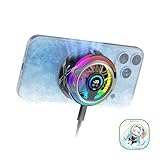

Top 3 picks at a glance
Quick comparison of the best Android phone coolers
| Pick | Best for | Key specs (per manufacturer / spec class) | Typical price |
|---|---|---|---|
| Black Shark FunCooler 3 Pro | Best overall | Thermoelectric cooling plate plus fan, magnetic attachment, USB-C powered, works with most phones that take a magnetic ring | $40–$70 |
| Razer Phone Cooler Chroma | Best clamp-style, any phone | Thermoelectric plate plus fan, adjustable clamp, USB-C powered, Chroma RGB lighting | $50–$80 |
| ASUS ROG Phone AeroActive Cooler (model matched to your ROG Phone) | Best for ROG Phone owners | Phone-specific fit, uses the side accessory connector, fan-based, adds a kickstand and extra buttons on some versions | $40–$70 |
| Generic magnetic Peltier cooler (spec class) | Best for MagSafe-style or Qi2 magnetic cases | Roughly 10–15 W draw, metal cooling plate, 5–12 V USB-C input | $25–$50 |
| Fan-only clip-on cooler (spec class) | Best budget | 2–4 W draw, small blower, spring clip, no cooling plate | $10–$25 |
Exact specs and compatibility vary by revision, so check the manufacturer’s current listing before you buy. Some brands have refreshed these lines.
How a phone cooler helps
A gaming phone’s processor typically sustains about 5–9 W before the thermal governor cuts clocks. Heat travels from the chip to a vapor chamber or graphite sheet and then to the back glass, where it is shed to the air. A Peltier cooler lowers the temperature of that back surface, which keeps the chip cooler for longer. It can’t remove heat that never reached the back panel, so a thick case or a poorly placed cooler reduces the effect.
Expect smoother frame times in long sessions of games like Genshin Impact, Honkai: Star Rail or Call of Duty: Mobile, because the phone throttles later and less often. Published reviews of these coolers generally show sustained frame rates holding closer to the phone’s peak, but gains vary a lot by phone, game, ambient temperature and software version.
Best overall: Black Shark FunCooler 3 Pro
This is the easiest recommendation if your phone supports a magnetic ring. It attaches in seconds and leaves your thumbs free in both orientations. It also has a real cooling plate rather than only a fan. The main trade-off is that it adds a cable, since it draws power over USB-C, and a heavy back-mounted cooler changes the balance of the phone in landscape. A thin case or a magnet ring is a must.
Best clamp-style for any phone: Razer Phone Cooler Chroma
The Razer cooler grips the phone with an adjustable clamp, so it doesn’t depend on magnets or a particular back panel. That makes it the safer pick for phones with glass backs, odd curves or thick cases. The trade-offs are bulk and a price at the upper end of the category. The clamp can also sit over the buttons or the camera on some phone layouts, so check where your SoC sits relative to the plate.
Best for ROG Phone owners: ROG AeroActive Cooler
If you own an ASUS ROG Phone, the matching AeroActive Cooler is designed around the phone’s vents and side connector. It keeps the charging port free and can give the cleanest ergonomics. Each version fits specific generations, so an old cooler may not fit a newer phone. A model for another ROG generation is a common wrong purchase.
Best magnetic budget option: generic Peltier magnetic cooler
Many third-party magnetic Peltier coolers offer most of the cooling hardware at a lower price. Look for a metal (aluminum or copper) contact plate, a USB-C input rated for the wattage the cooler needs, and magnets strong enough to hold the phone in a vertical grip. The trade-off is inconsistent build quality, and unbranded fans can get noisy. Avoid listings that don’t state power draw.
Best cheap fix: fan-only clip-on cooler
A fan-only cooler moves air over the back but can’t chill the glass below room temperature. It’s good for mid-range phones, emulators and casual play, and it uses little power. For flagship phones in hot rooms, it is a smaller upgrade than a Peltier model.
Worked example: what a cooler costs in battery
A typical 5,000 mAh battery at 3.85 V holds about 19.3 Wh. Suppose the phone draws 7 W in a demanding game.
- No cooler: 19.3 Wh ÷ 7 W ≈ 2.7 hours of play, assuming no throttling.
- Cooler powered from the phone’s battery at 8 W: 19.3 Wh ÷ 15 W ≈ 1.3 hours, which is less than half the runtime.
- Cooler powered from a charger or power bank through a passthrough cable: the phone still draws 7 W, and the cooler adds no battery drain.
These figures are illustrative, since real power varies by game, brightness and phone. The practical lesson is that most Peltier coolers should run from a wall charger or power bank. A cooler powered from the phone’s own battery can shorten runtime sharply. Check whether your phone supports OTG power output and whether the cooler has its own passthrough port.
Decision matrix: which cooler fits your situation
| Your situation | Choose | Why |
|---|---|---|
| Flagship phone with a magnetic case, long sessions | Black Shark FunCooler 3 Pro or similar Peltier magnetic | Best cooling per second to attach, free hands |
| Thick case, curved back, or no magnet support | Razer Phone Cooler Chroma (clamp) | Doesn’t rely on magnets or flat glass |
| ROG Phone | Matching ROG AeroActive Cooler | Phone-specific fit and port layout |
| Mid-range phone, casual games, under $25 | Fan-only clip-on | Low cost, low power, adequate for lighter loads |
| Wireless charging while gaming | Cooler with passthrough USB-C, not a wireless charger | Plates and magnets block or heat-stress wireless charging |
| Hot room or outdoors | Peltier plus a heat-sink fan | Peltier needs good airflow to dump heat from the hot side |
How to choose: criteria that matter
- Cooling method: Thermoelectric coolers can cool the back below ambient, while fan-only coolers can’t. If your phone throttles within 15–20 minutes, choose Peltier.
- Attachment: Magnetic rings need a compatible case or a stick-on ring. Clamps fit more phones but cover more of the body.
- Plate alignment: Most phones place the SoC in the upper third of the back. Check teardown or review info for your model, then match the plate position.
- Power draw: Aim for a cooler that runs over a passthrough or its own cable. Anything over 10 W needs a charger that can supply it plus the phone’s own needs.
- Noise: Small fans spin fast. Expect noticeable noise from most Peltier coolers, especially at the highest setting.
- Condensation: In humid conditions, a very cold plate can cause moisture on the back of the phone. Don’t run it at maximum in a humid room, and avoid sudden temperature swings.
Settings and habits that help more than the cooler
- Remove thick or insulating cases while gaming. Silicone and leather cases trap heat.
- Cap the frame rate at 60 fps for games that don’t need 120 fps. This can cut chip power noticeably and reduces the cooling you need.
- Lower the screen brightness when you can, since the display is a major heat source.
- Don’t charge at maximum speed while gaming. Charging heats the battery, and many phones throttle when charging and playing together.
- Start the cooler a minute or two before you launch the game, so the chassis begins cooler.
Frequently Asked Questions
Do Android CPU coolers actually work?
Peltier phone coolers do lower the back-panel temperature, and that can delay throttling in long sessions. The benefit depends on the phone, case, room temperature and game. Fan-only models give a smaller improvement.
Can a phone cooler damage my phone?
It’s unlikely in normal use. The main risks are condensation from a very cold plate in humid air and stress from strong clamps or magnets on a weak case. Use the cooler as the maker describes and don’t force it onto the back of a phone.
Will a cooler work with wireless charging?
Not at the same time in most cases. Cooling plates and magnets sit on the back where the charging coil is, and the added metal can block or heat the charge. Use a wired passthrough instead if you want to play and charge.
Is a Peltier cooler worth it over a fan-only one?
It is worth it if you play demanding 3D games for more than 20 minutes and your phone throttles. For casual games or a mid-range phone, a fan-only clip-on is usually enough. The extra cost and power draw of a Peltier model pay off mainly on flagship phones in warm rooms.
Do phone coolers drain the battery?
Yes, if they take power from the phone. A Peltier cooler can draw 8–15 W, so in the example above it cuts runtime by more than half. Run it from a charger or power bank through a passthrough cable to avoid that.
Can I use a cooler with a phone case on?
Thin cases are fine, and magnetic coolers need a magnet-compatible case or a stick-on ring. Thick or insulated cases reduce cooling noticeably. For best results, remove the case during long gaming sessions.
Related guides
More from Amazon
Programs that pair well with the guide above. Offers and eligibility are set by Amazon and may change.
A free business account with business pricing and bulk-buying tools for work, shop or home office.
Create a business accountFree shipping on eligible items, Prime Video and more. Eligible new members can start with a free trial.
Start a Prime free trialAudiobooks and podcasts to listen to on the go. Eligible new members can start with a free trial.
Try Audible freeAd-free music streaming. Eligible new subscribers can start with a free trial.
Try Music Unlimited freeAs an Amazon Associate we earn from qualifying purchases.


