The best aftermarket CPU cooler for most gaming PCs in 2026 is a dual-tower air cooler such as the Thermalright Peerless Assassin 120 SE, which handles nearly every mainstream gaming CPU at a low price. If you run a 200W+ chip or want a cleaner build, a 360mm AIO like the Arctic Liquid Freezer III 360 is the better step up, and the Noctua NH-D15 G2 is the premium air choice. Pick based on your CPU’s sustained power, your case clearance and your noise target, not on a cooler’s marketing wattage.
As an Amazon Associate we earn from qualifying purchases at no extra cost to you.

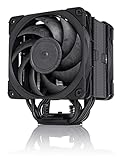

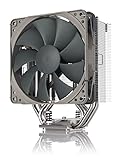
Our Top Picks

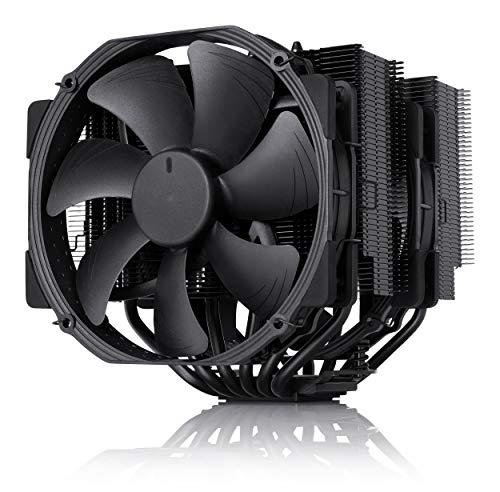
Top 3 picks at a glance
Quick comparison of the picks
| Pick | Best for | Key specs (approx., per manufacturer) | Price range |
|---|---|---|---|
| Thermalright Peerless Assassin 120 SE | Best overall value | Dual tower, two 120mm fans, about 155mm tall, six heat pipes | Usually $30–$50 |
| DeepCool AK400 | Best budget | Single tower, one 120mm fan, about 155mm tall, four heat pipes | Usually $20–$35 |
| DeepCool AK620 | Best for tight-but-not-tiny cases with hot CPUs | Dual tower, two 120mm fans, about 160mm tall | Usually $50–$70 |
| Noctua NH-D15 G2 | Best premium air cooler | Dual tower, three-fan-ready design, about 168mm tall with fan | Usually $130–$150 |
| Arctic Liquid Freezer III 360 | Best AIO for high-power CPUs | 360mm radiator, 38mm thick, integrated VRM fan, three 120mm fans | Usually $90–$130 |
| Noctua NH-L9i-17xx | Best low-profile for small cases | About 37mm tall, one 92mm fan, Intel LGA1700/1851 mounting | Usually $50–$60 |
Dimensions and fan configurations come from manufacturer spec sheets and can differ slightly between revisions and bundle versions. Verify against the current product page before ordering.
Best overall: Thermalright Peerless Assassin 120 SE
This dual-tower cooler is the default recommendation for a gaming CPU in the 65W–200W range. It supports AM4, AM5 and Intel LGA1700/1851 mounting, and it is widely reported in published reviews to land close to coolers costing several times more. It suits builders who have a standard mid-tower case and a Ryzen 5/7 or Core i5/i7 class chip.
Trade-off: it is a large block of metal. Check RAM height and case clearance, and expect more fan noise than a premium cooler at full load because the bundled fans prioritize price over acoustics.
Best budget: DeepCool AK400
The AK400 is a single-tower cooler for chips that draw modest power in games, such as a Ryzen 5 or a locked Core i5. It is a large upgrade over a stock cooler’s noise and temperature behavior and costs about the same as a decent case fan pack.
Trade-off: a single tower and single fan run out of headroom on unlocked Core i7/Ultra 7 chips or a Ryzen 9 under all-core load. It is fine for gaming, but expect throttling or loud fans in long renders.
Best for hot CPUs in air-cooled builds: DeepCool AK620
The AK620 is a dual-tower design that sits between the budget class and the premium class. It makes sense when you want strong cooling for a Core i7 or Ryzen 9 without paying premium prices, and when the case side panel allows roughly 160mm of height.
Trade-off: it offers little advantage over the Peerless Assassin 120 SE at similar settings and price. Choose it mainly if it is easier to find locally or you prefer its look.
Best premium air: Noctua NH-D15 G2
If you want AIO-class cooling without a pump to fail, this is the pick. It is built for high-power chips, ships with quality fans, and keeps noise low at the fan speeds most gaming loads need. Noctua also offers different mounting orientations, which helps with RAM and GPU spacing.
Trade-off: price and size. At around $130–$150 it costs well above the value picks, and it is tall and deep enough to collide with some cases or tall memory.
Best AIO: Arctic Liquid Freezer III 360
A 360mm AIO moves heat to a radiator mounted at the case edge, which suits CPUs that spike to 200W or more. This model’s integrated VRM fan also cools the motherboard power-stage area, which an air tower normally helps with by airflow. It is a strong choice for Ryzen 9, Core i9 and Core Ultra 9 builds. Smaller 240mm and 280mm versions exist if you lack a 360mm mounting spot.
Trade-off: you need a case that supports a 360mm radiator with enough thickness clearance (plan for about 38mm plus fans), and an AIO adds pump noise and a finite lifespan, commonly around five or more years according to typical warranty terms.
Best low-profile: Noctua NH-L9i-17xx
For mini-ITX or slim cases with limited height, this tiny cooler is a practical fit. Its sweet spot is a lower-power CPU. It is not the cooler for an unlocked high-end chip.
Trade-off: a 92mm fan on a 37mm-tall body gives limited cooling capacity, so pair it with a 65W-class CPU or a tuned power limit.
How to choose: a worked headroom calculation
A cooler’s “TDP rating” is not a standard measurement, so calculate what you actually need. A simple planning formula is:
Required thermal resistance (°C/W) = (target CPU temperature − room temperature) ÷ sustained CPU power.
Take a target of 85°C and a room temperature of 25°C, which gives a 60°C budget. Here is what different CPU power levels demand:
| Sustained CPU power | Example CPU class | Required resistance (60°C budget) | Cooler class that usually fits |
|---|---|---|---|
| 65W | Locked Core i5, Ryzen 5 with eco limits | 0.92 °C/W | Budget single tower, low-profile |
| 120W | Ryzen 7 X3D class gaming (peak around 120–160W) | 0.50 °C/W | Quality single or dual tower |
| 170W | Ryzen 9 at rated TDP | 0.35 °C/W | Dual tower or 240mm AIO |
| 230W | Core Ultra 7/9 or Ryzen 9 at max power limits | 0.26 °C/W | Premium dual tower or 280/360mm AIO |
| 250W+ | Unlocked Intel flagship with raised limits | 0.24 °C/W or lower | 360mm AIO |
The figures are planning math, not measured results. Real resistance varies with the CPU’s heat density, paste, fan speed and case airflow, and published reviews are the best check for specific models.
Example: a Ryzen 7 gaming PC peaking around 120W at 85°C in a 25°C room needs roughly 0.50 °C/W or better. A quality dual tower beats that comfortably at low fan speeds, so a 360mm AIO would add cost without a gaming benefit. By contrast, a Core Ultra 9 build doing video exports at 230W needs about 0.26 °C/W, where a 360mm AIO or NH-D15 G2 class cooler earns its price.
Gaming rarely hits the all-core limit, so judge by your heaviest regular task. If you only play games, you can often size down one tier.
Decision matrix: match your situation to a cooler
| Your situation | Choose | Why |
|---|---|---|
| Mainstream gaming, standard mid-tower, Ryzen 5/7 or Core i5/i7 | Peerless Assassin 120 SE | Strong cooling per dollar; 155mm height fits most cases |
| Tight budget, locked 65W CPU | DeepCool AK400 | Cheap, sufficient headroom |
| Ryzen 9 or Core Ultra 9, rendering or streaming on the same PC | Liquid Freezer III 360 or NH-D15 G2 | Handles 200W+ spikes with lower noise |
| Case with limited radiator support or you distrust pumps | NH-D15 G2 or AK620 | No pump, no radiator mounting needed |
| Mini-ITX or slim case under about 70mm CPU clearance | NH-L9i-17xx | Fits where towers will not; pair with a 65W CPU |
| Tall RAM kit with RGB heat spreaders | AIO, or a tower with verified RAM clearance | Fan overhang can block memory slots |
Compatibility checks before you buy
- Socket: AM5 uses the same cooler mounting hole spacing as AM4, so most AM4 coolers fit, but check for the correct bracket. LGA1700 and LGA1851 use compatible mounting. Confirm your cooler lists your socket, or ask the maker about a mounting kit.
- Cooler height versus the case: compare the cooler’s listed height to the case’s CPU cooler clearance spec, and leave a few millimeters spare.
- RAM clearance: if the front fan overhangs the memory slots, you may need to raise the fan or use low-profile RAM.
- Radiator fit: check front or top mount support for 240/280/360mm, plus the clearance between radiator and motherboard components or RAM.
- Fan headers: a dual-fan tower or AIO needs a CPU fan header or a splitter. AIO pumps need a pump or always-on header.
- Weight: big towers are heavy, so remove them before shipping or moving a PC.
Common buying mistakes
- Buying an AIO for looks over fit. A 240mm AIO is not always better than a good dual tower.
- Trusting rated wattage. Manufacturers do not use a shared test method, so use the headroom math and independent reviews.
- Ignoring case airflow. A great cooler in a closed-front case will run hotter than a mid-range cooler in a well-ventilated one.
- Over-tightening. Tighten mounting screws evenly in a cross pattern and stop at the stop point or the spring limit.
Frequently Asked Questions
Is an aftermarket CPU cooler worth it for gaming?
Usually yes, if your CPU does not ship with a cooler or ships with a weak one. A $30–$50 tower typically lowers temperature and noise compared with a basic boxed cooler, and it leaves headroom for boost clocks. If your boxed cooler is already adequate and quiet for your chip, the upgrade is optional.
Is air cooling or an AIO better?
Neither wins universally. Air towers are cheaper, simpler and have no pump to fail, while a 360mm AIO gives more headroom for 200W+ CPUs and can look cleaner. For most gaming CPUs below about 170W, a quality dual tower is the better value.
Will a cooler for AM4 fit AM5?
Often yes, because AM5 keeps the same mounting hole spacing as AM4, and many coolers ship with an AM5-compatible bracket. Older coolers may need a manufacturer’s mounting kit, so confirm on the product page before buying.
How much cooling headroom do I need?
Aim for a cooler that holds your CPU’s sustained power at about 80–85°C with fans at moderate speed. Using the formula above, a 170W CPU needs roughly 0.35 °C/W or better in a 25°C room. Choose a tier up if your room is warmer, your case is small or you want quieter fans.
Do I need new thermal paste?
Most aftermarket coolers include pre-applied paste or a small tube, which is fine for most users. If you reuse an old cooler, clean the surfaces and apply fresh paste. A pea-sized amount at the center is a common method.
Can I reuse my cooler when I upgrade my CPU?
Often, as long as the new socket is supported and you have the correct mounting kit. Also check that the cooler’s capacity matches the new chip’s power. A cooler that suited a 65W CPU may be too weak for a 230W one.
Related guides
More from Amazon
Programs that pair well with the guide above. Offers and eligibility are set by Amazon and may change.
A free business account with business pricing and bulk-buying tools for work, shop or home office.
Create a business accountFree shipping on eligible items, Prime Video and more. Eligible new members can start with a free trial.
Start a Prime free trialAudiobooks and podcasts to listen to on the go. Eligible new members can start with a free trial.
Try Audible freeAd-free music streaming. Eligible new subscribers can start with a free trial.
Try Music Unlimited freeAs an Amazon Associate we earn from qualifying purchases.


